When there’s virtually no room to move, a stationary trackball may be the answer. If you still have space to move a mouse, a compact conventional mouse is another option. Then choose based on how much you click and scroll, how well it fits your hand and the connections available. The Dutch Authority for Digital Infrastructure (RDI) states that equipment must carry the correct CE marking; check the specific device.
Who is this mouse guide for?
Administrator with a crowded desk
You work between your keyboard and membership paperwork, and want to start by working out how much room you have left to control the pointer. A stationary trackball and a compact mouse solve the space problem in different ways. Kensington describes the Orbit Optical Trackball as stationary.
Handling lengthy membership lists
You click on lots of fields and scroll through records, so try pointing and scrolling in the software you actually use rather than comparing sensor sensitivity alone. Arboportaal highlights repetitive mouse movements as a factor to consider when working with a screen.
Considering your hand position
You use your mouse for long periods and want to assess its shape, how well it fits your hand and where it sits beside your keyboard. A different mouse is no substitute for varying your tasks and setting up your workspace appropriately; Arboportaal advises keeping the mouse close to your body.
What should you look for in a mouse for a small desk?
First, work out how much room you have to move the mouse and how you navigate through membership records. Then compare how well it fits your hand and connects with your own setup.
| What to consider |
What should you check? |
Who is this important for? |
| Room to move |
Measure the clear space beside your keyboard. A compact mouse still needs room to move; a stationary trackball does not. |
I want enough room between my keyboard and paperwork to move the mouse. This matters to around 33% of consumers who mainly need space to move the pointer freely. |
| Working with records |
Try selecting fields and scrolling through long lists in the software you use. |
When working with long membership lists, I want to select fields and scroll through records. Around 27% of consumers prioritise this. |
| Fit and hand position |
Check how your hand rests on the mouse and whether you can position it close to you. Kensington says the Orbit Optical Trackball is suited to medium to large hands. |
If I work for long periods, I want a mouse that fits my hand and can sit close by. Around 20% of consumers prioritise fit and hand position. |
| Connections and devices |
Check Bluetooth, available USB ports, any receivers you may need, and whether you need to switch between devices. |
I want to connect the mouse to the computer I use, or switch between devices. This is a priority for around 20% of consumers who prioritise connectivity or switching between devices. |
What to watch out for when buying a mouse for membership administration
-
Assuming a small mouse needs no room to move
A conventional mouse still needs space to move across your desk. You control a stationary trackball with its ball, but it’s a different way of pointing.
Measure the available space and, if possible, try both ways of working with the tasks you usually do.
-
Not checking the connection and what’s included
Logitech states that the standard MX Anywhere 3S does not come with a Logi Bolt receiver. Depending on your computer, you may therefore need to buy a compatible receiver separately.
Check the exact version, Bluetooth support and box contents before you choose.
If you need the receiver, you may have to buy it separately.
-
Assuming DPI or scrolling claims prove you’ll save time
A stated DPI figure or manufacturer’s description of scrolling does not prove that you’ll work through your records more quickly or accurately.
Try the mouse with the selection and scrolling tasks you usually do, and adjust the pointer speed where possible.
-
Overlooking the CE marking on the device
The RDI states that equipment placed on the Dutch market must carry the correct CE marking. A general product listing does not, by itself, confirm which marking is on a specific device.
Check the marking on the device and follow the accompanying instructions.
Brands to consider as a starting point
Kensington
Kensington’s Orbit Optical Trackball offers a stationary way to work at a desk with little room for a mouse.
- Kensington says the Orbit Optical Trackball is symmetrical and suitable for both left- and right-handed use.
- Kensington says it is suited to medium to large hands; this doesn’t tell you whether you’ll find controlling the ball comfortable.
Logitech
The Pebble Mouse 2 M350s is a compact option, while the MX Anywhere 3S has a scroll wheel with two modes, according to Logitech.
- Logitech says the Pebble Mouse 2 M350s and MX Anywhere 3S have quiet clicks. According to Logitech, you can switch between three devices with the Pebble Mouse 2 M350s.
- The standard MX Anywhere 3S comes without a Logi Bolt receiver. The manufacturer’s description of its scrolling is not a measure of how it performs with membership administration software.
HP
According to HP, the HP 240 is a symmetrical Bluetooth mouse for anyone looking for a conventional mouse without a USB receiver.
- For the black 3V0G9AA#ABB, HP lists Bluetooth 5.1, three buttons, an AA battery and dimensions of 107 × 60,5 × 29,31 mm.
- Bluetooth will work only with a device that supports this connection.
Rapoo
The Rapoo M100 Silent is an option if you’re looking for quiet buttons and multiple connection options.
- Rapoo lists several connection modes and 1300 DPI for this model.
- The DPI specification is not an independent measure of accuracy when handling membership records.
Trust
Trust describes the Yuki Compact Multi-device Wireless Mouse as a small mouse with quiet buttons and device switching.
- Trust lists a 2.4 GHz connection, Bluetooth and a choice of 800 or 1600 DPI.
- A compact size alone doesn’t tell you whether the mouse will fit your hand well.
Joybuy mice for a small workspace
These Joybuy product picks suit different ways of pointing, working with membership records and setting up a small workspace.
 No image available
Microsoft Surface Arc Mouse Violet
A compact conventional mouse to consider if you’d like to store it flat when you’re not using it.
Check that your computer supports Bluetooth.
View at Joybuy
 No image available
HP 125 Wired Mouse
A wired option if you’d prefer a mouse with a scroll wheel for working with membership records.
The product name describes an optical USB mouse with a cable, 1200 DPI and a scroll wheel.
View at Joybuy
 No image available
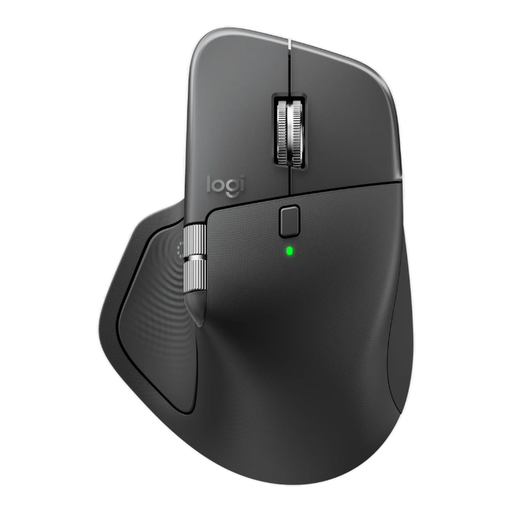
Logitech MX Master 4 for Business
An option to consider if you also want to navigate horizontally through long lists or wide tables.
The product name lists 8K DPI, Bluetooth, USB-C charging and a Logi Bolt receiver. The receiver included is USB-C; Bluetooth is the other connection option listed. The shape is designed for right-handed use.
View at Joybuy
 No image available
Dell Pro Compact Silent Mouse MS355
A compact option if space is limited and quiet operation matters to you.
The included dongle is needed for the RF connection; Bluetooth is the alternative. The description says it has a symmetrical design for both left- and right-handed use.
View at Joybuy
 No image available
Trust Bayo II Vertical Mouse
A vertical mouse to consider if hand position is important to you and you use the mouse with your right hand.
This is a wired USB mouse designed for right-handed use.
View at Joybuy
Frequently asked questions about mice for membership administration
Do you always need a trackball for a small desk?
No, not if there’s enough room beside your keyboard to move a conventional mouse. A stationary trackball doesn’t need a sweeping movement, but you’ll need to find its ball controls comfortable.
How do you connect a wireless mouse without a spare USB port?
Choose a Bluetooth version only if your computer supports the Bluetooth connection it requires. HP lists Bluetooth 5.1 for the HP 240; Logitech lists Bluetooth for the MX Anywhere 3S and says the Logi Bolt receiver is not included.
Will a mouse described as ergonomic prevent discomfort?
The product name alone doesn’t tell you that. Arboportaal highlights the strain caused by repetitive tasks and the importance of varying your activities and setting up your workspace appropriately. Assess fit and positioning separately.
Which marking should you check on a mouse for use in the Netherlands?
Check that the device has the correct CE marking. The RDI states that equipment placed on the Dutch market must meet this marking requirement.
What should you look for if you handle membership records for long periods?
Check that the mouse fits your hand and that you can comfortably select fields and scroll through lists with it. Arboportaal recommends varying your screen-based work with other tasks or taking a break.


