If you have barely any room to move a mouse beside your keyboard, a stationary trackball is worth considering. For familiar control, a compact mouse may be a better fit if you still have some room to move it around. A vertical mouse is an alternative if a different hand position matters to you, but also consider hand size, whether the model is designed for left- or right-handed use, and varying your working posture.
Who is this choice relevant to?
Writer with barely any room for a mouse
If your keyboard and reference materials fill the desk, the space beside your keyboard matters. A stationary trackball and a compact mouse need room in different ways. Kensington and Logitech describe the relevant product types and features.
Writer who works for long periods at a time
If you spend a lot of time working at a screen, it’s worth considering the shape of the mouse and your working posture, without assuming that a mouse will prevent discomfort. Arboportaal describes the repetitive movements and static strain that can be associated with screen work; Logitech provides guidance on hand size for the Lift.
Writer who consults lots of sources
If you often navigate long documents or work in a shared space, scrolling controls and click noise may be important. Logitech describes the scroll modes on the MX Anywhere 3S; Trust lists quiet buttons for the Yvi+ Silent.
What should you look for when choosing?
Stationary trackball
Choose this if: you have barely any room to move a mouse beside your keyboard.
Bear in mind: you may need time to get used to ball control, and an optional wrist rest will take up extra space.
Compact conventional mouse
Choose this if: you want to keep the familiar mouse movement and still have some free space to move it around.
Bear in mind: even a compact model needs a surface to move across.
Vertical mouse
Choose this if: a different hand position is your main priority and the shape suits your hand.
Bear in mind: you’ll need the right size and a model designed for left- or right-handed use; switching to a different mouse doesn’t replace varying your posture.
| What to consider |
What should you check? |
Who should pay particular attention? |
| Room to move the mouse on your desk |
Measure the free space beside your keyboard and allow for the device’s full footprint, including any wrist rest. |
If I have barely any room to move a mouse, stationary control matters more to me. Around 36% of consumers prioritise needing minimal room to move. |
| Hand position during long work sessions |
Check which hand size the model is designed for and choose the right version for left- or right-handed use. |
If you’re looking for a different hand position during long writing sessions, you’ll want a suitable shape without relying on it to prevent discomfort. Around 29% of consumers give hand position top priority. |
| Long documents and click noise |
Check which scroll modes and buttons the exact model has; manufacturers may describe clicks as quiet or quieter. |
If I consult lots of sources or work in a shared space, I pay attention to scrolling controls and click noise. For around 21% of consumers, navigation and quiet clicking come top of the list. |
| Connectivity and power |
Check Bluetooth support, the USB port required, any included accessories, and whether the mouse is rechargeable or uses batteries. |
If you need a free USB port or want to know in advance how the mouse is powered, consider its connectivity and ease of use. Around 14% of consumers make this their main priority. |
Common buying pitfalls
-
Compact doesn’t mean you won’t need room to move it
A compact conventional mouse still needs to move across a surface; a trackball stays in place.
Measure the free space beside your keyboard and compare it with the full area the device will occupy.
-
Don’t assume every wireless mouse includes a receiver
Logitech says the standard MX Anywhere 3S does not come with the compatible Logi Bolt receiver.
For the exact model, check whether Bluetooth works with your computer, which USB port is needed and what’s included in the box.
-
Don’t assume a vertical mouse will prevent discomfort
A different hand position doesn’t guarantee an individual medical outcome. Arboportaal also describes other types of strain associated with screen work.
Choose a model that suits your hand and vary your working posture and tasks.
Brands to consider
Kensington
Kensington offers Orbit trackballs in both wireless and wired versions.
- According to Kensington, the Orbit versions mentioned are suitable for both left- and right-handed users.
- Check whether the specific version has a cable, wireless connectivity or a receiver; ball control takes some getting used to, and a wrist rest may take up space.
Logitech
The MX Anywhere 3S is a compact conventional mouse; the Lift is a separate vertical range.
- Logitech lists Bluetooth, two scroll modes and quiet clicks for the MX Anywhere 3S. The Lift is designed for small to medium-sized hands, according to Logitech.
- The compatible Logi Bolt receiver is not included with the standard MX Anywhere 3S. For the Lift, check the hand size and whether it’s designed for left- or right-handed use; its shape does not guarantee a particular health outcome.
Trust
The Yvi+ Silent is a compact mouse with quiet buttons; the Puck is a separate rechargeable model.
- Trust lists Bluetooth or an included USB micro receiver for the Puck.
- According to Trust, the Yvi+ Silent uses a battery. Check the exact model: features of the Puck don’t automatically apply to the Yvi+ Silent.
CHERRY
The compact MW 9100 and vertical MW 4500 are different product ranges.
- CHERRY lists three adjustable resolutions for the MW 9100, which can be charged via USB-C, including while in use.
- According to CHERRY, the MW 4500 has a 45° shape and separate versions for left- and right-handed users. Check that the shape and version suit your needs.
Joybuy mice for a small desk
The products below are compact conventional mice for writing and navigation at a small desk; remember to allow for the space a moving mouse needs.
 No image available
Microsoft Surface Arc Mouse Violet
A good fit if you’re looking for a compact conventional mouse and often navigate long documents.
The product information lists a flat, foldable design and Bluetooth pairing. Compatibility is listed for Surface and other Bluetooth devices running Windows 10/11.
Joybuy
 No image available
HOFOTEK M311 2.4G+BT Silent Office Mouse
A compact option for anyone short on desk space who wants quiet buttons.
The product name lists 2.4G+BT, adjustable DPI and one AA battery.
Joybuy
 No image available
Trust Yvi+ Wireless Mouse Multi-Device
A compact conventional option with quiet buttons for writing or working in a shared space.
The USB receiver needs a spare USB-A port; Bluetooth is an alternative.
Joybuy
 No image available
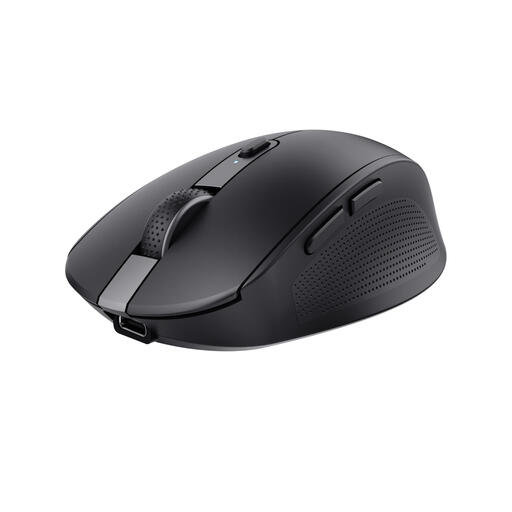
Trust Ozaa Mouse Office Right-Hand RF Wireless + Bluetooth 3200DPI
A compact conventional mouse for anyone who considers quiet buttons and cursor speed important when working with documents.
The product name lists a right-handed design, RF and Bluetooth connectivity, and 3200 DPI.
Joybuy
 No image available
Razer Orochi V2
The product information describes a compact, symmetrical shape for both left- and right-handed use.
The product name lists 18,000 DPI; the product information says it runs on an AA or AAA battery.
Joybuy
Frequently asked questions
How do you connect a mouse if your laptop has few USB ports?
First, check whether your laptop supports Bluetooth. Logitech says the standard MX Anywhere 3S works via Bluetooth and does not come with the compatible Logi Bolt receiver; check the connectivity and accessories for other models separately.
Does a trackball need maintenance?
Kensington recommends gently removing dirt from the ball of the wireless Orbit with a finger or a dry cloth.
Can you try a mouse bought online and return it?
For a standard online consumer purchase, you generally have a statutory cooling-off period of up to 14 days after delivery, subject to legal exceptions, according to ACM ConsuWijzer. Check the terms that apply to your purchase; the cooling-off period is separate from your rights if a product is faulty.
Is the statutory guarantee in the Netherlands always exactly two years?
No. ACM ConsuWijzer explains that the statutory guarantee depends on what you could reasonably expect from the product under normal use. If the product turns out to be faulty, contact the seller.


