
Editor working at different desks
You take your mouse with you and want to get started quickly on different computers. The connection type, receiver and ability to switch between devices all help determine which model is right for you.


If you work on different computers, start by checking the connection type and whether Bluetooth or a USB receiver is allowed at your shared workspace. For newsletter tasks, a comfortable scroll wheel and quiet clicks matter too. Then choose a shape that suits your hand and check the exact model and included accessories.
You take your mouse with you and want to get started quickly on different computers. The connection type, receiver and ability to switch between devices all help determine which model is right for you.
You often navigate text, images and layouts. A comfortable scroll wheel is useful, and quieter clicks can be important at a shared desk.
You want a grip that suits your hand. A vertical mouse is another style to consider, but it is no guarantee that it will relieve discomfort.
Start with a connection that works with the shared computer and is permitted. Then compare the controls for navigating documents, the click noise and the fit.
| What to consider | What should you check? | Who should pay extra attention? |
|---|---|---|
| Connecting and switching | Compare Bluetooth, a USB receiver and a cable. Check whether the receiver is included with the exact model and how many devices it can be paired with. | If you work on different computers, you’ll want to switch between them without hassle. Around 28% of consumers cite switching devices as their main reason for buying. |
| Scrolling and navigation | See how the main scroll wheel works; horizontal scrolling is particularly useful for wide documents. Also check whether you can configure any extra controls on your work computer. | For long newsletters or wide layout documents, you’ll want to move smoothly through text and elements. Around 22% of consumers prioritise document navigation. |
| Click noise | Check whether the buttons are specifically described as quiet and, if possible, assess the sound of the buttons and wheel for yourself. | If you work close to colleagues, quieter clicks can help create a calmer workspace. Around 22% of consumers put quiet operation first. |
| Hand fit and posture | Check the hand size, whether the model is designed for left- or right-handed use, and whether you have enough room to move the mouse. If possible, try an alternative grip. | For long editing sessions, you’ll want a grip that suits your hand. Around 17% of consumers give hand fit top priority. |
| Power and maintenance | Choose between a cable, a replaceable battery and recharging. Also check that the computer has the required port and that there’s room for a cable. | If you want to minimise pairing, charging or changing batteries, the power source makes a difference. Around 11% of consumers prioritise easy maintenance. |
According to Logitech, the standard MX Anywhere 3S does not include a Logi Bolt receiver. A receiver is only useful if the computer has a compatible USB port and its use is permitted.
Check what’s included with the exact model and whether Bluetooth is available on the work computer.
Vertical models may be designed for specific hand sizes or have separate left- and right-handed versions. A different grip is no guarantee of a solution to personal discomfort.
Check the model and fit; if possible, try the mouse before you decide.
A higher stated DPI figure alone doesn’t prove that a mouse is better suited to editing a newsletter.
Compare the connection, scrolling controls, noise and fit first. Then use the sensor specifications as additional information.
The product ranges mentioned offer different options for everyday use, switching between devices and a vertical grip.
The Ozaa+ is a larger mouse for people who work with wide documents and multiple devices, among other things.
The MW 4500 and MW 4500 LEFT are separate vertical models for right- and left-handed use respectively.
The Pro Fit Ergo range includes both a vertical wireless mouse and a different model with a wrist rest; these are separate versions.
The Desktop 320M is a wired option for a computer with a suitable USB-A port.
These Joybuy products suit different needs at a shared desk, from wired use to wireless scrolling and switching between devices.
 No image available
An option to consider if you switch between devices and often navigate wide documents; check that this Mac version is suitable for the shared computer.
Bluetooth; USB-C charging; haptic feedback. The product name lists MacOS, iPadOS and Windows.
 No image available
Suited to a fixed workspace where you want a wired connection; bear the cable in mind and check that the computer has a compatible USB port.
Wired; optical; USB; scroll wheel; 1200 DPI.
 No image available
An option if you want to work wirelessly using a USB receiver. Check whether you’re allowed to use one with the shared computer; according to the product information, this mouse doesn’t work via Bluetooth.
Wireless; requires a USB receiver.
 No image available
An option to explore if you’re looking for a wireless mouse for office work. If quiet clicks are essential, assess the sound for yourself at your workspace.
The product name lists multiple DPI levels, compatibility with multiple systems and one AA battery.
 No image available
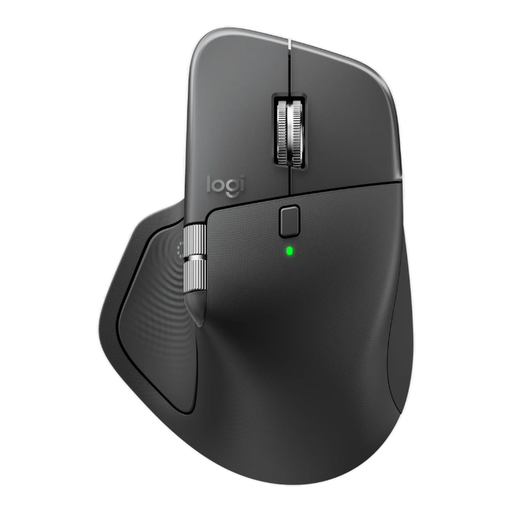
An option to consider if you switch between devices and navigate long or wide documents. Check that using the receiver complies with the shared workspace’s policy.
Bluetooth; Logi Bolt receiver; USB-C charging; the product name lists 8K DPI.
No. Bluetooth, a USB receiver and a wired USB-A connection are different options. Choose one that works with the computer and is permitted under your workplace policy. Logitech says that the Logi Bolt receiver is not included with the standard MX Anywhere 3S.
That depends on the model and the software you’re allowed to use. Logitech mentions Options+ for customisable controls; CHERRY mentions CHERRY KEYS for the thumb buttons on the MW 4500. Check that the relevant software is available and permitted on the work computer.
Choose a power option that suits your workspace. According to the product information, the Signature M650 has a replaceable AA battery, the MX Anywhere 3S and Ozaa+ are rechargeable, and the wired HP Desktop 320M doesn’t need a separate mouse battery; the latter does require a USB-A port.
According to the Dutch government, if a product develops a fault, you should contact the seller for a solution; your statutory rights are separate from any manufacturer’s or extended warranty. For distance purchases, you have a 14-day cooling-off period in many cases. Check the terms that apply to your purchase.
Arboportaal’s guidance on screen-based work covers safe working practices and setting up your workspace. This guidance does not make a vertical or silent mouse a universal choice for every buyer; assess a mouse based on its fit, connection and the conditions at your workplace.