Start by choosing a mouse that works for everyone’s preferred hand at the shared desk; a simple, symmetrical wired mouse may be enough. If you switch between computers or work with wide spreadsheets, a wireless model with device switching or horizontal scrolling could be more convenient, but check its shape, connection and power supply. A mouse is no substitute for a suitable workstation setup or taking breaks during prolonged screen work.
Who will use the mouse?
Housemates with different dominant hands
If several people share a desk, a symmetrical shape is a sensible starting point for comparing options for left- and right-handed users. CHERRY describes the GENTIX Corded as suitable for either hand; each user should assess the size and grip for themselves.
Family members managing finances in wide spreadsheets
If you work with bills and budget spreadsheets, horizontal scrolling or switching between computers could be useful. Trust and Logitech describe these features on specific models; check they’ll work with your software and equipment.
Users in a quiet shared workspace
If someone is sitting beside you while you go through the household admin, quiet buttons may be worth considering. Trust and Rapoo list quiet operation for specific mice; also check the shape, connection and power supply.
What should you look for?
| What to consider |
What should you check? |
Who is this important for? |
| Use by different people |
Check the hand orientation, dimensions and button reach; try the shape for yourself if possible. |
If left- and right-handed housemates use the same mouse, I want a shape that works for both. Around 36% of consumers give shared usability top priority. |
| Navigation and switching between devices |
Check whether the model offers horizontal scrolling and which computers it can connect to via Bluetooth or a receiver. |
For wide financial spreadsheets or several computers, I want to navigate tables easily and switch between devices. Around 29% of consumers prioritise navigation and device switching. |
| Clicking noise |
Check whether the exact version has quiet buttons; a product description is not a sound measurement. |
When someone is working beside me, I want to take clicking noise into account when choosing. Around 21% of consumers give quiet operation top priority. |
| Connection and power supply |
Check which USB ports are available and whether the model is wired, rechargeable or powered by a replaceable battery. |
If the mouse stays at a desktop computer, I want an easy connection and minimal power-related upkeep. Around 14% of consumers prioritise ease of use and minimal battery maintenance. |
Things to watch out for
-
Choosing a right-handed mouse without involving the other user
The Trust Ozaa+ and Logitech M720 are right-handed models, while CHERRY describes the GENTIX Corded as symmetrical. A label describing the shape doesn’t automatically mean the mouse will feel comfortable for everyone.
Ask all users which hand they use, then check the dimensions and grip too. Don’t rely on a description such as ‘ergonomic’ alone.
-
Assuming a wireless mouse will automatically work with every computer
Bluetooth and USB receivers aren’t available in the same way on every computer; wireless models may also use different power sources.
Check which connections are available on each computer and what connection the mouse needs. Also check how the version you choose is powered.
-
Confusing paid extra cover with your statutory rights
The Government of the Netherlands states that there is no fixed statutory guarantee period in the Netherlands. A paid-for extended warranty is not the same as your statutory rights if a product is faulty.
Check what any additional cover includes, and contact the seller if the product is faulty.
Brands worth comparing
CHERRY
The GENTIX Corded is a wired, symmetrical option for a permanent shared workspace with a USB-A connection.
- CHERRY lists three buttons, a 1000 dpi optical sensor and a 1.8 m cable for this model.
- The cable takes up desk space; the manufacturer’s description of its comfort doesn’t tell you whether it will suit you personally.
Trust
According to Trust, the Ozaa+ is designed for wireless use with multiple devices and has a side scroll wheel for wide spreadsheets.
- Trust lists quiet buttons, two scroll wheels and a rechargeable battery for this model.
- The Ozaa+ is large and designed for right-handed users; check the fit and whether your computers support the connection you want.
Rapoo
The M200 Silent is a wireless option if quiet operation and switching between paired devices are important to you.
- Rapoo specifies Bluetooth, a 2.4GHz receiver and quiet buttons for this model.
- The stated battery life of up to nine months is a claim from Rapoo, not a measurement of real-world use; check the power supply for the version you choose.
Logitech
The M720 Triathlon is a right-handed option for users who scroll through documents frequently and switch between compatible devices.
- Logitech lists two scroll modes, horizontal tilt scrolling and connection via Bluetooth or Unifying.
- It is designed for right-handed users. Logitech states that button customisation with Logi Options+ isn’t available on Linux.
Joybuy products for this use
This selection includes wireless mice suited to a shared workspace. For each model, check that the hand orientation, quiet operation and connection options you want are clearly specified.
 No image available
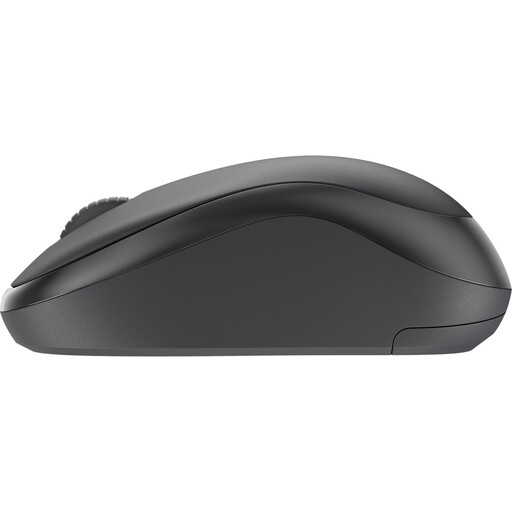
Logitech M240 Silent Wireless Mouse, black
Suited to a shared workspace where quiet operation and use by both left- and right-handed housemates are important.
The product information lists wireless operation, Silent Touch and Logi Bolt.
View at Joybuy
 No image available
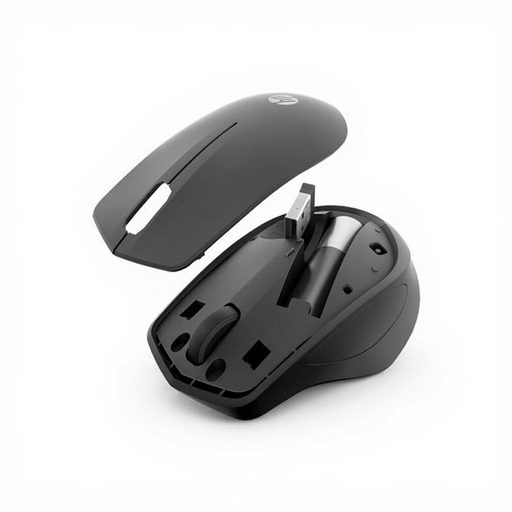
HP 285 Silent Wireless Mouse
Could suit a shared workspace where quiet clicks and use with either hand are important.
The product information lists an ambidextrous shape, a 2.4GHz receiver and one AA battery.
View at Joybuy
 No image available
HOFOTEK M311 2.4G+BT Silent Office Mouse
Suited to anyone who values quiet operation and switching between compatible devices.
The product information lists 2.4GHz and Bluetooth connections, quiet clicks, connection to up to three devices and one AA battery.
View at Joybuy
 No image available
AJAZZ AJ200 AI MC Wireless Gaming Mouse
An option for anyone considering a gaming-focused mouse as well as one for household admin.
The product name lists a charging dock and Bluetooth, 2.4G and USB-C connection modes.
View at Joybuy
 No image available
AULA SC620 Wireless Gaming Mouse, white
A gaming-focused option for comparing wireless connection options.
The product name lists Bluetooth 5.0, 2.4G and USB-C.
View at Joybuy
Frequently asked questions
Do I need to pair a mouse again when I switch computers?
It depends on the model and the pairings already set up. Trust describes the Ozaa+ as having a USB receiver and two Bluetooth channels; Rapoo and Logitech also describe switching between previously paired devices. Check the instructions for the version you choose and the connection options available on each computer.
What can I do during long periods of household admin at a desk?
Take breaks from screen work and set up your workspace appropriately. Arboportaal identifies repeated hand movements and static strain as considerations when working with screens. The regulations referred to apply to employers and employees; they don’t create a general obligation for a household checking bills at home.
Are there specific product requirements for a wireless mouse in the Netherlands?
For radio equipment, the Dutch Authority for Digital Infrastructure describes European requirements and obligations for manufacturers, importers and distributors, including applicable conformity information and CE marking. This alone doesn’t confirm whether a specific product on sale meets the requirements; if in doubt, check the documentation for that particular version.
What if a mouse is faulty, and can I return an online purchase?
According to the Government of the Netherlands, you have statutory rights if a product is faulty; there is no fixed statutory guarantee period in the Netherlands, and the seller must offer an appropriate solution. For online purchases from a business, you will usually have a 14-day cooling-off period. Check the applicable terms and exceptions; paid-for extra cover doesn’t replace your statutory rights.


