Start by choosing a mouse that works with the computer at the shared desk and feels comfortable when selecting text and scrolling. If colleagues are sitting nearby, quiet buttons may be a key consideration. A wired mouse needs a suitable cable route, while a wireless mouse requires the right Bluetooth connection or receiver and may need battery management. Consider hand size and handedness separately: TNO describes the risks of prolonged mouse use, but a product name alone cannot tell you whether its shape will suit your hand.
Who should consider this choice?
Editing a reading list beside colleagues
You select and move text or links, and want to click quietly and scroll through pages smoothly. Logitech, Trust, HP and CHERRY describe quiet buttons or different scrolling features for the models reviewed here. These are product claims, not the result of comparative sound testing.
Using different desk computers
You work on more than one device or find that the same connections aren’t available at every workstation. The models reviewed offer different connection options, including Bluetooth, a USB receiver and a wired USB-A connection.
Using a mouse for long periods
Your main priority is finding a mouse shape and size that suit your working posture. TNO describes the risks of prolonged mouse use; this does not prove that any particular model prevents discomfort.
What should you look for in a mouse for a shared desk?
| What to consider |
What to look for |
Who is this important for? |
| Scrolling and selecting |
Try the scroll wheel and buttons in the application you use to edit your reading list. |
When I’m working through a long reading list, I want to select text precisely and scroll smoothly through lines and longer sections; around 29% of consumers prioritise scrolling and selecting. |
| Quiet clicks |
Check whether the main buttons are described as quiet and, if possible, try them for yourself to assess how they feel. |
When colleagues are working nearby, I want clicks to distract them as little as possible; around 29% of consumers give peace and quiet for desk neighbours top priority. |
| Connection and switching |
Check for available USB ports and Bluetooth support, and consider whether you want to control one or more computers. |
When I move between workstations, I want to know in advance whether the mouse will connect; around 21% of consumers prioritise a reliable connection. |
| Hand fit |
Check the size and whether it’s designed for left- or right-handed use, and try the grip in your own working setup. |
When I’m working for longer periods, I want a design that suits my hand and preference; around 21% of consumers put hand fit first when choosing a mouse. |
Common mistakes
-
Assuming every wireless mouse uses Bluetooth
According to HP, the HP 280 Silent uses a 2.4GHz receiver; the Logitech M650 range also offers Bluetooth as a connection option.
Check the connection method for the exact version and the ports available on your work computer.
A receiver needs a suitable available port. Depending on your computer, you may need an adapter, and you’ll need to keep the receiver to hand.
-
Choosing an M650 based on the family name alone
Logitech distinguishes between the M650, M650 L and M650 L Left according to hand size or handedness.
Check the full model name and make sure it suits your hand before ordering.
-
Assuming quiet clicks prevent discomfort
Quiet buttons describe the sound of the clicks; TNO separately describes the risks of prolonged mouse and screen use.
Consider click noise, hand fit and your workstation setup separately.
Brands to consider
Logitech
The Signature M650 range is worth considering if scroll modes, Bluetooth or a USB receiver, and a choice of hand sizes matter to you.
- Logitech describes the range as featuring SmartWheel and Bluetooth Low Energy or Logi Bolt. The M650, M650 L and M650 L Left are designed for different hand sizes or handedness.
- The family name alone doesn’t tell you which version is right for you; check the full model and handedness.
Trust
The Ozaa+ is worth considering if you switch between devices at a shared desk or work with wide documents.
- Trust specifies quiet buttons, two scroll wheels and multi-device connectivity for the Ozaa+.
- Its larger size and rechargeable battery are factors to weigh up. These features apply to this model and aren’t automatically found on other Trust mice.
HP
The HP 280 Silent is a straightforward wireless option for a computer with an available USB-A port.
- HP specifies quiet clicks, a 2.4GHz receiver and one AA battery for this model.
- The product specifications don’t list Bluetooth as a connection option. HP states a battery life of up to 18 months; this isn’t a guaranteed usage period.
CHERRY
The GENTIX SILENT is a wired alternative if quiet buttons matter and a cable works for your desk setup.
- CHERRY specifies quiet buttons, a 1.8 m cable and USB-A.
- CHERRY lists Windows for this version; check compatibility with other systems separately.
Joybuy product picks
These product picks are intended for scrolling and selecting text at a shared desk. Check the connection, handedness and click noise for each version.
 Image unavailable
Logitech MX Master 4 Graphite
Worth considering if you work through long reading lists; check that the scrolling options, connection and shape suit your workstation and hand.
View at Joybuy
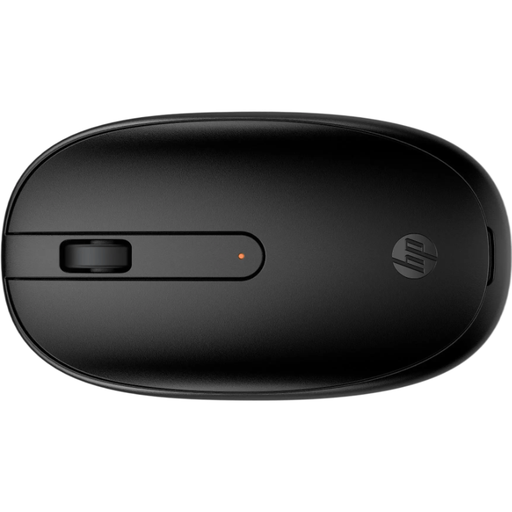 Image unavailable
HP 240 Black Bluetooth Mouse
Worth considering if you want to work wirelessly without a USB receiver; check that Bluetooth is available on the computer at the shared desk.
Bluetooth connectivity is stated in the product name.
View at Joybuy
 Image unavailable
Trust Ozaa+ optical wireless office mouse, 3200 DPI, right-handed
Worth considering if you want to combine scrolling with working across several devices; its larger size is something to bear in mind at a shared desk.
The product name specifies 3200 DPI and a right-handed design. Trust specifies quiet buttons, two scroll wheels and connectivity with up to three devices for the Ozaa+.
View at Joybuy
 Image unavailable
Trust Bayo II Medical, Right-Handed, RF Wireless, Optical, 2400 DPI, Black
Consider this version if you’re looking for a right-handed model; its shape still needs to suit your hand and working posture.
The product name specifies RF Wireless, Optical and 2400 DPI. The model name is not a claim of medical efficacy.
View at Joybuy
 Image unavailable
Logitech Signature M650 L Left, White (910-006240)
This version is designed for left-handed users with larger hands; try it for yourself to see whether the size and shape feel comfortable.
Logitech describes the M650 range as featuring SmartWheel and Bluetooth Low Energy or Logi Bolt. Connection and handedness are separate factors to consider.
View at Joybuy
Frequently asked questions
Which connection should I check before buying a mouse for a shared desk?
Check the work computer for available USB ports and Bluetooth support. A USB receiver needs a suitable port, Bluetooth connects without a USB receiver, and a wired model needs a suitable cable route.
How do I choose the right version of the Logitech M650?
Choose based on hand size and handedness, not just the family name. Logitech describes the M650 as suitable for small to medium-sized hands, the M650 L for large hands and the M650 L Left for left-handed users; try it for yourself to check the fit, too.
Do quiet mouse buttons prevent discomfort during prolonged use?
Quiet buttons describe the sound of the clicks and don’t prove that a mouse prevents discomfort. TNO describes the risks of prolonged mouse use, so consider your hand fit and workstation setup as well.
How do I keep a mouse at a shared desk clean?
Follow the cleaning instructions for the exact model and take care not to let liquid get inside the device. Logitech publishes cleaning guidance, but that doesn’t prove that every model mentioned here can be cleaned with the same products.
What if the mouse doesn’t feel comfortable or breaks too soon?
Many online consumer purchases in the Netherlands come with a cancellation period; ACM ConsuWijzer states that this ends 14 days after delivery. Check the applicable terms and any return costs. If a product doesn’t perform as you could reasonably expect under normal use, you also have a legal guarantee; a manufacturer’s warranty does not replace this right.


