Choose according to what matters most to you at a shared desk: quiet buttons, a shape that suits your hand during long sessions, or a connection that works with the devices you use. Then check the exact version, whether it suits your dominant hand, and whether Bluetooth or the included USB receiver is compatible with your computer. A vertical mouse does not guarantee that any discomfort will go away.
Who is this buying guide for?
Writer working alongside colleagues
You want to keep audible clicks to a minimum while editing and checking your application at a shared desk. Trust lists quiet buttons for the Yvi+ Silent, while Logitech specifies SilentTouch for the Signature M650.
Long-hours computer user
You spend long sessions working on text and attachments, and want a mouse that suits your hand and desk setup. Arboportaal notes that computer work involves repetitive actions and static strain.
Someone who changes workstations
You take your mouse with you or use more than one computer, so connectivity and portability are important factors for you. HP describes the 435 Multi-Device as offering Bluetooth and a USB-A nano dongle.
What should you look for when choosing?
Quiet mouse with a conventional shape
Choose this if: click noise around colleagues is your main concern and you prefer a familiar shape. Logitech lists SilentTouch and SmartWheel for the Signature M650; Trust specifies quiet buttons for the Yvi+ Silent.
Bear in mind: quiet does not mean silent. The Yvi+ Silent version reviewed uses a USB receiver; also check the scroll noise and choose the right M650 version.
Vertical mouse
Choose this if: you find the grip comfortable and a good fit for your hand matters more than a compact shape. Logitech describes the Lift as a 57° vertical mouse for small to medium-sized hands; CHERRY lists the MW 4500 LEFT as a left-handed design with a 45° angle.
Bear in mind: a different grip may take some getting used to. Check that it is designed for your dominant hand and, if possible, try the fit first. The shape alone cannot guarantee relief from discomfort.
Mouse for multiple devices
Choose this if: you switch between computers while writing. HP lists the 435 Multi-Device as connecting to up to two devices via Bluetooth or a USB-A nano dongle; Rapoo says the M200 Silent can switch between paired devices.
Bear in mind: check the available ports, Bluetooth support and any workplace rules for each computer. A multi-device feature does not, in itself, tell you whether the mouse will fit your hand.
| What to consider |
What should you check? |
Who is this important for? |
| Noise level |
Check whether the exact version you are choosing has quiet buttons, and pay attention to the sound of the scroll wheel too. |
When I write alongside colleagues, I want clicks to be as unobtrusive as possible. Around 33% of consumers say quiet operation is their main reason for buying. |
| Fit for your hand |
Check your hand size, which hand you use and whether you can use the mouse close to the keyboard. |
During long sessions, I want a grip that suits my hand. Around 25% of consumers give hand fit and working posture top priority. |
| Connectivity |
Check the USB port, Bluetooth options and any rules about connecting peripherals. |
When I switch between devices or workstations, I want to know in advance how to connect the mouse. Around 25% of consumers put connectivity at the top of their list. |
| Document navigation |
Check whether the scroll wheel is accurate and responsive enough, and whether you want to use side buttons. |
When reviewing application documents and attachments, I want to scroll through long documents comfortably. Around 17% of consumers cite navigation as their main reason for buying. |
Pitfalls when choosing a mouse
-
Assuming ‘quiet’ means completely silent
As well as the buttons, the scroll wheel and moving the mouse can make noise too.
If a quiet workspace matters to you, consider the noise from the whole experience, not just the buttons.
-
Choosing a vertical mouse without checking the version
Your hand size and whether you are left- or right-handed affect how well the grip fits. A different shape does not guarantee that any discomfort will go away.
Check the exact version and, if possible, try the grip first. Talk to a specialist if you develop work-related discomfort.
-
Assuming every wireless mouse works without a USB port
The Trust Yvi+ Silent version reviewed uses a USB receiver, while some other models also offer Bluetooth.
Before buying, compare the connection options of the exact mouse version with those available on your laptop or work computer.
If your computer does not have a suitable port and the mouse does not offer a usable Bluetooth connection, you may need a compatible adapter.
-
Confusing an extended warranty with your statutory rights
An extended warranty does not replace your statutory right to a product that is fit for purpose.
Read the details of any extra cover and report product problems to the retailer. The Dutch Government identifies the retailer as your point of contact for a solution.
Brands to compare for this choice
Logitech
Worth considering if you are comparing quiet controls, different hand-specific versions or a vertical shape.
- Logitech lists SilentTouch and SmartWheel for the Signature M650. The Lift is described as a 57° vertical mouse for small to medium-sized hands.
- The M650 comes in versions for different hand sizes and dominant hands. Do not assume that features carry over from one model to another without checking.
Trust
The Yvi+ Silent is a compact option if you want to take a mouse with you to a shared desk.
- Trust lists quiet buttons and a compact shape for the Yvi+ Silent.
- The version reviewed uses a USB receiver; do not assume this model offers Bluetooth.
HP
The 435 Multi-Device is worth considering if you want to connect one mouse to more than one computer.
- HP lists Bluetooth or a USB-A nano dongle, with connections to up to two devices.
- Check that the connections are compatible with your computers; the features listed are not based on an independent user test.
CHERRY
The MW 4500 LEFT is a specifically left-handed option with an angled grip.
- CHERRY lists a 45° design, adjustable resolution and thumb buttons for this version.
- CHERRY’s claims about reducing strain on the wrist are manufacturer claims, not a guarantee for individual users.
Rapoo
The M200 Silent is worth considering if you are looking for quiet controls and a connection to multiple devices.
- Rapoo describes the M200 Silent as a mouse with Bluetooth and a wireless receiver, and says it can switch between paired devices.
- Check that the connection options are compatible with your computer; the features described are not based on an independent test for this writing scenario.
Joybuy product picks
This selection includes mice for switching between devices, navigating long documents, and weighing up hand shape and connectivity.
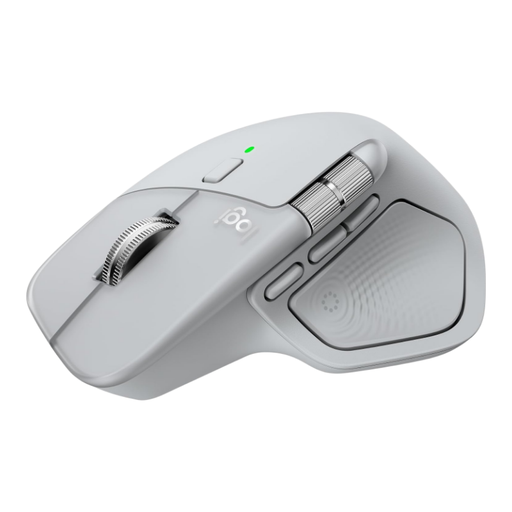 Image unavailable
Logitech MX Master 4 Light Grey
Worth considering if you switch between devices and scroll through long documents.
The product information lists Bluetooth 5.1, a Logi Bolt USB-C receiver and connections to up to three devices. The scroll wheel has free-spin and ratchet modes; a horizontal thumb wheel is also listed.
View at Joybuy
 Image unavailable
AJAZZ AJ159 PRO Wireless Gaming Mouse, white
Its listed office and gaming uses make this an option to compare if you want one mouse for writing and other tasks.
The product name lists 2.4G, USB-C and Bluetooth, a PAW3395 sensor, up to 26,000 DPI and a 56 g design. The included magnetic charging dock contains magnets; keep it away from pacemakers, medical implants and credit cards.
View at Joybuy
 Image unavailable
Logitech M705 Wireless Mouse Black
Worth comparing if scrolling quickly through long documents matters to you.
The product information lists a Unifying receiver and a scroll function for long documents. This version does not use Bluetooth and connects via a USB receiver.
View at Joybuy
 Image unavailable
HOFOTEK M311 2.4G+BT Silent Office Mouse Black-Orange
Worth comparing if you want quiet controls and a connection to multiple devices.
The product information lists Bluetooth 5.1, 2.4 GHz and a USB receiver, with the option to switch between up to three devices. The product name describes it as a quiet office mouse with adjustable DPI settings.
View at Joybuy
 Image unavailable
AJAZZ AJ200 AI MC Wireless Gaming Mouse with charging dock
The product information lists office work and connections to multiple devices; compare the connection options with those available on your computer.
The product name lists Bluetooth, 2.4G and USB-C, a PAW3311 sensor and up to 24,000 DPI. The product information describes a shape for medium to large hands.
View at Joybuy
Frequently asked questions
Should I choose Bluetooth for a shared desk?
No, you do not have to. Choose Bluetooth if your computer supports it and you do not want to use a USB receiver; a receiver may be suitable if your computer and workplace allow it. Before buying, check the connection options for the exact version.
How should I set up my mouse area for a long writing session?
Set up your workstation to suit your body, position the mouse so you can work comfortably, and break up your screen time. Arboportaal provides this workstation advice; changing your mouse does not replace these measures.
What should I do if the mouse becomes faulty?
When you buy as a consumer in the Netherlands, you are entitled to a product that is fit for purpose. According to the Dutch Government, the retailer is your point of contact if there is a problem with a product; a manufacturer’s warranty or extended warranty is in addition to your statutory rights.
Does Dutch health and safety law require a particular type of mouse?
Arboportaal sets out requirements for safe computer work and taking breaks, but does not specify a particular mouse model. Its guidance says that computer work must be alternated at set intervals with other work or a break.


