For membership administration at a shared desk, a wired USB mouse is a practical choice if the computer has a free, permitted port and users want to get started straight away; Logitech describes the M100 as ready to use without any pairing. A wireless mouse may be suitable if you want to reduce cable clutter or clicking noise, provided Bluetooth or a USB receiver is allowed on the work computer. Then choose based on hand size, handedness and the sound of both the buttons and the scroll wheel; a vertical mouse will not automatically suit every user. A mouse does not protect membership data: access rights and accounts must be managed separately, as the Dutch Data Protection Authority points out.
Who is this relevant to?
Users of a shared PC
If you want to start clicking and browsing membership lists as soon as your shift begins, look for a connection that does not require you to pair the mouse each time. Logitech and Trust describe models with different connection options.
Staff who use a mouse a lot
The right shape and size can matter when you perform repetitive tasks. Logitech describes different sizes and handedness options; Arboportaal recommends reassessing your workstation when you move to a different place to work.
Colleagues in a quiet room
If you want to reduce repeated clicking noise, look for models described as quiet, and check that their connection works with the work computer. Trust and Rapoo list quiet buttons on specific models.
What should you look for in a mouse for a shared desk?
Start with the connection permitted on the shared computer. Then decide whether fit, clicking noise or easy maintenance matters most.
| What to consider |
What to look for |
Who might prioritise this? |
| Connection |
Check whether the computer has a free USB port and whether Bluetooth or a USB receiver is permitted under the workplace policy. |
If several colleagues use the same PC, I want the mouse to work straight away when my shift starts; around 33% of consumers prioritise plug-and-play use without pairing. |
| Fit |
Match the mouse’s size and handedness to your hand; try the grip if possible and readjust your workstation. |
If I do a lot of data entry, I want a mouse that suits my hand and preference; around 25% of consumers put fit and handedness first. |
| Operating noise |
Check the sound of the buttons and scroll wheel separately; a quiet-button label does not automatically tell you anything about the wheel. |
When I work alongside colleagues, I want repeated clicking to be as unobtrusive as possible; around 25% of consumers prioritise quiet operation. |
| Maintenance |
Compare a fixed USB cable with the power supply and receiver used by wireless models; check how to clean the mouse you choose. |
At a permanent workstation, I want to manage as few loose parts as possible; around 17% of consumers prioritise easy maintenance. |
Common selection mistakes
-
Assuming multi-device support means safe switching between staff
A mouse feature that lets you switch between devices does not manage accounts or access rights for membership data.
Manage user accounts and access rights separately from your choice of mouse. The Dutch Data Protection Authority lists individual user accounts as a possible security measure.
-
Assuming similar model names mean the same version
Variants can differ in size, handedness and connectivity. Not every version named Yvi+ offers the same connection options either.
Before buying, check the full model name, handedness, connection and what is included in the box.
Choosing the wrong connection or handedness may mean you need a different mouse or an adjustment.
-
Assuming quiet buttons mean the whole mouse is silent
A claim about quiet buttons does not, on its own, confirm how loud the scroll wheel is.
Assess clicking and scrolling separately if noise levels matter in your shared workspace.
Brands to consider
Logitech
The range includes straightforward wired mice, wireless models in different sizes and vertical mice for a more individual grip.
- Logitech describes the M100 as a wired mouse that is ready to use once connected to USB. The M650 series comes in different sizes, including a large left-handed version.
- The Lift is designed for small to medium-sized hands. A vertical shape will not suit every member of a changing group of users.
Trust
The Yvi+ is a compact option, while the Ozaa+ is a larger model with a side scroll wheel.
- Trust lists quiet buttons and multiple connection options on specific models.
- Compact and larger models require separate consideration of fit. Check exactly which connections are available on the Yvi+ version you are considering.
HP
The HP 280 Silent Wireless Mouse is a wireless option that uses a USB receiver.
- HP lists an AA battery and a dongle for this version.
- The receiver requires a free USB-A port; according to the product specifications, this model does not offer Bluetooth connectivity.
Rapoo
According to Rapoo, the M500 Silent combines quiet clicks with connections for multiple devices.
- Rapoo lists Bluetooth and 2.4GHz connectivity for the M500 Silent, with the option to switch between connected devices.
- These features apply to the M500 Silent and not automatically to other Rapoo models. Also check whether pairing is permitted on the work computer.
Mouse options at Joybuy
This selection includes wireless mice for quiet or multi-device use, a wired Logitech mouse and a vertical mouse for users whose hand size is a good fit.
 Image unavailable
Trust Yvi+ wireless mouse, multi-device, quiet buttons, compact, black
A good fit for a shared workspace where a compact mouse and switching between devices are useful; check that Bluetooth or a free USB-A port is available.
View at Joybuy
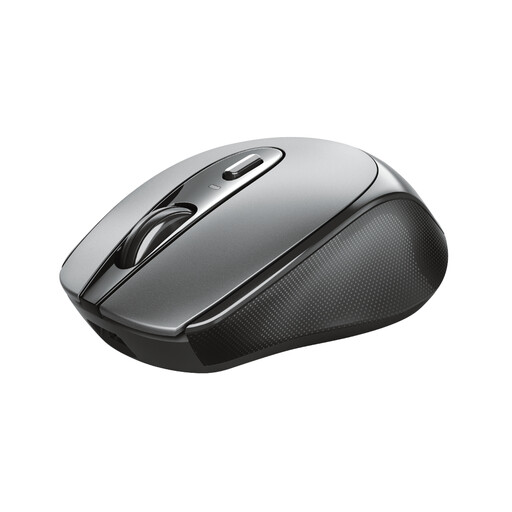 Image unavailable
Trust Zaya Office ambidextrous RF wireless optical mouse, 1600 DPI
Its symmetrical shape may suit a shared mouse used by both left- and right-handed colleagues; check that the computer has a suitable connection for the USB micro receiver.
View at Joybuy
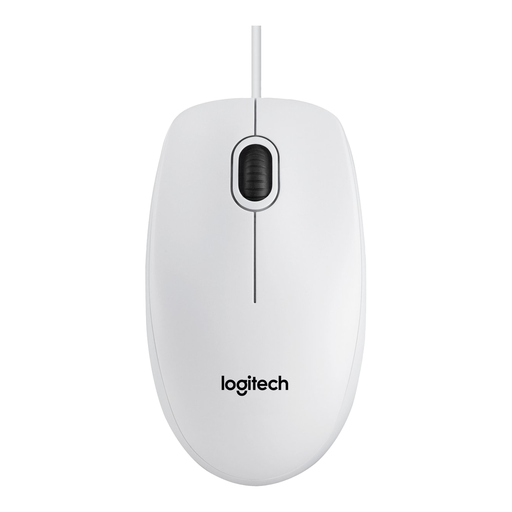 Image unavailable
Logitech Mouse B100, white (910-003360)
A wired option for a desktop computer with a free USB port, suitable for alternating between left- and right-handed users; bear the cable on the desk in mind.
View at Joybuy
 Image unavailable
Philips 3000 Series SPK7378B/00, 2.4GHz USB receiver, quiet clicks, 1600 DPI, right-handed
Its quiet-click feature and USB receiver may suit a calm workspace where wireless use is preferred; the right-handed design is less suitable when colleagues with different handedness share the mouse.
View at Joybuy
 Image unavailable
Logitech Lift Vertical Ergonomic Mouse, Graphite
This version is designed for an individual user with a small to medium-sized right hand who wants a vertical grip; its handedness makes it less of an obvious choice for a changing group of users.
View at Joybuy
Frequently asked questions
Can I simply pair a Bluetooth mouse with a shared work computer?
No. First check that the computer supports Bluetooth and that the workplace policy allows pairing. A wired USB mouse does not need Bluetooth pairing; Bluetooth and a USB receiver are different connection options.
How can you keep a mouse usable and clean when staff change shifts?
Keep any separate receiver in a designated place and check the power supply for the model you have chosen. Follow the cleaning instructions for that specific mouse: Logitech describes cleaning tests for the education products mentioned, but this does not show that every mouse can withstand the same cleaning products.
Does a stated manufacturer's warranty mean that Dutch consumers have no rights afterwards?
No. ACM ConsuWijzer explains that statutory guarantees apply alongside a manufacturer's or seller's warranty: if a product breaks sooner than could reasonably be expected under normal use, the seller must offer an appropriate remedy free of charge. If you are buying on behalf of an organisation, the buyer should check which rights apply to that purchase; this consumer guidance does not establish business buyers' rights.
Does choosing a particular mouse mean our membership administration complies with the GDPR?
No, a mouse model does not replace the organisation's security measures. The Dutch Data Protection Authority says that appropriate security should be determined based on the risks; access rights and individual user accounts may play a part. Lock the computer when you step away.
Does Dutch law require you to use a vertical mouse?
Arboportaal's official guidance on working with display screens does not require a vertical mouse. Employers have obligations relating to safe screen work and task variation; whether those rules apply to a particular workplace depends on the working situation.


