What should you look for when buying?
First decide whether you switch between computers, regularly work across wide spreadsheets or mainly need a mouse that fits comfortably. Then compare the controls and connection options that suit your shared desk.
| What to consider |
What should you check? |
Who might this matter to? |
| Switching between computers |
Check how many channels are available, how you switch between them, and whether Bluetooth or an available USB port will work with your computers. |
When we each use our own laptop at the same desk, I want to switch between them without having to pair the mouse again each time. Around 36% of consumers say switching between devices is their top priority. |
| Wide expense spreadsheets |
Compare a tilt or side-scroll wheel, and check how it works in the spreadsheet software you use. |
When I’m looking at a spreadsheet with lots of categories and months, I want to move sideways quickly. Around 29% of consumers prioritise navigating wide spreadsheets. |
| Comfort for different users |
Check the size and whether it’s designed for left- or right-handed use; ask the regular users to try the shape. |
When we share the mouse with different people, I want a shape that feels comfortable for all of us. Around 21% of consumers say comfort and fit are their top priority. |
| Quiet, simple operation |
Check whether the buttons are described as quiet, and what power source and accessories come with the mouse. |
For occasional expense entry on one computer, I want quiet, simple operation without features I won’t use. Around 14% of consumers prioritise quiet simplicity. |
Joybuy mice for a shared desk
These Joybuy picks are suited to switching between devices, working with wide spreadsheets or both. Check the controls and shape of each model to see whether they suit the way you use it.
 No image available
Logitech MX Master 4 for Mac
The listed features make this model a good match for switching between devices and scrolling across wide spreadsheets.
The product information lists Bluetooth, a Logi Bolt receiver and a rechargeable battery. It describes support for up to three paired devices, a switch button and a thumb wheel for horizontal scrolling.
The product name mentions macOS, iPadOS and Windows; check the connection and compatibility with your own devices.
Joybuy
 No image available
HOFOTEK M311 2.4G+BT Silent Office Mouse
This model is a good fit if quiet operation and switching between multiple devices are important to you.
The product name lists 2.4G+BT and one AA battery. The product description mentions quiet clicks, adjustable DPI levels and switching between up to three devices.
Joybuy
 No image available
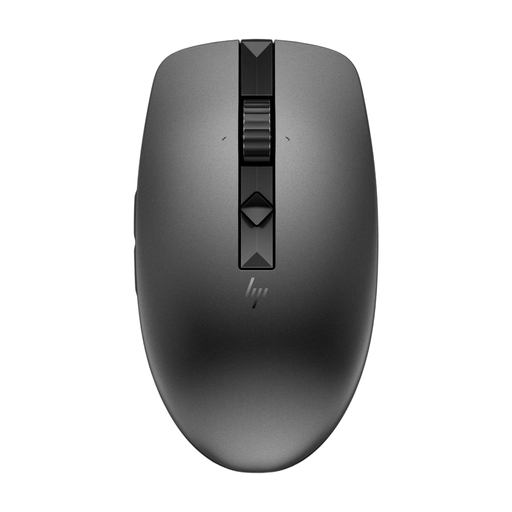
HP 635 Multi-Device Wireless Mouse
The listed device-switching features and symmetrical shape may be useful when several people share the mouse.
The product description mentions quiet buttons, programmable buttons and adjustable scrolling speed. It also lists switching between up to three devices and a replaceable battery.
Joybuy
 No image available
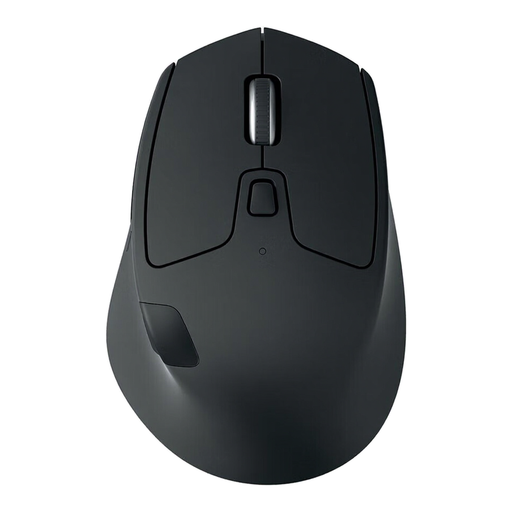
Logitech M720 Triathlon Wireless Right-Hand Mouse Black - 910-004791
The listed device-switching features and horizontal scrolling make this model worth considering for shared computers and wide spreadsheets.
The product information lists Bluetooth, a USB receiver and Easy-Switch for three computers. Logitech describes the M720 as offering horizontal scrolling with its tilt wheel.
This version is designed for right-handed use; check that the shape suits everyone who regularly uses it.
Joybuy
 No image available
Trust Ozaa+ Optical Office Mouse
The listed side-scrolling and device-switching features are designed for wide documents and shared desks.
The product name lists 3200 DPI. The product information mentions a rechargeable battery, Bluetooth and a USB receiver, as well as switching between up to three devices and a side-scroll wheel.
This version is described as large and designed for right-handed use; check the fit before choosing it for shared use.
Joybuy
Frequently asked questions
Do I need a special scroll wheel to move between expense categories in Excel?
No, it isn’t essential. Microsoft also describes navigating with keys and scroll bars. A tilt or side-scroll wheel can be handy with wide spreadsheets; check that it works as you want in your spreadsheet software.
How do I connect a mouse when two laptops share a desk?
First, check that the laptops support Bluetooth and that a suitable USB port is free for a receiver. Then follow the instructions for the available connection channels. Logitech describes the M720 as supporting both Bluetooth and a Unifying receiver.
Can a vertical mouse prevent wrist pain?
Don’t assume so: the shape alone can’t guarantee a particular result. CHERRY describes the MW 4500 as putting your hand in a different position, but comfort and fit are personal. For prolonged screen work, Arboportaal also recommends varying your working posture and taking breaks. A mouse is no substitute for appropriate advice if you have persistent symptoms.
Should I buy extra cover in case my mouse breaks?
You don’t need it to benefit from your statutory rights. According to ACM ConsuWijzer, the seller is responsible for providing an appropriate solution at no extra cost if a product breaks sooner than you could reasonably expect with normal use. Check separately what any additional cover includes.
Can I use a Bluetooth mouse at home in the Netherlands without a licence, and what should I look for when buying one?
According to the Dutch Authority for Digital Infrastructure (Rijksinspectie Digitale Infrastructuur), Bluetooth use in the Netherlands is licence-exempt and does not require notification or registration. Wireless equipment placed on the market in the European Union must meet product requirements, and the CE marking must appear on the equipment. Check the marking and product information for the item you’re buying.


