
Presenting slides at a quiet shared desk
You edit presentations close to colleagues and are mainly looking for a mouse whose manufacturer specifies quiet buttons. Trust and HP list this feature on selected models.


Start with a mouse that connects to your computer and feels comfortable in your hand. At a shared desk, quiet buttons and an easy-to-use scroll wheel are practical considerations. If you switch between computers, check the supported connections and how many devices it can connect to. A vertical mouse may offer a different hand position if its size and design suit you, but it won’t prevent discomfort on its own: your workstation set-up and varying your activities matter too.
You edit presentations close to colleagues and are mainly looking for a mouse whose manufacturer specifies quiet buttons. Trust and HP list this feature on selected models.
For example, you use both your own computer and a shared one. Check the connection, how to switch between devices and whether you’re allowed to use any companion software on your work computer.
You spend a long time working on slides and other screen-based tasks, and want to consider the shape of the mouse alongside your workstation set-up. Arboportaal highlights repetitive hand movements and static strain associated with screen work.
Start with compatibility and fit. Then compare what matters most for your working situation: quieter clicks, switching between computers, navigating slides or a different hand position.
| What to consider | What should you check? | Who might prioritise this? |
|---|---|---|
| Click noise | Check whether quiet buttons are listed for the exact version; scrolling and moving the mouse may still make noise. | If I edit slides close to colleagues, I mainly want less disruptive clicking. Around 33% of consumers put quieter clicks at the top of their list. |
| Connection and switching | Check Bluetooth support, whether pairing is allowed, and whether a USB receiver is required or included. | If I want to use the same mouse with different computers, I look at the connection and how I can switch between them. Around 27% of consumers give switching devices top priority. |
| Navigation and portability | Compare the scroll controls and compactness with the grip that feels comfortable to you; also check whether any customisation software is available on your work computer. | If I work through slides and take my mouse between workstations, I want controls that suit the way I navigate. Around 20% of consumers prioritise navigation and portability. |
| Hand shape and strain | Check the hand size and handedness a vertical mouse is designed for. Also assess your workstation set-up and vary your screen-based tasks. | If I work at a screen for long periods, I want a shape that suits my hand and I also pay attention to my workstation. Around 20% of consumers start with hand position. |
Trust and HP list quiet buttons or clicks on selected models. That doesn’t mean scrolling or moving the mouse will be silent.
Compare the details for the exact version and think about the scroll controls and fit you need too.
Logitech states that the standard MX Anywhere 3S is supplied without a Logi Bolt receiver. Other versions may offer different connection options.
Before buying, check what’s in the box, whether you can use Bluetooth and which USB ports are available on the computer you work on.
The Logitech Lift is designed for small to medium-sized hands; fit and handedness are still key. Arboportaal also highlights workstation set-up and varying your activities when working at a screen.
Consider whether the shape suits your hand, and pay attention to your workstation and breaks too.
According to the Dutch government, the Netherlands does not have a fixed two-year legal warranty period. The seller is your point of contact if a product is faulty.
Distinguish between your statutory rights and any manufacturer’s warranty, and contact the seller if your product is faulty.
The Ozaa Compact is a compact option for anyone looking for quiet buttons and a choice of Bluetooth or USB receiver connectivity.
The HP 425 is designed for Bluetooth use with multiple devices and customisable controls.
The MX Anywhere 3S is a compact option with a two-mode scroll wheel; the Lift is a vertical mouse designed for a suitable hand size and handedness.
These Joybuy mouse options cater to different needs, including quieter clicks, connecting to computers, navigating slides and choosing between different mouse shapes.
 No image available
An option if you want to work wirelessly and can use a USB receiver.
The product description specifies a 2.4GHz connection via USB dongle and an AA battery.
The description mentions noise reduction on the left and right buttons; this doesn’t mean all operating sounds are eliminated.
 No image available
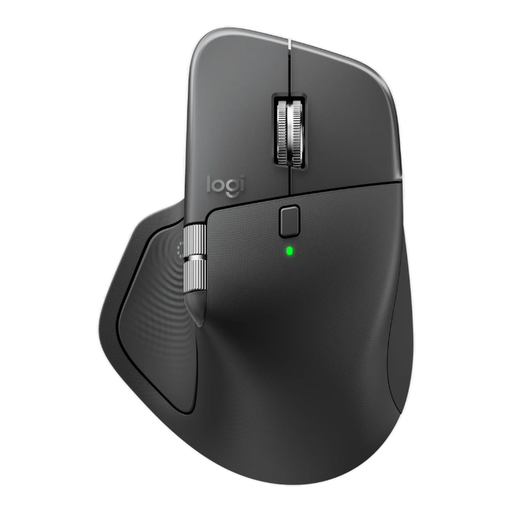
An option if you want to work with a wide range of content and connect to multiple devices.
The product name specifies Logi Bolt, Bluetooth and USB-C charging.
The product description mentions MagSpeed scrolling, horizontal scrolling and pairing with up to three devices. Logitech describes its Quiet Click technology; decide for yourself whether the sound is suitable for your shared workspace.
 No image available
A compact option if you want to take your mouse with you and switch between devices.
The product description specifies quiet buttons, a USB receiver and Bluetooth, with connectivity for up to three devices.
 No image available
An option if you’re looking for quiet buttons, connectivity to multiple devices and side-to-side scrolling.
The product name specifies RF wireless, Bluetooth and 3200 DPI; according to the product information, this version is for right-handed use.
The description mentions quiet buttons, connectivity to up to three devices and an additional side-scrolling function.
 No image available
A vertical option if this version suits your handedness and hand size.
The product description lists quiet clicks, a SmartWheel, four customisable buttons and connectivity via Bluetooth or USB receiver.
According to the product information, this version is for right-handed use and designed for small to medium-sized hands. Its shape doesn’t guarantee that it will prevent discomfort.
According to HP, you need HP Accessory Center to programme the buttons on the HP 425. If you’re using a shared or managed computer, check whether you’re allowed to install the app. Otherwise, choose controls that work for you without customised shortcuts.
Check whether the computer supports Bluetooth and allows pairing. HP lists Bluetooth for the HP 425; according to Trust, the Trust Ozaa Compact can connect via Bluetooth or a USB receiver. Follow the pairing instructions for your chosen model.
Check the power supply for the exact version. HP specifies one AA battery for the 425; Trust lists a rechargeable battery and included charging cable for the Ozaa Compact. This will help you decide whether replacing or recharging the battery better suits the way you use it.
According to the Dutch government, when you buy online from a business, you often have a 14-day cooling-off period; terms and exceptions depend on the purchase. You’re also entitled to a product that works as it should. The Dutch government states that there is no fixed two-year legal warranty period in the Netherlands. Contact the seller if your product is faulty.
Arboportaal’s guidance doesn’t specify a required mouse model. Screen-work rules cover areas including safe working and workstation set-up; screen work should be regularly alternated with other work or a break. This means that no particular mouse shape is compulsory for every individual buyer.