
Student designing a portfolio homepage
You’re building and checking elements of your homepage and want a mouse that suits your workspace. Focus on the controls, scrolling features and fit, rather than looking only at a high DPI figure.


Start with a mouse that suits your hand and laptop, then decide whether adjustable controls and extra scrolling, quiet clicks or a compact design matter most. A larger mouse with extra scroll controls can be useful if you do a lot of navigating, while a vertical mouse is a shape you’ll need to assess against your hand size. During long screen sessions, vary your posture and take micro-breaks too, as recommended by Arboportaal.
You’re building and checking elements of your homepage and want a mouse that suits your workspace. Focus on the controls, scrolling features and fit, rather than looking only at a high DPI figure.
You’re considering hand size, grip and how your desk is set up. A vertical mouse is one shape you could try, but it’s no substitute for changing your posture while working at a screen; Arboportaal also recommends micro-breaks.
You want to consider click noise and the space available on your desk. Compare the dimensions, how it connects to your laptop and whether the model is specifically described as having quiet buttons.
Start with a comfortable fit and compatibility with your laptop, then compare the controls and click noise with what you need in your student room.
| What to consider | What should you check? | Who should pay particular attention? |
|---|---|---|
| Controls and navigation | Check whether you can adjust the sensitivity and whether the scroll wheel and button layout suit your design work. | I want to set up the cursor and navigation to suit me while building my homepage. Around 33% of consumers prioritise control when placing and navigating. |
| Fit for your hand | Compare the grip and hand size; if you’re considering a vertical mouse, check that you’re choosing the right left- or right-handed version. | During long design sessions, I want a grip that suits my hand and the chance to vary my posture. Around 27% of consumers prioritise a comfortable fit. |
| Click noise | Look for an explicit mention of quiet buttons, and check that the shape suits your hand too. | If I share a room, I want to keep audible clicks to a minimum, even if that means giving up some extra controls. Around 20% of consumers prioritise quiet clicks. |
| Connectivity and space | Check how many USB ports are available and whether your laptop supports Bluetooth. Also check which receiver or cable is included. | With limited space, I want to know whether the mouse connects to my laptop and fits neatly on my desk. Around 20% of consumers prioritise connectivity and space. |
The maximum figure alone doesn’t tell you whether the cursor controls, grip and buttons suit your hand and tasks.
Check whether you can adjust the sensitivity and whether the cursor and navigation feel comfortable to use. Treat DPI as a specification, not a quality score.
According to HP, the HP 280 Silent uses a 2.4GHz receiver and requires a free USB-A port. Logitech says the compatible Logi Bolt receiver for the MX Anywhere 3S is not included.
Before choosing a specific version, check which connections your laptop supports and what’s included in the box.
If your chosen connection requires a separate receiver or adapter, you’ll need to factor that in alongside the mouse.
The different grip may take some getting used to, and won’t automatically suit every hand size or workspace. A different mouse shape is no guarantee that discomfort will go away.
Consider the grip, hand size and workspace setup together. If you have persistent discomfort, you can seek appropriate professional advice.
Additional cover is separate from your legal rights. According to the Dutch government, the Netherlands has no fixed statutory warranty period; if a product is faulty, the retailer is your point of contact.
Check exactly what additional cover includes, and contact the retailer if you have a problem with a faulty product.
The models mentioned offer a range of shapes and controls, including extra scrolling features, a vertical grip and compact designs.
The Ozaa Compact is a small mouse with several connectivity options, while the Ozaa+ has a side-mounted scroll wheel.
The HP 280 Silent is a straightforward option for a laptop with a free USB-A port.
According to Rapoo, the M500 Silent has quiet buttons and offers a choice of Bluetooth or a 2.4GHz receiver.
This selection includes mice with extra scrolling controls, adjustable settings, quiet clicks or a vertical grip. Check each model’s fit and connectivity to make sure it suits your workspace.
 No image available
Worth comparing if you want extra scrolling controls and adjustable buttons for your design work.
The product description lists a MagSpeed scroll wheel, a thumb wheel for horizontal scrolling and eight programmable buttons. The title specifies the for Mac version.
 No image available
Worth comparing if quiet clicks and a choice of connectivity options matter to you.
The product description lists 2.4GHz and Bluetooth, five DPI settings from 800 to 4000, and a weight of 62 g. The product title specifies one AA battery.
 No image available
Worth comparing if you’re looking for a compact mouse with quiet controls.
The product description lists a compact, ambidextrous shape, adjustable DPI up to 4020, and RF or Bluetooth connectivity. An RF receiver is included.
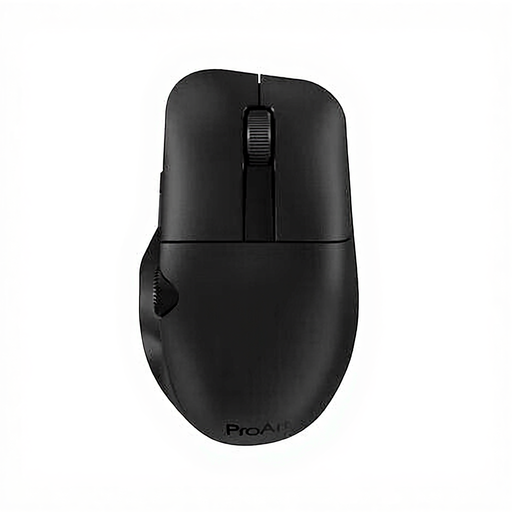 No image available
Worth comparing if you want to customise the controls with programmable buttons to suit your workflow.
The product description lists six programmable buttons and RF and Bluetooth connectivity. The product title specifies 4200 DPI and a right-handed design.
 No image available
Worth comparing if you want to try a vertical grip and the shape suits your hand.
The product description lists four customisable buttons, quiet clicks, and connectivity via Bluetooth or a USB receiver. According to the description, this Graphite version is designed for right-handed users with small to medium-sized hands.
No. A higher maximum DPI figure doesn’t prove that you’ll design more accurately. Check whether you can set the sensitivity to suit you, and whether the shape, buttons and scroll controls work for your needs.
It depends on the model. According to HP, the HP 280 Silent uses a 2.4GHz receiver and requires a free USB-A port; Trust also lists Bluetooth for the Ozaa Compact. Check which connections your laptop supports and what’s included with the mouse.
First, check that the mouse suits your hand and that your workspace is set up well. Arboportaal recommends varying your activities and taking micro-breaks when working at a screen; a different mouse shape is no guarantee that discomfort will go away.
For eligible distance purchases from a business, you’ll generally have a 14-day cooling-off period, according to the Dutch government. You’re also entitled to a product that is fit for purpose; according to the Dutch government, the Netherlands has no fixed statutory warranty period. If a product is faulty, the retailer is your point of contact.
No. Employers’ legal obligations don’t automatically apply to a student working privately at a screen at home. However, Arboportaal’s separate advice on varying your activities and posture may help when setting up your workspace.