Who is this choice relevant to?

Players who want to reassign shortcuts

If you use the same in-game actions frequently, look for conveniently placed mouse buttons and software that lets you assign functions to them. Paradox Interactive describes reassignable shortcuts for Victoria 3.

Players who enjoy long sessions

If you spend a lot of time navigating maps and menus, consider the fit, grip and scroll controls. The most comfortable shape depends on your hand and grip style.

Players in shared spaces

If you don’t want to disturb others or you use a microphone, pay particular attention to the click noise of the model you choose. A headset alone won’t muffle the clicks for other people in your home.

What should you look for when buying?

What to consider What to look for Who it matters to
Fit and controls Compare the shape, handedness and thumb reach, and check which scroll modes are available. If you spend a long time switching between maps and menus, you’ll want a grip and buttons that feel comfortable and are easy for your hand to reach. Around 31% of consumers prioritise fit and controls above all else.
Conveniently placed shortcuts Count the actions you really want to assign, then check the button layout, software and compatibility with your computer system. If you regularly use the same actions while playing, a suitable button layout can help keep them within easy reach. Around 31% of consumers rank shortcuts like these above other considerations.
Click noise Check claims for the exact model and what they’re based on; if possible, test it with your microphone setup. If people in your home can hear the clicks or your microphone picks them up, you’ll want to know how audible the mouse is in your setup. Around 23% of consumers prioritise click noise above all else.
Cable and power Check the connection type, the required port and what’s included with the version you’ve chosen. If you don’t want a cable on your desk or would rather not manage a battery, the connection type could be decisive. Around 15% of consumers prioritise wireless use or avoiding battery management.

Common buying mistakes

  • Automatically assuming more buttons are better

    An extensive side panel is most useful if you want to assign lots of separate actions and can reach the buttons comfortably.

    First decide which shortcuts you actually use, then compare the button layout with your hand and grip style.

  • Assuming a headset makes clicks inaudible to other people

    A headset sits over your ears; it doesn’t make the mouse quieter for other people in your home. Whether your microphone picks up the clicks also depends on your setup.

    Check any noise claim for the exact model and, if possible, test it with your own microphone setup.

  • Assuming a productivity mouse and a gaming mouse are equivalent in one respect

    Logitech’s claim about quieter clicks on the MX Master 3S tells you nothing about the button layout of the Logitech G502 X, and vice versa.

    Compare the features you need for your game on a model-by-model basis.

  • Confusing the manufacturer’s warranty with your full statutory rights

    ACM ConsuWijzer distinguishes between commercial and statutory guarantees. There isn’t a fixed statutory guarantee period that applies to every mouse.

    Keep your proof of purchase and contact the seller if the mouse develops a fault prematurely.

Relevant brands

Logitech

The G502 X is a wired gaming mouse, while the MX Master 3S is a separate productivity mouse.

  • Logitech lists a switchable scroll wheel and 13 assignable controls via G HUB for the G502 X.
  • Logitech’s claim of 90% less click noise for the MX Master 3S is compared with the MX Master 3 and measured at one metre. This isn’t a comparison with gaming mice or a promise of silent operation.

Razer

According to Razer, the wired Basilisk V3 has a customisable button layout and several scroll modes.

  • Razer lists 10+1 programmable buttons and a HyperScroll wheel for the Basilisk V3.
  • How comfortable the shape and buttons feel depends on your hand and the game.

SteelSeries

According to the manufacturer, the Rival 5 is designed for assigning multiple commands, though not necessarily dozens.

  • SteelSeries describes nine programmable buttons, including five controls in the side-panel layout.
  • That specification doesn’t prove the layout will work better for every hand or political simulation.

Corsair

The wired Scimitar RGB Elite is designed for players who want to assign lots of commands to thumb buttons.

  • Corsair specifies 17 programmable buttons, 12 of which are on a movable side panel.
  • A layout this extensive could feel unnecessarily busy if you only use a few shortcuts.

Joybuy products

This selection includes gaming mice for players who navigate maps and menus in political simulations and may want to assign in-game actions to mouse buttons.

AJAZZ AJ200 AI MC wireless gaming mouse

AJAZZ AJ200 AI MC Wireless Gaming Mouse

An option to consider if you want to play wirelessly and assign in-game actions to mouse buttons.

Tri-mode: BT/2.4G/USB-C. 24000 DPI. 63 g.

Joybuy

AULA SC620 wireless gaming mouse, white

AULA SC620 Wireless Gaming Mouse, White

An option if you’re looking for a wireless gaming mouse with programmable buttons for recurring in-game actions.

Bluetooth 5.0/2.4G/USB-C. Seven programmable buttons. 67 g. 400 mAh battery.

Joybuy
Logitech G G502 X right-handed gaming mouse

Logitech G G502 X, right-handed, USB Type-A

A wired option to consider if you want to assign several in-game actions to buttons and scroll through menus.

Logitech lists 13 assignable controls and a switchable scroll wheel. Wired via USB Type-A; check that your computer has the right port.

Joybuy

RAPOO VT9Pro 4K wireless gaming mouse, BlackPurple

RAPOO VT9Pro 4K Wireless Gaming Mouse, BlackPurple

An option to consider if you want to assign several in-game actions to programmable buttons.

10 programmable buttons. 26000 DPI. Onboard memory. The title lists battery life of up to 180 hours.

Joybuy
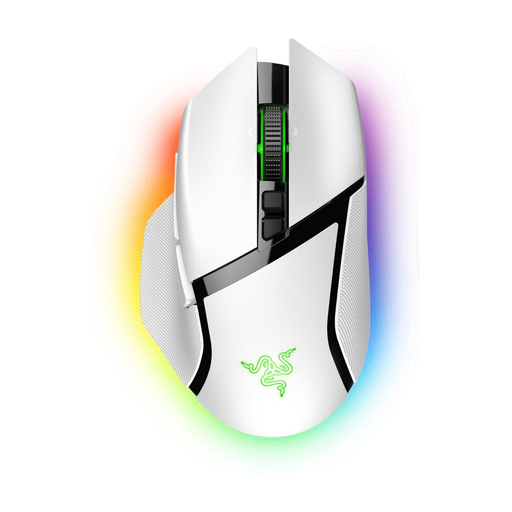
Razer Basilisk V3 Pro wireless gaming mouse, white

Razer Basilisk V3 Pro White

An option to consider if you’re looking for a wireless gaming mouse and want to compare features such as programmable buttons and different scroll modes.

Joybuy

Frequently asked questions

Do you need as many mouse buttons as possible for political simulations?

No, start with the in-game actions you actually use frequently. Paradox Interactive describes reassignable shortcuts for Victoria 3; a mouse button is only useful if you can assign the action you want in your game and configuration.

How do you set up extra mouse buttons?

Check which software is compatible with your exact mouse model and computer system, then test the assignments in the game. Logitech describes G HUB for the G502 X, while Corsair describes iCUE for key and macro assignments on the Scimitar RGB Elite.

Does a headset make mouse clicks quiet for other people?

No, a headset won’t muffle clicks for other people in your home. If your microphone picks them up, check its position and settings, and look for claims that apply to the exact mouse model.

Is a manufacturer’s warranty in the Netherlands the same as your full statutory guarantee?

No. ACM ConsuWijzer distinguishes between commercial and statutory guarantees: if a product doesn’t meet what you could reasonably expect under normal use, the seller is responsible. There isn’t a fixed statutory guarantee period that applies to every mouse.

Does every mouse sold in the Netherlands have to have a USB-C charging port?

No, not every mouse is charged via a cable. According to the European Commission, the EU common charger rules have also applied to mice since 28 December 2024, but the conditions for their application include a rechargeable battery and the ability to charge via a wired connection. Check each version individually; don’t assume this means a wired mouse without a rechargeable battery must have USB-C.
