If you play next to someone who is resting, start by choosing a mouse with clearly specified click and scroll noise for your needs. Then check that its shape and buttons suit your game. Logitech reports that the MX Master 3S is 90% quieter on left and right clicks than the MX Master 3, measured at 1 metre. This comparison applies to those main clicks; it is not a measurement of every mouse noise in a bedroom. A gaming mouse with more customisable controls may be a better fit if shortcuts matter more to you.
Who is this choice relevant to?
Night-time gamer with a roommate
You play while someone else is resting and mainly want to keep click and scroll noise down. Also check whether a quieter mouse offers enough control for your game. Logitech’s noise comparison for the MX Master 3S covers only the main clicks.
Gamer who uses shortcuts
You want to control recurring in-game actions with easy-to-reach mouse buttons. Check whether your game and the accompanying software support the commands you want; extra buttons alone say nothing about click noise.
Gamer who spends long sessions on maps and menus
You navigate for long periods, so consider fit and scroll control rather than automatically going for the highest sensor rating. The right shape depends, among other things, on your hand size and preference.
What should you look for when choosing?
Quiet productivity mouse
A good fit if: you play next to someone who is resting, and quieter clicks or scrolling matter more than extensive gaming controls.
Trade-off: check that the available buttons and connections are enough for your game. Logitech and Razer specify quiet features for particular models, not every mouse in their ranges.
Gaming mouse with programmable controls
A good fit if: you want to assign frequently used actions to easy-to-reach buttons; Razer lists nine programmable controls for the Basilisk V3 X HyperSpeed.
Trade-off: programmability does not confirm that your game supports every command. The cited product information makes no quiet-click claim for this model.
Lightweight, simpler gaming mouse
A good fit if: you do not need many extra buttons and want a lightweight wireless gaming mouse. SteelSeries lists a weight of 68 g and six buttons for the Aerox 3 Wireless (2022).
Trade-off: weight and gaming credentials say nothing about click noise or comfort for your hand; check the exact version and fit.
For this choice, the main things to consider are noise, useful buttons, fit and connectivity. The table can help you weigh these factors against what you need during your own sessions.
| What to consider |
What to look for when buying |
Who is this important to? |
| Click and scroll noise |
Check whether a noise claim applies to the main buttons, side buttons or scroll wheel. |
If I play while a roommate is resting, I want to know which actions are quieter and which are not. Around 36% of consumers put noise at the top of their buying concerns. |
| Easy-to-reach extra buttons |
Check which commands are supported by the game and the software you use. |
If I often perform the same menu or map actions, I only want to assign them to a button if my game allows it. Around 29% of consumers prioritise useful shortcuts. |
| Fit and scrolling |
Compare the shape with your hand and assess how the scroll wheel works for navigating maps and menus. |
For longer sessions, I want a mouse that feels comfortable in my hand and lets me navigate maps and menus. Around 21% of consumers make fit and scrolling their main buying criteria. |
| Connectivity and battery |
Check the connection, what is included in the box, and whether the mouse uses batteries or needs charging. |
If I use my mouse wirelessly, I want to know how it connects to my computer and how to manage its power. Around 14% of consumers start with connectivity and battery management. |
Things to watch out for when buying
-
Assuming a click-noise claim means the whole mouse is virtually silent
Logitech’s comparison for the MX Master 3S covers left and right clicks compared with the MX Master 3, measured at 1 metre. It does not automatically describe side buttons, scrolling or the noise the mouse makes in your bedroom.
Check which parts are covered by a noise claim, and pay particular attention to the scroll wheel if you use it often.
-
Assuming productivity and gaming mice are interchangeable
Razer describes the Pro Click Mini as having quiet switches, while the Basilisk V3 X HyperSpeed has nine programmable controls. These features belong to different models.
First decide what matters most for your bedroom and game, then check the features of the exact model.
-
Choosing by product name without checking the version
The product name alone does not confirm which version, connection or accessories you will receive.
For the mouse you are considering, check the exact model, connection options and what is included in the box.
Brands to compare
Logitech
The range includes quiet productivity mice, options for different hand sizes and dedicated gaming models.
- Logitech reports that the MX Master 3S is 90% quieter on left and right clicks than the MX Master 3, measured at 1 metre. Logitech also describes the MagSpeed scroll wheel on this model as quiet.
- The click comparison is Logitech’s claim about one model and the specified main clicks; it is not an independent measurement of all mouse noises or all Logitech mice.
Razer
Razer offers the compact Pro Click Mini productivity mouse and the Basilisk V3 X HyperSpeed gaming mouse with programmable controls.
- Razer specifies quiet, tactile switches for the Pro Click Mini and nine programmable controls for the Basilisk V3 X HyperSpeed.
- These features belong to different models. The quiet-switch claim for the Pro Click Mini does not mean the Basilisk clicks quietly.
SteelSeries
The Aerox range includes versions for anyone looking for a lightweight gaming mouse, as well as models with different numbers of buttons.
- SteelSeries lists a weight of 68 g and six buttons for the Aerox 3 Wireless (2022).
- These specifications do not indicate quiet clicks or a comfortable fit for every hand; check the version you have in mind.
Mouse options at Joybuy
This selection includes wireless gaming mice with different connection and control options, as well as mice that specify quiet clicks. Check each model to see which features suit your bedroom, game and computer.
 No image available
AJAZZ AJ159 PRO Wireless Gaming Mouse, white
An option if you are looking for a lightweight wireless gaming mouse with several connection options.
The title lists 56 g, 26K DPI and 2.4G, USB-C and Bluetooth support. The product description mentions a PAW3395 sensor, a rechargeable battery and a magnetic charging dock.
View at Joybuy
 No image available
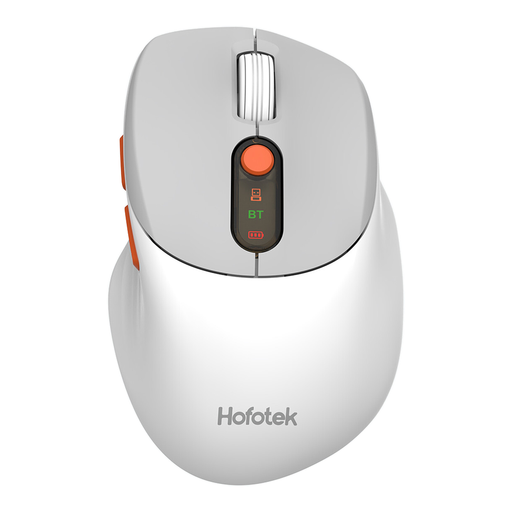
HOFOTEK M311 2.4G+BT Silent Office Mouse, white and grey
An option if quieter clicks and wireless use with multiple devices are important to you.
The product description mentions quiet clicks, 2.4G and Bluetooth connectivity, pairing with up to three devices, and a weight of 62 g. The product name specifies one AA battery.
View at Joybuy
 No image available
AJAZZ AJ200 AI MC Wireless Gaming Mouse
An option if you want to assign recurring in-game actions and have a choice of connection methods.
The title lists 63 g, Bluetooth, 2.4G and USB-C. The product description mentions customisable buttons and macros; the title specifies a PAW3311 sensor and 24,000 DPI.
View at Joybuy
 No image available
AULA SC620 Wireless Gaming Mouse, white
An option if you want programmable buttons and the listed connections are compatible with your computer.
The title lists seven programmable buttons, a fire button, 67 g, 12,000 DPI and Bluetooth, 2.4G and USB-C connectivity. It also specifies a PAW3311 sensor, 8KHz and a 400 mAh battery.
View at Joybuy
 No image available
Philips 3000 Series Wireless Mouse SPK7378B/00, black
An option if quiet clicks and a straightforward wireless connection are important to you.
The product name specifies quiet clicks, a 1600 DPI optical sensor and a 2.4GHz connection with a USB receiver.
View at Joybuy
Frequently asked questions
Do I need a mouse with lots of buttons for a political simulation?
No. Choose extra buttons only if you can assign useful commands to them in your game and reach them comfortably. Razer lists nine programmable controls for the Basilisk V3 X HyperSpeed, but that does not mean every game offers nine useful commands.
How do I connect a quiet wireless mouse, and what should I consider about the battery?
First check which connections the exact version supports. Razer lists Bluetooth and an included 2.4GHz dongle for the Pro Click Mini. If your mouse uses a replaceable battery, remember that it will need replacing and dispose of flat batteries separately; Milieu Centraal advises against putting batteries in general waste.
What are my rights if a mouse arrives faulty or does not work properly?
According to the Dutch government, you are entitled to a product that works properly, and the seller must provide a solution if the product is faulty. For distance purchases, a 14-day cooling-off period applies in many cases; conditions and exceptions may apply.
Are there rules for using a wireless mouse in the Netherlands?
The European Commission’s Radio Equipment Directive sets out a framework for radio equipment placed on the market. It is not a separate licence for users, nor does it in itself prove that a particular mouse on sale meets all the applicable requirements.


