When classifying plant observations, start by choosing a mouse that lets you comfortably point to small details and scroll through long lists. At a shared desk, you’ll also need to consider hand preference, connectivity and cleaning. A vertical mouse or trackball is a personal choice, not an obvious fit for everyone. Arboportaal describes the strain caused by repetitive mouse use; the product features mentioned here are manufacturer specifications, not independent performance tests.
Who should consider this choice?
Image observation classifier
You repeatedly point to details in photos or work through long lists of observations. Try pointing and scrolling in the software you use. Arboportaal specifically identifies precise positioning and frequent mouse movement as factors that can cause strain.
Shared-desk user
You’re taking over a colleague’s workstation and want a mouse that’s easy to connect and position, and can be cleaned according to its instructions. Check each model’s hand preference, connectivity and cleaning instructions.
User considering a different hand position
You’re weighing up a vertical mouse or trackball for extended screen use. Fit and workstation setup are personal; neither style has been proven suitable for every user. Arboportaal also highlights the role of workstation setup.
What should you look for?
For classifying plant observations at a shared desk, your choice comes down to precise pointing and scrolling, sharing the mouse between users, and the hand position you prefer. The options also differ in connectivity, controls and how easily different users can take over.
Wired, ambidextrous mouse
Choose this option if: several people use one computer and there’s a spare USB-A port. HP describes the 125 as ambidextrous and suitable for daily cleaning with disinfectant wipes.
Bear in mind: the cable takes up space and gives you less freedom when positioning the mouse.
Silent wireless mouse with device switching
Choose this option if: quiet operation matters to you or you switch between computers. Logitech lists silent clicks and device switching for the Pebble Mouse 2 M350s; Trust lists silent buttons and two scroll wheels for the Ozaa+.
Bear in mind: check how pairing and power work for each version. A compact model won’t automatically suit every hand; the Dutch product listing describes the Ozaa+ as right-handed.
Vertical mouse
Choose this option if: you want to try the shape for yourself and will mainly be the only user. Logitech describes the Lift as designed for small to medium-sized hands and sells separate left- and right-handed versions.
Bear in mind: a version designed for one hand is less convenient to share between left- and right-handed users. Its shape doesn’t guarantee that discomfort will go away.
Stationary trackball
Choose this option if: you have little room to move a mouse and want to consider a device that can be used with either hand. Kensington describes the Orbit as stationary and ambidextrous.
Bear in mind: you control the cursor with the ball instead of moving the whole mouse. Try it to see whether this way of working suits pointing to details.
| What to consider |
What to look for when buying |
Who is this important for? |
| Pointing and scrolling |
Try making small selections and working through long lists in the software you use; pay attention to cursor speed and scrolling controls. |
If I need to point to lots of small details and work through long lists of observations, I want to try the controls in the software I use. Around 33% of consumers prioritise pointing and scrolling. |
| Sharing, connecting and cleaning |
Check who will use the mouse, which ports or Bluetooth are available, and which cleaning method is approved for that exact model. |
If different people will take over the mouse, I want its connectivity, hand preference and cleaning to be practical for everyone. Around 27% of consumers prioritise ease of sharing. |
| Hand position |
Check the hand size and whether the version is for left- or right-handed use; position the mouse close by and vary your tasks. |
If I want to try a different grip during extended screen use, I’ll consider fit and workstation setup. Around 20% of consumers prioritise hand position. |
| Quiet operation and device switching |
Check how many connections the version supports, which receiver it needs and how users switch between devices. |
If I want to work more quietly at a shared desk or switch between computers, I want it to be easy to take over the controls. Around 20% of consumers make quiet operation or device switching their top priority. |
Pitfalls to avoid
-
Choosing a mouse designed for one hand for a shared desk
The Logitech Lift is available in separate left- and right-handed versions. So a version that suits one user won’t necessarily suit everyone sharing the workstation.
Before buying, check which hand preferences are represented at the desk. If preferences vary, consider an ambidextrous model.
If users have different hand preferences, you may need an additional mouse that suits them.
-
Mistaking an antimicrobial coating for a replacement for cleaning
HP says the HP 125 has a coating and is designed to withstand daily cleaning with disinfectant wipes. These are two different features.
Follow the cleaning instructions for the exact model and use only an approved method.
-
Relying on a high DPI figure alone
A sensor specification doesn’t prove that you’ll classify more accurately. When you need to point precisely and often, cursor speed, workstation setup and varying your tasks matter too.
Try pointing and scrolling in your classification software, then adjust the cursor speed to suit.
Relevant brands for this use
HP
The HP 125 is a simple wired option for one shared computer.
- According to HP, version 265A9UT is ambidextrous and connects via USB-A. HP says this version is designed for daily cleaning with disinfectant wipes.
- Check your computer’s connection. The antimicrobial coating doesn’t make cleaning unnecessary.
Logitech
The Pebble Mouse 2 M350s is designed for quiet, compact use and device switching; the Lift is a separate vertical option.
- Logitech lists silent clicks and device switching for the Pebble Mouse 2 M350s. According to Logitech, the Lift is designed for small to medium-sized hands.
- The Lift is available in separate left- and right-handed versions. Check you have the right version; the manufacturer’s comfort claims aren’t a guarantee against discomfort.
Trust
The Ozaa+ is a wireless office option for anyone who switches between devices and wants to scroll horizontally.
- Trust lists silent buttons and two scroll wheels for the Ozaa+.
- The Dutch product listing describes this model as right-handed. Check that its size and controls suit the people sharing the mouse.
Kensington
The Orbit Optical Trackball is a stationary, ambidextrous option when desk space for movement is limited.
- For the Orbit Optical Trackball 64327EU, Kensington lists a 180 cm USB cable, left- and right-handed operation, and adjustable cursor speed.
- A trackball changes how you control the cursor. These features come from the product description, not a user test for classification work.
Mouse options at Joybuy
This selection includes wired and wireless mice for pointing and scrolling at a shared desk, including quiet wireless versions and models that let you switch between devices.
 No image available
Logitech MX Master 4 for Mac, Space Black
An option for anyone who wants to switch between work devices while browsing and navigate horizontally too.
Bluetooth and Logi Bolt receiver; connects to up to three devices; scroll wheel with pixel-precise scrolling mode and an additional horizontal scroll wheel; USB-C charging.
The product title lists macOS, iPadOS and Windows.
View at Joybuy
 No image available
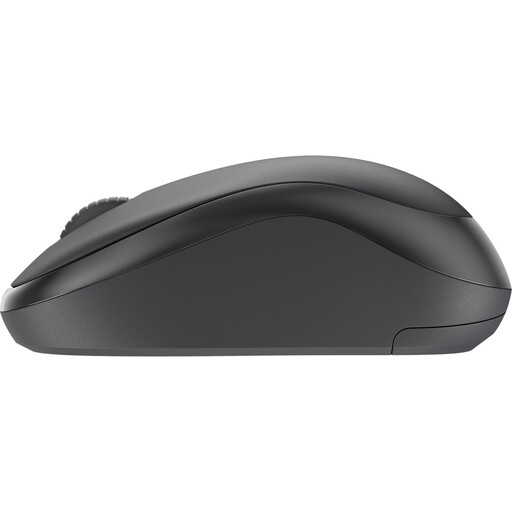
Logitech Mouse M240 Silent Wireless Black
A wireless mouse to consider if quieter working at a shared desk matters to you.
The product name specifies wireless and silent operation.
View at Joybuy
 No image available
HP 285 Silent Wireless Mouse
A wireless option for anyone who wants to work more quietly at a shared desk.
The product name specifies silent, wireless operation.
View at Joybuy
 No image available
HP 125 Wired Mouse, USB, 1200 DPI
A wired option to consider when sharing the mouse with one computer that has a spare USB Type-A port.
Optical operation, scroll wheel and 1200 DPI. The fixed USB cable needs a spare USB Type-A port and limits where you can position the mouse.
View at Joybuy
 No image available
HOFOTEK M311 2.4G+BT Silent Office Mouse
An option for anyone looking for quiet operation and wireless connections between work devices.
The product name specifies 2.4G+BT, adjustable DPI, a black and orange version, and an AA battery (1xAA).
View at Joybuy
Frequently asked questions
Will a vertical mouse automatically help with arm or wrist discomfort?
No, that isn’t something you can conclude from the product specifications. Assess the fit for yourself; Arboportaal also recommends keeping the mouse close and varying your tasks.
What should you check when connecting to a shared computer?
Check which USB port or Bluetooth connection is available and how to connect the exact version. According to HP, the HP 125 uses USB-A; wireless models may have a different pairing or receiver setup.
How do you keep a shared mouse clean?
Follow the cleaning instructions for the exact model. HP specifically says the HP 125 is designed for daily cleaning with disinfectant wipes; don’t assume the same applies to other mice or cleaning products.
Which returns and warranty rules apply when buying online in the Netherlands?
For many distance purchases by consumers, there is a 14-day cooling-off period, with some exceptions, according to the Dutch Government. The Dutch Government says the Netherlands has no fixed statutory warranty period: you’re entitled to a product that works properly, and the manufacturer’s warranty is separate. Check the applicable terms and any additional costs.
Which product safety rules apply to a wireless mouse?
The Dutch Ondernemersplein (Business Portal) refers to the Radio Equipment Directive for electrical equipment with Bluetooth or a radio frequency module. Check the information for the exact version; a listing on a product page doesn’t in itself verify that the version meets the applicable requirements.


