For a photo gallery beside a bright window, choose a mouse that suits your hand, the surface you use it on and the way you select and browse photos. Adjustable cursor speed and comfortable scrolling matter more than a high maximum DPI alone. A mouse that works on glass won’t solve screen reflections: Arboportaal recommends, among other things, positioning your line of sight parallel to the window.
Who this choice matters to
Building a photo gallery at a fixed workstation
You select, organise and browse lots of photos, and want control over the cursor and scrolling. Keep screen reflections separate from tracking on your desk: Arboportaal offers advice on setting up your workstation by a window, while tracking is about the surface beneath your mouse.
Using a mouse for long periods
You spend a long time working on your gallery and want a shape that suits your hand and posture. Focus on how it actually fits, not just whether it has an ergonomic label.
Working in a small or changing workspace
You have little room beside your keyboard or regularly move your laptop. A trackball, compact mouse and suitable connection may then be better choices than a larger desktop mouse.
What should you look for when choosing?
| What to consider |
What to look for |
Who is this most important for? |
| Cursor control |
Check whether you can adjust the cursor speed and whether the cursor responds smoothly on your mouse surface. |
When I’m selecting photos precisely and navigating a lot, I want to be able to fine-tune cursor movement. Around 33% of consumers give cursor control the highest priority. |
| Hand comfort |
Consider hand size, grip and whether you’re left- or right-handed; a shape won’t automatically suit everyone. |
For longer working sessions, I look for a shape that suits my hand and grip. Around 27% of consumers put fit first. |
| Limited mouse space |
Measure the space beside your keyboard and check whether a stationary trackball suits the way you work. |
At a crowded or small desk, I don’t want to keep moving the whole mouse around. Around 20% of consumers consider available movement space the most important factor. |
| Portability and connectivity |
Check Bluetooth support, compatibility with your devices and whether a receiver is included. |
When I work in different places, I want to be able to take my mouse with me and connect it to my devices. Around 20% of consumers prioritise portability and switching between devices. |
Buying pitfalls
-
Choosing a mouse for glass to tackle screen reflections
Glass tracking is about the surface the mouse moves over. Screen reflections need a different solution and won’t be fixed by the mouse sensor.
First work out whether your problem is with the cursor or with screen visibility. For reflections, you can adjust your screen setup or window coverings; Arboportaal recommends positioning your line of sight parallel to the window.
-
Assuming a USB receiver is included as standard
Logitech states that the compatible Logi Bolt receiver is not included with the consumer version of the MX Anywhere 3S mentioned here.
Check the exact model, what’s in the box and your computer’s connection options. If you don’t have a suitable Bluetooth connection, you may need a separate receiver.
-
Assuming an ergonomic shape will suit everyone
CHERRY describes the MW 8C ERGO as a model for right-handed users with medium to large hands. A trackball also requires a different way of working from a standard mouse.
Choose based on your hand size, grip and available space, not just the product description.
Brands to consider
Logitech
The MX Master 3S reviewed here is designed for extensive control at a fixed workstation; the MX Anywhere 3S is more compact for changing workspaces.
- Logitech says both models offer adjustable tracking on a range of surfaces. The MX Master 3S glass-tracking claim applies to glass at least 4 mm thick.
- The Logi Bolt receiver is not included with the consumer version of the MX Anywhere 3S reviewed here. The glass-tracking claim says nothing about screen reflections.
CHERRY
The MW 8C ERGO is a reviewed option for right-handed users with medium to large hands.
- CHERRY says it tracks on glass tables, offers four sensitivity settings and can be charged via USB-C while you work.
- The stated hand size and right-handed shape limit who this particular model may suit; its performance has not been independently tested here.
Kensington
The Expert Mouse Wireless Trackball offers a different way to work when there’s little room to move a standard mouse around.
- Kensington lists Bluetooth or a USB receiver, a scroll ring and customisable buttons.
- Kensington says KensingtonWorks has limitations on ChromeOS and ARM-based Windows computers. Whether you’re happy to get used to trackball controls is a personal choice.
Razer
The Pro Click Mini is a compact option with several wireless connection methods and programmable controls.
- According to Razer’s product specifications, this model has Bluetooth, a 2.4 GHz receiver, seven programmable buttons and runs on one or two AA batteries.
- A high stated DPI does not, on its own, prove better control for photo work. Suitability for use on glass has not been established for this model.
Joybuy products for photo work
These Joybuy products are suited to browsing photos, adjustable cursor control, different workspaces and longer periods of use. Check that each model’s shape and connection suit your needs.
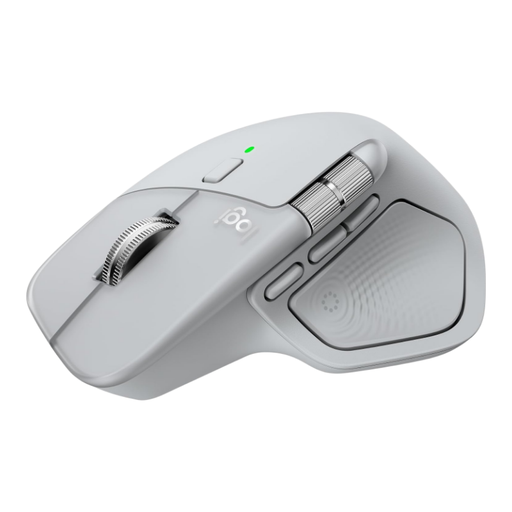 No image available
Logitech MX Master 4 Light Grey
Suited to anyone who spends a lot of time navigating images and content while working on photos. The described shape is for right-handed users.
View at Joybuy
 No image available
HOFOTEK M311 2.4G+BT Silent Office Mouse
Worth considering if you’re looking for a compact mouse to use in different workspaces.
The product name lists Bluetooth and 2.4 GHz, adjustable DPI levels, quiet clicks and one AA battery.
View at Joybuy
 No image available
HP 925 Ergonomic Vertical Mouse
Consider this model if a vertical shape and wrist rest suit your working posture. It is not recommended for use on highly reflective surfaces.
View at Joybuy
 No image available
Trust Bayo II, wired vertical mouse, black
Suited to anyone looking for a vertical mouse for a fixed workstation, with adjustable cursor control. This is a wired model for right-handed users.
View at Joybuy
 No image available
Logitech Lift Vertical Ergonomic Mouse Graphite
An option for longer working sessions and scrolling through content. According to the product description, this model is designed for small to medium-sized right hands.
View at Joybuy
Frequently asked questions
Will a mouse that works on glass solve the problem of a bright window?
No. Glass tracking describes the surface the mouse moves over, not how visible the screen is. Arboportaal recommends, among other things, positioning your line of sight parallel to the window and using suitable window coverings.
Do I need software or a USB receiver for a compact wireless mouse?
That depends on the model and the features you want to use. Logitech lists Bluetooth and compatibility with a Logi Bolt receiver for the MX Anywhere 3S; the receiver is not included with the consumer version mentioned here. Check the packaging and software support for your device.
Can I try out a mouse bought online in the Netherlands and return it?
For eligible online consumer purchases, there is generally a statutory 14-day cooling-off period after delivery. Check ACM ConsuWijzer for the conditions on trying out and returning a product. Your statutory guarantee is also not automatically limited to two years.
Are there any specific lighting rules for a workstation beside a window?
For workplaces, Arboportaal states that employers must provide good lighting. This is not a general legal product specification for a mouse bought by an individual.


