
Photo organiser with a small desk
You organise photos on a laptop that you also use for your studies. Consider the connection and size, and think about whether the grip will stay comfortable when you work for longer.


Start with a mouse that works with your laptop and fits on your desk. Then choose one based on what you need most when selecting and organising photos. A compact Bluetooth mouse keeps a USB port free, while a wired model doesn’t need a mouse battery. Extra controls or a vertical grip may suit the way you work, but check that the features and shape work with your computer and hand.
You organise photos on a laptop that you also use for your studies. Consider the connection and size, and think about whether the grip will stay comfortable when you work for longer.
You often navigate through folders or wide timelines. Extra scrolling could be useful if you can also use it in your photo-editing software.
You want to avoid disturbing others with clicking sounds. Logitech and Trust list quiet buttons on certain mouse models; check the specifications for the exact version.
First, check the connection and how much space you have on your desk. Then compare the controls, clicking noise and grip based on what matters most for your work.
| What to consider | What should you look for? | Who should pay extra attention? |
|---|---|---|
| Connection and space | Check whether your computer supports Bluetooth, which USB ports are available and whether the mouse will fit on your desk. | If I’m working on a laptop with few spare ports, I want a suitable connection and a mouse that doesn’t take up too much space. Around 27% of consumers prioritise connection and space. |
| Photo controls | Check whether your photo software uses horizontal scrolling or extra buttons, and whether the mouse has those features. | When I’m working with lots of files or wide timelines, I want to navigate quickly to the right place. Around 27% of consumers prioritise controls for organising and editing photos. |
| Clicking noise | Check whether quiet buttons are listed for the exact version; the scroll wheel may make a different sound. | In a shared room, I want to click without unnecessarily disturbing my housemates. Around 20% of consumers prioritise keeping things quiet for others. |
| Fit and grip | Compare the mouse shape with your hand. For an ergonomic model, also check the hand size it suits and whether it’s designed for left- or right-handed use. | If I’m editing photos for long periods at a time, I want a grip that suits my hand. Around 13% of consumers prioritise a good fit for their hand. |
| Power and cable | Check whether the model uses batteries, needs charging or has a cable, and whether your computer has the required connection. | I want to keep power-related faff to a minimum and may be happy to use a cable at my regular workspace. Around 13% of consumers prioritise ease of use and maintenance. |
A small mouse is easier to carry around, but that doesn’t necessarily mean its shape will suit your hand. Working at a screen involves repeated hand movements.
Assess the size and grip separately. Vary your tasks and pay attention to your posture, too.
A mouse with a receiver needs a suitable free USB port. The HP 240 uses Bluetooth and doesn’t need a receiver for this connection, but your computer must support Bluetooth.
Before choosing, check the connection for the exact mouse version and the ports on your computer.
A vertical shape changes your grip, but it’s no guarantee against discomfort. Spending a long time at a screen can also put strain on your hand, arm, neck and shoulder.
Check that the size and version suit you, and also consider your posture and how often you vary your tasks.
The Pebble Mouse 2 M350s is designed for compact use, while the Lift range offers a vertical shape.
The Ozaa+ is designed for use with multiple devices and offers extra scrolling controls; the Basi is a basic wired option.
The HP 240 is a Bluetooth mouse for left- and right-handed use.
These mice are options for selecting and organising photos on a computer; they differ in connection, controls and shape.
 No image available
A Bluetooth option for navigating horizontally across wide timelines.
The product information lists Bluetooth and a touch surface for horizontal and vertical scrolling. According to the product information, Bluetooth use is intended for Surface devices or Bluetooth devices running Windows 10/11.
 No image available
A compact option if you want to work wirelessly and quiet controls are important to you.
The product information lists RF via a receiver or Bluetooth. RF requires the dongle; check whether Bluetooth is available on your computer.
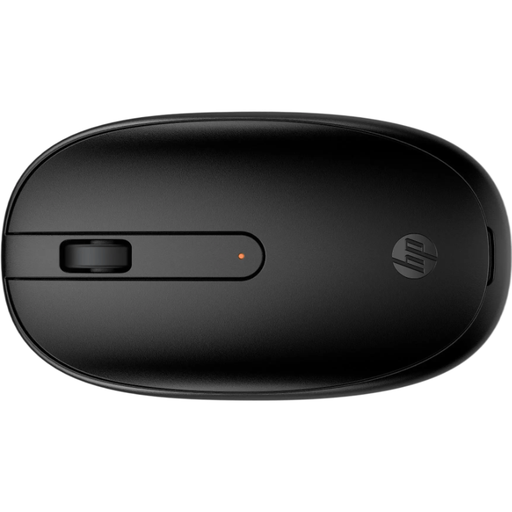 No image available
A Bluetooth mouse that keeps a USB port free on a computer that supports Bluetooth.
HP lists Bluetooth 5.1, three buttons and a 1600 dpi optical sensor. The product information describes an ambidextrous design.
 No image available
A compact option for a shared room or if you want to switch between devices.
The product information lists quiet buttons and connection to up to three devices via receiver and Bluetooth. A free USB-A port is needed for the 2.4 GHz connection.
 No image available
A vertical mouse to try if you’re looking for a different grip during longer working sessions.
According to the product information, this version is for right-handed use and small to medium-sized hands. The product information lists Bluetooth or a USB receiver.
The HP 240 doesn’t need a USB receiver for its Bluetooth connection, but your computer must support Bluetooth. For another model, check which connection the specific version uses.
First, check that the mouse is switched on and that the battery is supplying power. Then check that Bluetooth is enabled, or check the connection if you have a model with a receiver or cable. Finally, follow the instructions for your version.
Dutch government information refers to the Radio Equipment Directive for devices with Bluetooth or a radio frequency module. For devices that meet the applicable requirements, the manufacturer must provide a CE marking and an EU Declaration of Conformity. These general rules don’t confirm that an individual product listing meets the requirements.
No. According to the Dutch government, if a product is faulty, the seller must provide a solution; a manufacturer’s warranty is an additional benefit. The Netherlands doesn’t have a fixed statutory warranty period that applies equally to every product.
Dispose of electrical equipment separately at an appropriate collection point; the EU WEEE mark indicates that it should be collected separately. According to the Dutch government, used batteries should go to a battery collection point, not in the bin.