
Student who spends long sessions editing
If you regularly edit a newsletter, look for a mouse shape that suits your hand. Arboportaal also recommends varying your tasks, taking microbreaks and looking away regularly when working at a screen.


Start with a mouse that suits your hand and how long you work. If you share a room, look for buttons described as quiet, too. Extra scrolling features may be more useful than a compact design for long texts or wide layouts. Also check that it connects to your laptop and that you really need the extra features.
If you regularly edit a newsletter, look for a mouse shape that suits your hand. Arboportaal also recommends varying your tasks, taking microbreaks and looking away regularly when working at a screen.
If you work while your housemate is resting, mice with buttons described as quiet may be worth comparing. Check the description of the exact model you’re considering.
If you often navigate long texts or wide layouts, consider extra scrolling controls. For example, Trust describes the Ozaa+ as having a side scroll wheel; this feature isn’t automatically included on other models from the brand.
First decide what matters most to you when editing: how the mouse fits your hand, quiet clicks, navigation, connectivity, or the total cost and aftercare.
A good fit if: a comfortable fit for your hand is your priority during long editing sessions. Logitech says the Lift is designed for small to medium-sized hands and also offers a left-handed version.
Bear in mind: its tall shape may take some getting used to. In 2025, iCreate noted that switching between the mouse and keyboard can be less convenient with this design.
A good fit if: you have limited desk space, want to take your mouse with you, or often work while your housemate is resting. Trust describes the Ozaa Compact’s buttons as quiet.
Bear in mind: check that the size feels comfortable in your hand and that Bluetooth or the USB receiver is compatible with your laptop.
A good fit if: you often navigate long texts or wide layouts. Trust lists two scroll wheels, including a side scroll wheel, for the Ozaa+.
Bear in mind: Trust describes the Ozaa+ as large. Extra controls may be unnecessary if you mainly edit straightforward text.
A good fit if: quiet clicks and a choice of connection methods matter more to you than extra editing buttons. Rapoo describes the M200 Silent as offering Bluetooth and a 2.4 GHz receiver.
Bear in mind: Rapoo quotes a battery life of up to nine months; actual battery life depends on how you use it.
| What to consider | What to look for | Who is this most important for? |
|---|---|---|
| Fit for your hand | Check your hand size, which hand you use the mouse with and whether its shape feels comfortable. Also remember to vary your tasks and take breaks. | If I’m editing a newsletter for a long time, I want a mouse that suits my hand. Around 28% of consumers put fit for their hand first. |
| Click noise | Check whether the buttons on that exact version are described as quiet; don’t assume a wireless connection means quieter clicks. | If I’m working while my housemate is resting, I want to avoid unnecessary noise from clicking. For around 22% of consumers, quiet clicks are their top concern. |
| Scrolling controls | Check whether the mouse supports horizontal scrolling and whether the extra controls suit your software and working style. | For long texts or wide layouts, I want to navigate smoothly. Around 22% of consumers prioritise scrolling and navigation controls. |
| Connectivity | Check Bluetooth support, available USB ports and the connection method for the exact version. | If I want to use the mouse with my laptop or another device, it needs to be compatible. For around 17% of consumers, device compatibility is their top priority. |
| Costs and aftercare | Compare the current purchase price and included items. If you’re considering an extended warranty, check what it adds to your statutory rights. | If I want to keep a close eye on the purchase price and any aftercare, I compare these details in advance. Around 11% of consumers give the greatest weight to total costs and aftercare. |
Logitech says the Lift is designed for small to medium-sized hands. Its different grip may take some getting used to, and its tall shape can make switching between the mouse and keyboard less convenient.
Check the size and version, and consider whether you can comfortably switch between the mouse and keyboard.
Trust lists a side scroll wheel for the Ozaa+, but describes the Ozaa Compact as a different model with a more compact design.
Check the full model name and the scrolling feature you want in the product description.
According to the Dutch government, there is no fixed statutory guarantee period in the Netherlands. You’re entitled to a product that works properly for as long as you could reasonably expect it to.
Read what an additional warranty covers before choosing one.
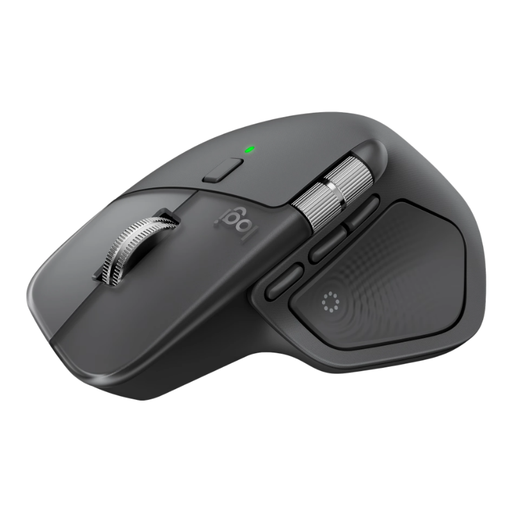
The Lift is designed for a particular hand fit, while the MX Master range offers extra scrolling controls.
The Ozaa Compact is described as compact, while the larger Ozaa+ has extra scrolling controls, according to Trust.
The M200 Silent is a straightforward mouse with several wireless connection options.
The Modern Mobile Mouse is a compact Bluetooth option for anyone looking for a portable mouse.
These mice cater for different newsletter-editing needs, from extra scrolling controls and a compact design to buttons described as quiet or a vertical grip.
 No image available
An option if you’re looking for extra scrolling features and quiet buttons while editing.
MagSpeed scroll wheel and horizontal scrolling; eight programmable buttons; Bluetooth 5.1 or a USB-C receiver; pairs with up to three devices. The ergonomic shape described is designed for right-handed use.
 No image available
A compact option if you’re short on space or looking for controls described as quiet.
RF or Bluetooth connectivity; adjustable DPI up to 4020; ambidextrous design.
 No image available
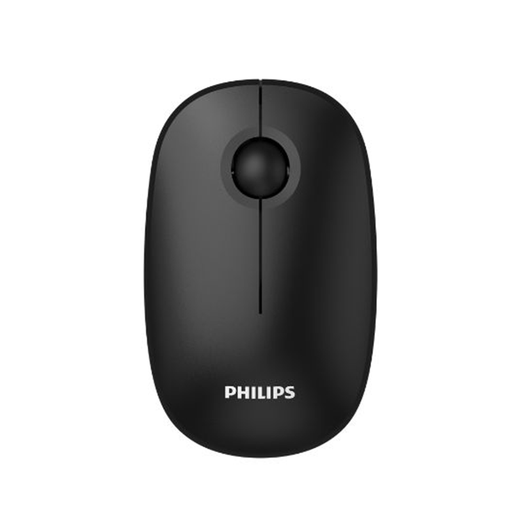
A straightforward option if you want to work wirelessly and quiet clicks are important to you.
Optical sensor with 1600 DPI; 2.4 GHz connection via USB receiver; clicks described as quiet.
 No image available
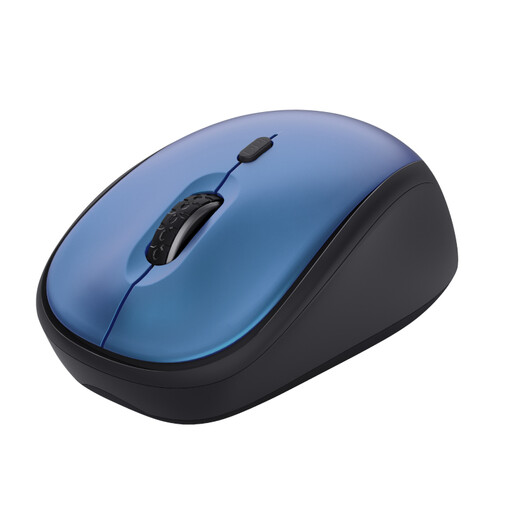
A compact option for a small workspace or taking with you, with buttons described as quiet.
Adjustable DPI from 800 to 1600; USB micro receiver that stores inside the mouse; AA battery.
 No image available
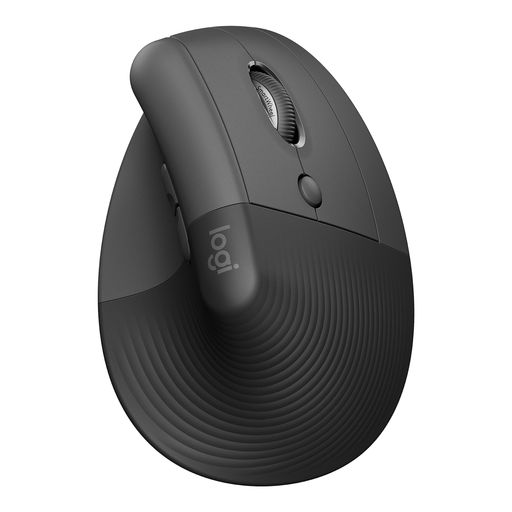
A vertical option if you want to try a different grip; the version described is designed for small to medium-sized right hands.
Bluetooth and USB receiver; four customisable buttons; SmartWheel; clicks described as quiet.
You can’t tell from the product specifications. Arboportaal also recommends varying your tasks, taking microbreaks and setting up your workspace properly; Logitech says the Lift is designed for small to medium-sized hands.
First check whether the exact mouse uses Bluetooth or a USB receiver. According to Trust, the Ozaa Compact offers both options; you’ll need a suitable free USB port for the receiver.
Check whether the version you choose has a rechargeable battery or replaceable batteries, and what’s included. Trust lists a rechargeable battery and a charging cable included with the Ozaa Compact.
No. According to the Dutch government, there’s no fixed statutory guarantee period in the Netherlands. You’re entitled to a product that works properly for as long as you could reasonably expect it to. If there’s a problem, contact the seller.
For eligible distance purchases from a business, the Dutch government says you’ll often have a 14-day cooling-off period. Check the terms of the specific purchase; this is separate from your statutory rights if a product is faulty.