
Student in a shared room
Plans lessons while others nearby are studying or sleeping, and wants quiet buttons and a mouse that fits on the desk. Logitech and Trust describe specific models as having quiet buttons.


If you share a room, look for quiet main buttons first. If you work for long stretches, pay extra attention to how the mouse fits your hand and to your posture. Then check that the connection is compatible with your laptop and whether you need extra scrolling controls for long lesson documents. A compact model is easier to carry around, while larger models may offer different controls. A quiet click or ergonomic shape does not guarantee silent operation or use without discomfort.
Plans lessons while others nearby are studying or sleeping, and wants quiet buttons and a mouse that fits on the desk. Logitech and Trust describe specific models as having quiet buttons.
Often spends long periods working on texts and schedules, and considers hand fit, posture and scrolling controls separately. Arboportaal recommends a relaxed working posture.
Takes the mouse along or switches between devices. The dimensions, connection and available ports need to suit your laptop and where you work.
First decide which factor matters most in your situation. Then check the specific model’s shape, connection and features.
| What to consider | What to check before buying | Who is this important for? |
|---|---|---|
| Quiet main buttons | Check whether the main buttons specifically are described as quiet. This does not mean the scroll wheel or every other action is silent. | If I work in a shared room while others are studying or sleeping, I want to keep clicking noise to a minimum. Around 29% of consumers prioritise quiet buttons. |
| Hand fit and posture | Compare the mouse with your hand size, dominant hand and reach to the buttons. Set up your workspace too, and change your posture regularly. | During long sessions, I want a grip that suits my hand and the flexibility to adjust my workspace. Around 23% of consumers give hand fit top priority. |
| Connection and portability | Check Bluetooth support, available ports, operating system and dimensions. The HP 280 Silent uses a USB-A receiver; the Logitech Pebble Mouse 2 M350s is a Bluetooth model. | If I move between study spaces, the mouse needs to connect to my laptop without taking up a port I need. Around 18% of consumers prioritise compatibility. |
| Scrolling through documents | Decide whether vertical scrolling is enough or whether a side scroll wheel would be useful. Trust describes the Ozaa+ as having a side scroll wheel; Logitech lists MagSpeed scrolling for the MX Master 4. | When working on long lesson plans or wide schedules, I want to navigate documents easily. Around 18% of consumers prioritise document navigation. |
| Battery and maintenance | Check whether the model uses an AA battery, is rechargeable or has a wired connection. HP lists an AA battery for the 280 Silent; Trust describes the Ozaa+ as having a rechargeable battery. | If I want to keep maintenance to a minimum, I consider whether I need to recharge or replace a battery. Around 12% of consumers take maintenance into account first. |
Hand size, hand position and workspace setup vary from person to person. Arboportaal also highlights the importance of changing your posture.
Check which hand size and dominant hand the model is designed for, and decide for yourself whether the grip feels comfortable.
According to HP, the HP 280 Silent needs a free USB-A port for its receiver.
Check the ports on your laptop. If necessary, choose a Bluetooth model if your device supports it.
You may not have a suitable free port, in which case you might need an adapter.
A description of quiet buttons does not necessarily say anything about noise from the scroll wheel, movement on the desk or other controls.
Think about which actions you perform often and, if possible, try the mouse in the room where you work.
The Pebble Mouse 2 M350s and MX Master 4 have different features. Logitech describes the former as compact and the latter as offering extensive scrolling controls.
Trust describes the Ozaa+ as a mouse with quiet buttons, a side scroll wheel and multi-device connectivity.
The HP 280 Silent is a wireless mouse with a USB-A receiver, for use with a compatible laptop or fixed workstation.
According to Kensington, the Pro Fit Ergo Wireless has a contoured body, a wrist rest, quiet clicks and a choice of Bluetooth or 2.4 GHz connectivity.
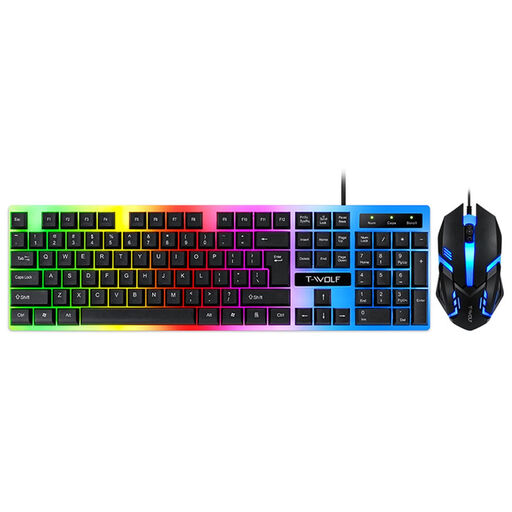
These Joybuy products are options for lesson planning, including wireless and vertical mice, as well as one wired keyboard and mouse set.
 No image available
Worth considering if you want extra scrolling controls and multi-device operation for lesson documents.
 No image available
A vertical shape may suit you if you prefer a different hand position. Decide for yourself whether the grip fits your hand.
 No image available
Worth considering if you want a vertical shape and extra controls for navigating documents.
 No image available
This set is for a fixed workstation where you want a wired mouse and keyboard.
 No image available
An option if you’re looking for a wireless mouse with different connection options.
Set up your workspace so that your shoulders, wrists and forearms can stay relaxed, and regularly switch your posture and tasks. Arboportaal offers this as workplace advice; simply switching to a different mouse does not replace the need to vary your posture.
No, the connection needs to be compatible with your laptop. According to HP, the HP 280 Silent needs a free USB-A port for its receiver; a Bluetooth model such as the Logitech Pebble Mouse 2 M350s requires a device with compatible Bluetooth support.
Take a used loose battery to a collection point, such as a shop or supermarket that sells batteries. The Dutch government lists this as an option.
When you buy online from a business, in many cases you have a 14-day cooling-off period, subject to legal exceptions and conditions, according to the Dutch government. If a product does not meet reasonable expectations under normal use, statutory guarantee rights may entitle you to a free repair, replacement or refund. ACM ConsuWijzer explains these rights.
No. The obligations described by Arboportaal apply to employers and employees. If lesson planning is part of your work, the employment context may be relevant; being in a student bedroom alone does not mean that it applies.