Choose a mouse that suits your hand size and whether you’re left- or right-handed, then check that its scrolling controls and connection suit your work. A vertical mouse may be worth considering if hand position is your priority, a mouse with advanced scrolling controls for long documents, and a trackball if you have limited space to move a mouse. None of these designs replaces a well-set-up workspace and regular breaks from screen work.
Who might find this choice relevant?
Home worker with long editing sessions
Creates and edits teaching materials during longer spells of screen work and wants to focus on fit and hand position. Logitech offers the Lift in several versions, with a fit designed for small to medium-sized hands.
Teacher who works through lots of documents
Often switches between pages or files when creating a handout, so scrolling controls and how easy buttons are to reach may be important. HP describes these features on the 480 Comfort, while Kensington’s Orbit Wireless Trackball has a scroll ring.
Worker with a compact or shared workspace
Needs to consider limited desk space or the connections available on their home computer. The Kensington Orbit is a stationary trackball; Trust’s models covered here include both wireless and wired options.
What should you look for when choosing?
| What to consider |
What to look for |
Who this matters most to |
| Fit and hand position |
Check your hand size, whether you’re left- or right-handed, and how easy the buttons are to reach. |
During long sessions, I want to know first whether the shape suits my hand. Around 36% of consumers put hand comfort and position at the top of their list. |
| Scrolling and document navigation |
Compare the scrolling controls you want and how easy any extra buttons are to reach. |
If I work through lots of pages and files, controls that suit the way I navigate are important. Around 29% of consumers give document navigation top priority. |
| Connection and power |
Check whether you need Bluetooth or a particular USB port, and whether the model uses a battery, rechargeable battery or cable. |
I want to know in advance whether the mouse will connect to my computer and how it gets its power. Around 21% of consumers choose mainly based on connection and power. |
| Room to move |
Consider the space available next to your keyboard and whether using a trackball would suit you. |
At a compact desk, I want to control the cursor without needing much space to move the mouse around. Around 14% of consumers say room to move is their top priority. |
Things to consider before buying
-
Assuming a vertical mouse will prevent arm or wrist problems
The shape alone won’t prevent problems from developing; your workspace and the amount of time you spend working at a screen matter too.
Check that the model suits your hand and take regular breaks from screen work. Arboportaal recommends, among other things, looking away regularly and taking microbreaks.
-
Assuming wireless means you won’t need a port or battery
Wireless mice vary in their connections and power sources. The Trust Bayo II uses a USB receiver and rechargeable battery, while the HP 480 Comfort uses Bluetooth and one AA battery.
Check your computer’s available connections and the power source for the exact model before choosing.
-
Choosing a trackball just to save space
With a trackball, you move the cursor using a ball instead of moving the mouse itself. It’s a different way of working.
Try to decide whether using a trackball and scroll ring would suit you before making the small amount of space it needs the deciding factor.
-
Confusing a manufacturer’s guarantee with your statutory rights
A manufacturer’s guarantee does not limit your statutory right in the Netherlands to a product that is fit for purpose. The Dutch government explains that there is no fixed statutory guarantee period; what you can reasonably expect from a product is taken into account.
Keep your proof of purchase and contact the retailer if something goes wrong.
Brands and models to compare
Logitech
The Lift reviewed here is a vertical option; the MX Master 3S focuses on adjustable tracking and scrolling controls.
- Logitech says the Lift suits small to medium-sized hands and is available in versions for left- and right-handed users.
- The MX Master 3S specifications don’t automatically apply to other Logitech mice. For this model, Logitech lists 8000 dpi and tracking on glass at least 4 mm thick.
Trust
The options reviewed here are the wireless, rechargeable Bayo II with USB receiver and the wired Verto.
- Trust says the Bayo II has quiet buttons and a battery life of up to three months with average use.
- The stated battery life is a Trust specification, not the result of an independent test. According to Trust, the Verto has a 1,5-metre cable.
HP
The HP 480 Comfort Bluetooth mouse reviewed here is designed for navigation and switching between devices.
- HP specifies a 4D tilt wheel, programmable buttons and access to three devices for this model.
- Check that your computer supports Bluetooth and that the shape feels comfortable in your hand; these features don’t automatically apply to other HP mice.
Kensington
The Orbit Wireless Trackball reviewed here is a stationary option when there’s little room to move a mouse around.
- Kensington specifies a scroll ring, left- and right-handed operation and a removable wrist rest for this model.
- Controlling the cursor with a ball works differently from using a regular mouse, so consider whether it would suit you.
Joybuy product picks
These mice for home use include a model with advanced scrolling controls, vertical options, and straightforward wired and wireless choices.
 Image unavailable
Logitech MX Master 4 for Mac
Its fast scrolling feature is handy for working through long documents.
The product name lists Bluetooth, USB-C charging and compatibility with macOS, iPadOS and Windows; this version is Space Black.
View at Joybuy
 Image unavailable
Wireless vertical mouse with 6 buttons
The vertical shape may be worth trying if you’d like to experiment with this hand position; comfort and fit are personal.
The product name lists 2,4 GHz with USB receiver, USB-C battery and 800–1600 DPI. You’ll need a compatible USB port for the receiver.
View at Joybuy
 Image unavailable
NAXSIR rechargeable wireless mouse
The different connection options listed may suit a workspace where you want to be able to choose between connections.
The product name lists Bluetooth, 2,4G and a Type-C cable connection, along with six DPI levels.
View at Joybuy
 Image unavailable
AJAZZ AJ159 PRO wireless gaming mouse
The product information says it’s designed to fit small to medium-sized hands; check that the shape suits yours.
The product name lists Bluetooth, 2,4G and USB-C, a 400 mAh battery and a weight of 56 g. According to the product description, the magnetic charging base should be kept away from pacemakers and medical implants.
View at Joybuy
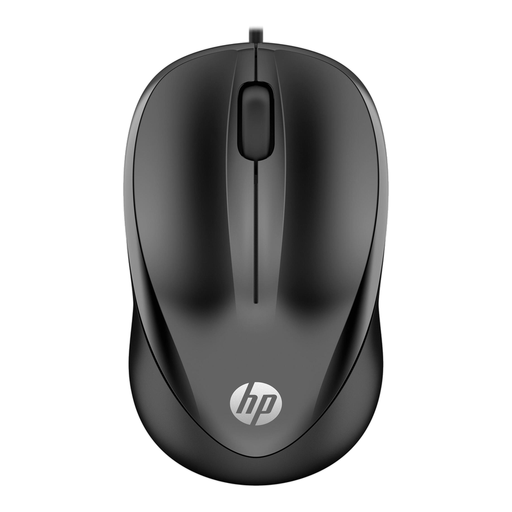 Image unavailable
HP Wired Mouse 1000, USB Type-A
A wired option may suit you if you want a straightforward connection without wireless pairing.
The product name lists USB Type-A, a 1200 DPI optical sensor and three buttons. You’ll need an available USB Type-A port.
View at Joybuy
Frequently asked questions
Is a vertical mouse enough to prevent problems during long periods of screen work?
No, you shouldn’t assume so. Arboportaal also recommends varying your activities, taking microbreaks and setting up your workspace properly. An ergonomic shape is no guarantee that a particular model will prevent problems for you.
Which connection should you check in advance?
Check your computer and the exact mouse model: the HP 480 Comfort reviewed here uses Bluetooth, the Trust Bayo II uses a 2,4 GHz USB receiver, and the Trust Verto has a USB cable. If you’re using a receiver, check that a compatible port is available too.
What should you do with a flat battery or a discarded mouse?
Recycle flat batteries separately; according to the Dutch government, they shouldn’t go in the bin. You can take a discarded electrical appliance to your local council’s recycling centre, among other options. If you buy a similar new appliance, the shop must take back the old one.
Are you automatically entitled to exactly two years’ statutory guarantee in the Netherlands?
No. The Dutch government states that there is no fixed statutory guarantee period in the Netherlands: you’re entitled to a product that is fit for purpose for as long as you can reasonably expect. The retailer is your point of contact; a manufacturer’s guarantee is an additional benefit.
Can you return a mouse bought online if you don’t like the shape?
According to the Dutch government, a 14-day cooling-off period applies in many cases when you buy as a consumer at a distance. Check that you’re buying from a business and find out which terms and exceptions apply to your purchase.


