
Analysts working with long lending lists
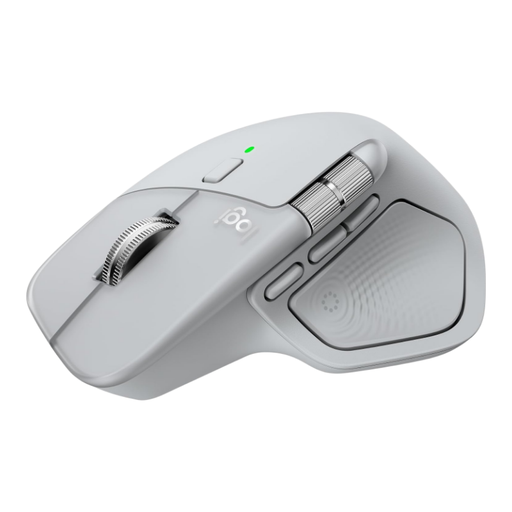
You navigate lots of rows or wide tables and want to switch between precise and fast scrolling. Logitech describes the MX Master 3S as offering both line-by-line and free scrolling, as well as a thumb wheel.


For long lending lists and wide tables, responsive scrolling is important. If you’re mainly looking for a different hand position, you could consider a vertical mouse, while a trackball is a good option if you want to keep your pointing device in one place. Whichever type you choose, check the fit, hand preference and connection. Whether you’re sitting or standing, position the mouse so you don’t have to reach unnecessarily.
You navigate lots of rows or wide tables and want to switch between precise and fast scrolling. Logitech describes the MX Master 3S as offering both line-by-line and free scrolling, as well as a thumb wheel.
You’re considering a vertical mouse for frequent pointing, without assuming that a different mouse shape alone will resolve discomfort. Logitech and Trust offer different types of vertical mouse.
You have little room beside your keyboard or change your desk height, so you’re considering a pointing device that can stay in one place. The Kensington Orbit is a trackball with a scroll ring.
Start with what you do most often: scroll a lot, change your hand position or move your mouse as little as possible.
A good fit if: you work through long lists or wide tables and want to keep using a familiar mouse movement.
Consider: you’ll still need to move the mouse across the desk, and extra features may require software.
A good fit if: a different hand position is your main priority and the shape suits your hand.
Consider: you’ll still need to move the mouse across the desk. Check the handedness, fit and connection for each version.
A good fit if: you want to keep your pointing device in one place, for example when you have little room beside your keyboard.
Consider: using the ball takes some getting used to, and it may need cleaning from time to time.
| What to consider | What to look for when buying | Who is this important for? |
|---|---|---|
| Hand position and fit | Check which hand the mouse is designed for, its fit for your hand size, and whether you can use it comfortably within easy reach at both desk heights. | If I want a different hand position, the mouse needs to fit my hand and stay within easy reach. Around 31% of consumers prioritise fit and hand position. |
| Scrolling through lists and tables | Check that the mouse offers the vertical and horizontal navigation you need, and that any software for its features is available on your work system. | When working with long lending lists and wide tables, I want to point precisely and move quickly through data. Around 31% of consumers prioritise scrolling controls. |
| Room to move | Check how much space there is beside your keyboard and whether you can keep your arm within easy reach at both desk heights. | If I have limited space, I want to use a pointing device without having to slide it across the desk each time. This is the top priority for around 23% of consumers. |
| Connection and shared use | Check which connections your work computer allows, whether a receiver is needed, and whether the mouse will be used by both left- and right-handed people. | At a shared workstation, I want the connection and controls to suit both the computer and its users. Around 15% of consumers prioritise compatibility. |
Arboportaal recommends paying attention to reach distances when working while standing, and alternating between sitting and standing. A suitable mouse does not replace an ergonomic workstation setup.
The Logitech Lift is available in separate left- and right-handed versions, and Logitech describes it as suitable for small to medium-sized hands. This makes the exact version and fit important when choosing.
Check which hand it’s designed for, and try the grip and reach while seated and standing at your desk.
With a trackball, you move the ball instead of the whole device. Kensington notes that dirt in the ball socket can increase friction.
Weigh the space-saving benefit against the different controls, and follow the cleaning instructions for the version you choose.
According to ACM ConsuWijzer, the statutory guarantee depends on what you can reasonably expect from the product; there is no single fixed period that applies to every product.
Keep your proof of purchase, and contact the retailer if a product doesn’t meet expectations.
The models reviewed include both a vertical mouse and a mouse with extensive scrolling controls.
The Kensington Orbit Wireless Trackball with Scroll Ring reviewed here is an option if you’re considering a pointing device that stays in one place.
The Trust Verto Draadloze reviewed here is a vertical mouse that connects via a USB micro receiver.
This product selection includes standard and vertical mice, so you can compare scrolling controls and hand position.
 No image available
The scrolling controls mentioned here are useful if you often navigate long documents and wide tables.
The scroll wheel has a ratchet mode and a free-spinning mode, while the thumb wheel is designed for horizontal scrolling. This version is right-handed.
 No image available
A vertical design to consider if you’re mainly looking for a different hand position.
The product information lists Bluetooth and a 2.4GHz receiver, six programmable buttons, and sensitivity settings of 800, 1200 and 1600 DPI.
 No image available
The vertical design is an option if a different hand position is your main consideration.
The product information lists a four-way scroll wheel, a 2.4GHz connection, USB-C charging and sensitivity settings from 800 to 1600 DPI.
 No image available
Worth considering if you’re looking for a mouse that folds flat for storage and scrolls both horizontally and vertically.
The product information lists Bluetooth and a flat, foldable design with scrolling controls on the surface.
 No image available
The vertical design is an option if you’re considering a different hand position; this version is right-handed.
The product information lists Bluetooth 5.3, a receiver and a connection to up to three devices.
No. Arboportaal recommends alternating between sitting and standing, and paying attention to reach distances when setting up your workstation. A mouse doesn’t replace those workstation choices.
First, check which connections your computer and workplace policy allow. Trust lists a USB micro receiver for the Verto Draadloze; Kensington lists a 2.4GHz receiver and Bluetooth LE for the Orbit version reviewed here. Check which connections and accessories are available for each version.
According to Kensington, dirt in the ball socket can cause extra friction. Follow the cleaning instructions for the version you’ve bought.
For a standard online consumer purchase, you generally have a statutory cancellation period of up to 14 days after delivery, with some exceptions. You’re also covered by the statutory guarantee if the product doesn’t meet what you could expect under normal use. ACM ConsuWijzer explains that there isn’t one fixed two-year period for every product. The retailer is your point of contact.
If you mainly work through long lists and wide tables, look for the vertical and horizontal scrolling controls you need. A vertical mouse is another option if hand position comes first. If you have limited space for a mouse, you could consider a trackball, bearing in mind its different controls and possible cleaning requirements.