For large datasets, choose a mouse that lets you scroll both vertically and horizontally. If you work close to colleagues, check that the buttons are quiet too. For extended use, fit and choosing the right hand version matter more, while for extra features you should first check that the connection and any required software will work on your work computer.
Who is this guide for?
Explorer of large spreadsheets
You regularly navigate lots of rows and columns and want a reliable way to scroll both vertically and horizontally. RTINGS and the product specifications from Logitech and Trust describe scroll features that may be useful for this.
Colleague in a shared workspace
You work close to other people or switch between computers, so click noise and the available connection options may matter. Trust and Logitech describe models with quiet buttons or connections to multiple devices.
Frequent mouse user
You’re particularly focused on hand size and whether the mouse is designed for left- or right-handed use, and want to break up screen work with other tasks or a rest. Logitech and R-Go Tools describe mice in different shapes and versions; Arboportaal recommends varying your screen-based work.
What should you look for?
Right-handed productivity mouse
A good fit if: you often work with large spreadsheets and want to scroll horizontally as well as vertically.
Bear in mind: check that the shape suits your hand. Some customisable features of the MX Master 4 require Logi Options+.
Vertical mouse
A good fit if: hand size, handedness and a different hand position are your main considerations.
Bear in mind: a vertical shape is not a proven treatment for discomfort and does not replace taking breaks from screen work.
Trackball
A good fit if: you have little room to move a mouse or want a symmetrical design.
Bear in mind: a scroll ring is not the same as a horizontal side-scroll wheel; the ball and its housing may need occasional maintenance.
Basic mouse without a side-scroll wheel
A good fit if: you mainly work with smaller datasets and rarely use extra mouse features.
Bear in mind: with large spreadsheets, you may need to use the scroll bar or software controls more often to navigate.
| What to consider |
What to check before buying |
Who should pay particular attention? |
| Scroll navigation |
Check that the exact model scrolls both horizontally and vertically; try it in the spreadsheet software you usually use. |
If I often open large datasets, I want to move smoothly through rows and columns. Around 30% of consumers make scroll navigation their main priority. |
| Fit |
Check the hand size it suits and whether it is designed for left- or right-handed use; try the grip if possible. |
For extended use, I want a shape and hand version that suit me. Around 30% of consumers make fit their top priority. |
| Quiet buttons |
Look for an explicit mention of quiet main buttons for the exact version; don’t assume it will be quiet because of another feature. |
If I work close to colleagues, I want repeated clicking to be less disruptive. Around 20% of consumers put click noise first. |
| Connection and switching |
Check Bluetooth support, the type of receiver, available USB ports and whether installation of configuration software is allowed. |
If I work on different work computers, I want a connection that works with them. Around 20% of consumers make compatibility their main priority. |
Things to watch out for when buying
-
Confusing a fast vertical scroll wheel with horizontal scrolling
A fast main scroll wheel or scroll ring alone doesn’t confirm that you can navigate horizontally through large spreadsheets.
Check the specifications for the version you’re considering to see whether it has a separate side wheel or a confirmed horizontal scroll function.
-
Assuming ‘ergonomic’ means it suits every hand
The models mentioned may be designed for specific hand sizes or handedness. A different shape won’t automatically suit your hand or solve existing discomfort.
Check the size and whether it is designed for left- or right-handed use before weighing up extra features.
-
Choosing customisable buttons without checking your work computer
Logitech states that some MX Master 4 customisation options require Logi Options+. Installing software may not be straightforward on a managed work computer.
Check your operating system, connection options and organisation’s software installation policy in advance.
Brands to consider
Logitech
The MX Master 4 mentioned here is designed for productivity, with horizontal scrolling; the Lift is a separate vertical mouse range.
- Logitech says the Lift is designed to fit small to medium-sized hands and comes in separate versions for left- and right-handed use.
- Some MX Master 4 haptic and customisation features require Logi Options+; the Lift’s stated fit does not automatically mean it will suit larger hands.
Trust
According to Trust, the Ozaa+ combines quiet buttons, a side-scroll wheel and the ability to connect to multiple devices.
- Trust lists two scroll wheels and connection to up to three devices for the Ozaa+.
- Trust describes the Ozaa+ as large, so check that its shape suits your hand. Features of the separate Vyran range do not automatically apply to the Ozaa+.
Kensington
The Orbit Wireless Trackball with Scroll Ring is an alternative if you have little room to move a mouse or want a symmetrical design.
- Kensington describes this model as having a symmetrical shape, a vertical scroll ring and two wireless connection options.
- Horizontal scrolling with a separate side wheel is not confirmed for this model; the trackball may need cleaning from time to time.
R-Go Tools
The R-Go HE Break range includes vertical mice in different sizes and versions for left- and right-handed use.
- R-Go Tools describes, among other options, a left-handed medium version with several connection options.
- The usefulness of the break indicator partly depends on the software required and your workplace settings; the manufacturer’s description does not prove that the model prevents discomfort.
Joybuy products
This selection includes mice for large spreadsheets and shared workspaces, with a focus on scroll navigation, quieter clicks, connectivity and fit.
 No image available
HOFOTEK M311 2.4G+BT Silent Office Mouse
Worth considering if quiet clicks and switching between devices are important to you.
The product title lists multiple DPI settings, a black and orange finish and an AA battery.
Joybuy
 No image available
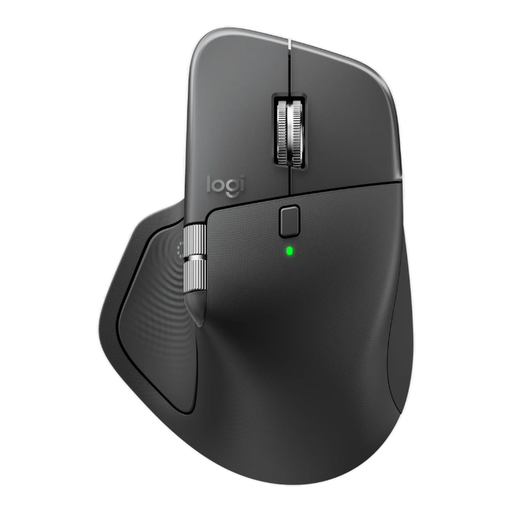
Logitech MX Master 4 for Business, Graphite
Worth considering if you need to work with large spreadsheets, sit near colleagues and switch between devices.
The product title lists 8K DPI, a Logi Bolt receiver, Bluetooth and USB-C charging. According to the product description, Logi Options+ is required to customise haptic feedback.
Joybuy
 No image available
Philips 3000 Series SPK7378B/00, EU Version
Worth considering if quiet clicks and a wireless USB receiver connection suit your workspace.
The product title lists 2.4 GHz, an optical sensor, 1600 DPI and a black finish.
Joybuy
 No image available
Trust Ozaa+ Optical Office Mouse
Worth considering if you work with large spreadsheets and value quiet buttons and the ability to switch between devices.
The product title lists a right-handed version, RF wireless and Bluetooth, and 3200 DPI. Trust describes the Ozaa+ as having two scroll wheels, quiet buttons and the ability to connect to up to three devices. This model is described as large.
Joybuy
 No image available
Logitech Lift Vertical Ergonomic Mouse, Graphite
Worth considering if you’re looking for a vertical design and have a small to medium-sized right hand.
The stated fit is for small to medium-sized right hands; check that this version suits you.
Joybuy
Frequently asked questions
Do you have to use a vertical mouse for extended screen work?
No. Dutch government guidance does not prescribe a particular mouse model. Arboportaal does recommend regularly alternating screen work with other tasks or a break; using a different mouse does not replace this.
Do you need to install software to use the MX Master 4?
According to Logitech, Logi Options+ is needed for some customisable MX Master 4 features. If you use a managed work computer, check in advance which software you’re allowed to install.
What can you do if a trackball’s pointer moves erratically?
Kensington lists a build-up of dirt around the ball and its housing as a possible cause and recommends cleaning it regularly. Follow the maintenance instructions for your specific model and check the settings too.
Are you always entitled to just two years’ warranty on a mouse in the Netherlands?
No. According to the Dutch government, there is no fixed period for statutory warranty in the Netherlands; it depends on what you could reasonably expect from the product. If a product is faulty, contact the seller. Check separately which terms apply if the mouse is bought for business use on behalf of an employer.


