Which mouse is right for you?

Transcript editor who navigates frequently

You move between sections of text and parts of a recording while making corrections. Pay attention to the scroll wheel and any shortcut buttons; Microsoft Support explains how to return to audio using timestamps when editing transcripts.

Long-hours home worker

You’re looking for a mouse that suits your hand and workspace. A vertical mouse or trackball works differently from a conventional mouse; Arboportaal also emphasises alternating screen work with other tasks or taking a break.

Editor in a shared workspace

You want to reduce clicking noise without losing useful document-editing features. Check both the buttons and the scroll wheel; Trust describes the Ozaa+ as having silent buttons and a side scroll wheel.

What should you look for when choosing?

Conventional productivity mouse

Suitable if: you want to work through long documents and need extra scrolling or button controls.

Bear in mind: extra features don’t automatically make a mouse more comfortable to use; iCreate describes the MX Master 4’s hand position as less distinctly ergonomic.

Vertical mouse

Suitable if: you’d like to try a different hand position as a key factor in your choice.

Bear in mind: the grip may take some getting used to; also check the size and whether the model suits your dominant hand.

Stationary trackball

Suitable if: you have little space to move a mouse across your desk.

Bear in mind: with the Kensington Orbit Wireless, you control the cursor with a ball and scroll with a ring. It feels different from using a conventional mouse.

What to consider What to look for Who should prioritise this?
Navigating long transcripts Try both precise and fast vertical scrolling; check whether side scrolling or customisable buttons would be useful in your application. If I often return to audio clips, I want to move through text quickly and find my place again easily. Around 36% of consumers give transcript navigation top priority.
Hand position and fit Check your hand size and dominant hand; try the grip and remember to vary your tasks during the day. During long working sessions, I want a shape that suits my hand, without expecting one mouse to replace a properly set-up workstation. Around 29% of consumers put hand position and fit first.
Quiet clicking Check which buttons are described as silent; also consider the sound and feel of the scroll wheel. In a shared or quiet workspace, I want to reduce clicking noise while still being able to navigate documents easily. Around 21% of consumers say quiet operation is their main concern.
Connection and power Check Bluetooth support or whether you need a receiver and USB port, the power source and any software required for your computer. If I want a straightforward set-up and maintenance routine, I want to know in advance what connection and power the mouse needs. Around 14% of consumers put connection and maintenance at the top of their list.

Common buying mistakes

  • Assuming an ergonomic label guarantees you won’t experience discomfort

    Hand size, model, posture and varying your tasks all matter; a mouse won’t automatically fix a poorly set-up workstation.

    Consider the mouse as part of your whole workspace, and alternate screen work with other tasks or a break. If discomfort persists, seek appropriate professional advice.

  • Assuming silent clicks mean it has every feature you want

    Silent buttons and extensive scrolling controls are separate features. One doesn’t automatically tell you anything about the other.

    Check both features on the exact model you’re considering.

  • Assuming every model in a product range is identical

    Handedness, size, connection and power can vary between models and affect how practical they are to use.

    Compare the full model name and check the size, connection and power source before choosing.

Brands to consider

Logitech

The models discussed range from advanced document controls to a vertical mouse.

  • iCreate notes that the MX Master 4 has two scroll wheels.
  • iCreate describes the MX Master 4’s hand position as less distinctly ergonomic. The Lift is said to be best suited to small to medium-sized hands.

Trust

The range discussed includes a mouse with silent buttons and side scrolling, as well as a simpler vertical option.

  • Trust says the Ozaa+ has silent buttons and a side scroll wheel; the manufacturer also lists multi-device connectivity and a rechargeable battery.
  • According to Trust, the wireless Verto uses a USB receiver and has adjustable cursor sensitivity. Check which connection and controls you need.

Kensington

The Orbit Wireless is a stationary trackball with a scroll ring, designed for left- and right-handed use.

  • Kensington lists Bluetooth, a 2.4GHz receiver, customisable buttons and two AA batteries.
  • The ball and ring controls work differently from a conventional mouse. Comfort claims come from the manufacturer.

R-Go Tools

According to the manufacturer, the HE Break range includes vertical mice in different sizes and models for left- and right-handed users.

  • The manufacturer describes a break indicator that works with R-Go Break software.
  • Check the size and model. A break reminder isn’t proof that a mouse prevents physical discomfort.

Mouse options at Joybuy

The products below include conventional wireless mice and vertical mice. Choose based on your scrolling needs, preferred hand position and connection.

Logitech M705 Wireless Mouse Black

Logitech M705 Wireless Mouse Black

May suit you if you often navigate long documents; the product description mentions fast scrolling and an ergonomic shape.

Wireless mouse. The listed connection uses a USB receiver; Bluetooth is not supported.

View at Joybuy
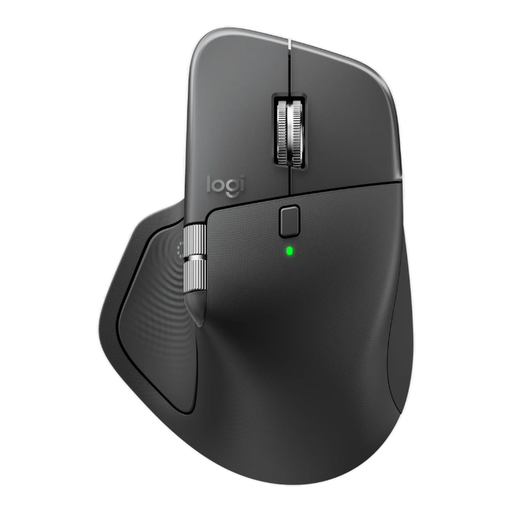
Logitech MX Master 4 for Business, Graphite

Logitech MX Master 4 for Business, Graphite

May suit you if you want to scroll quickly and precisely while editing text; the product description also mentions quieter clicks for shared workspaces.

The product name lists 8K DPI, a Logi Bolt receiver, Bluetooth and USB-C charging. According to the product description, you’ll need Logi Options+ to customise the buttons and scroll settings.

View at Joybuy

HP 925 Ergonomic Vertical Mouse

HP 925 Ergonomic Vertical Mouse

May suit you if you want to try a vertical hand position; the model described is for right-handed use.

The product description lists Bluetooth or a receiver for connecting up to three devices, and a detachable wrist rest. Check that the connection is compatible with your computer.

View at Joybuy

Philips 3000 Series Wireless Mouse, SPK7378B/00, black

Philips 3000 Series Wireless Mouse, SPK7378B/00, black

May suit you if you want to reduce clicking noise in a shared workspace.

The product name lists 2.4 GHz, a USB receiver and 1600 DPI. The wireless connection described uses a USB receiver.

View at Joybuy

Trust Bayo II Ergonomic Mouse, wired, black

Trust Bayo II Ergonomic Mouse, wired, black

May suit you if you’re looking for a wired vertical mouse for right-handed use; the product description specifies a 57-degree angle.

This model connects via USB cable. The description also mentions two thumb buttons for browser controls.

View at Joybuy

Frequently asked questions

Do I need a horizontal scroll wheel for transcript editing?

Not necessarily. If you mainly navigate continuous text, a comfortable main scroll wheel is more important; a side wheel is useful if you also want to scroll horizontally.

Do I need to install software to use the Kensington Orbit Wireless?

According to Kensington, the Orbit Wireless works without installation. KensingtonWorks is optional for adjustments such as button settings and scroll speed; check that the software supports your computer.

How do I clean the Kensington Orbit trackball?

Kensington recommends gently removing dirt from the ball with a finger or a dry cloth.

What are my rights when buying a mouse online in the Netherlands?

For online purchases from a business, you generally have a 14-day cooling-off period; check the applicable terms and conditions. Dutch law also provides a legal guarantee, with no fixed statutory guarantee period. If a product is faulty, the seller is your point of contact.

Does Dutch health and safety legislation require a particular type of mouse?

Government guidance does not specify a particular mouse model. The obligations described apply to employers and safe screen work, including alternating screen work with other tasks or taking a break; this is not automatically a legal product requirement for every individual buyer.
