
Form designer using a hot desk
You work at different desks and want to select form fields accurately without needing much space for your mouse. If you work on glass, Logitech specifies that the MX Anywhere 3S supports tracking on glass.


First, choose a mouse that suits your hand and the desk space available. If you work directly on glass, check explicitly whether the model supports tracking on glass. A compact mouse, vertical mouse or trackball may suit a different working style, but none of these options will prevent glare on your screen.
You work at different desks and want to select form fields accurately without needing much space for your mouse. If you work on glass, Logitech specifies that the MX Anywhere 3S supports tracking on glass.
You use your mouse directly on glass and want to know whether its sensor supports that surface. Logitech and HP specify tracking on glass for certain models, so check the details of the version you’re considering.
You pay attention to hand size, posture and ease of use during long work sessions. A suitable mouse won’t prevent reflections on your screen; Arboportaal advises positioning your viewing direction parallel to the window.
Start with the surface and space you work in, then compare the shape, scrolling controls and connection options.
| What to consider | What should you check? | Who is this important for? |
|---|---|---|
| Surface and cursor control | Check whether tracking on glass is specifically mentioned and whether you can adjust the cursor speed. | If you’re selecting small form fields on a glass surface, you’ll want to know whether the sensor works on it and whether you can adjust the cursor. Around 33% of consumers prioritise surface and cursor control. |
| Fit and hand comfort | Compare the shape, hand size and left- or right-handed version. Don’t assume that an ergonomic claim guarantees a particular benefit. | For long work sessions, you’ll want a shape that suits your hand, or perhaps stationary controls if there’s little room to move the mouse. Around 25% of consumers prioritise fit and hand comfort. |
| Navigation and scrolling | Check which scrolling directions and customisable features you use, and whether they require software. | If you work through long design pages or often scroll horizontally, suitable wheel controls and shortcuts can be useful. Around 25% of consumers choose a mouse primarily for navigation and scrolling. |
| Connection and requirements | Check Bluetooth support, available USB ports, whether a receiver is included and whether any software is required. | If you move between workspaces or prefer a wired connection, you’ll want to know in advance which connection and accessories the version requires. Around 17% of consumers prioritise connection and requirements. |
Tracking on glass relates to the surface beneath the mouse; it won’t change reflections on your screen.
Assess the surface for your mouse separately from the position of your screen and window coverings. Arboportaal advises positioning your viewing direction parallel to the window.
Hand size, design and connection vary by model. A claim about its shape doesn’t guarantee that a model will fit your hand or reduce discomfort.
Check the fit, whether it’s designed for left- or right-handed use, and the connection before you choose.
According to Logitech, the Logi Bolt receiver isn’t included with the standard MX Anywhere 3S.
Check the exact version, what’s in the box and the connections available on your computer.
According to ACM, statutory guarantee in the Netherlands has no fixed duration. What you can expect in terms of a product’s lifespan depends, among other things, on the product and its price.
Keep your proof of purchase and contact the seller if a product breaks sooner than you could reasonably have expected.
The Logitech models mentioned offer different ways to work, from compact designs to vertical mice and more fully featured options.
The HP 715 is a compact, symmetrical model for anyone considering tracking on glass and switching between devices.
The wired Orbit with scroll ring offers stationary cursor control for desks with little room to move a mouse around.
The wired Verto 22885 is a vertical mouse for anyone who doesn’t want a wireless connection or the need to recharge.
These Joybuy mice differ in their cursor settings, scrolling controls and connection options. These features can help you compare models, but don’t in themselves tell you whether a sensor works on glass.
 No image available
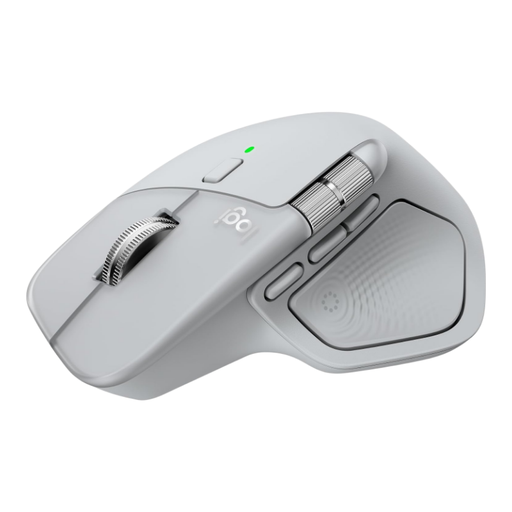
An option to consider if you want to compare horizontal and vertical scrolling and customisable controls for design work.
Logitech specifies tracking on glass. The mouse is designed for right-handed use; Logi Options+ is required for customisable actions.
 No image available
A model to compare if adjustable cursor sensitivity and a choice of wireless connections are important to you.
The product description lists five DPI settings, from 800 to 4000, and 2.4 GHz or Bluetooth connectivity. It also says you can switch between up to three devices.
 No image available
An option to consider if you want to compare several connection types and are looking for a fit for medium to large hands.
The product name lists a PAW3311 sensor and 24000 DPI. The product description mentions wired, 2.4 GHz and Bluetooth connectivity, as well as a magnetic charging dock.
 No image available
A compact option to compare if you want to switch between RF and Bluetooth connections.
The product description lists both connection types and adjustable DPI of up to 4020. Dell Peripheral Manager is required to adjust the DPI and polling rate.
 No image available
An option to compare if you’re looking for a wireless mouse for accurate pointing and a quieter working environment.
The product name lists a 1600 DPI optical sensor. The description mentions quiet clicks and a USB receiver for the 2.4 GHz connection; the shape is designed for right-handed use.
No. Tracking on glass relates to the surface beneath the mouse, not reflections on your screen. Arboportaal advises positioning your viewing direction parallel to the window; suitable window coverings may also be worth considering.
It depends on the model and feature. Logitech lists Logi Options+ for customisable features on the MX Master 4, while HP lists HP Accessory Center for the HP 715 settings. Check beforehand that the software supports your operating system.
In the Netherlands, employers must provide suitable display screen workstations for their employees. Arboportaal specifies adequate lighting and a well-adjusted contrast between the screen and its surroundings. These obligations relate to the employer and the workplace, not to buying one specific mouse.
In many cases, online purchases made at a distance from a business in the Netherlands come with a 14-day cooling-off period. Statutory guarantee also applies, with no fixed end date in the Netherlands; what you can expect in terms of a product’s lifespan depends, among other things, on the product and its price. Check the terms of your specific purchase: a manufacturer’s guarantee doesn’t replace your statutory rights.
For the wireless Orbit with scroll ring, Kensington advises gently cleaning the ball with a finger or a dry cloth. For another version, follow the instructions provided with it.