
Students in a quiet or shared room
You want to write and proofread your letter without distracting clicking sounds. Check whether quiet buttons are listed for the exact model.


Choose a mouse that’s compatible with your laptop, then decide whether quiet clicks, a comfortable fit for your hand or a compact desk matters most to you. A Bluetooth mouse such as the Logitech M240 Silent leaves a USB port free; a mouse with a receiver needs a compatible port. An ergonomic shape alone is no guarantee that it will prevent discomfort.
You want to write and proofread your letter without distracting clicking sounds. Check whether quiet buttons are listed for the exact model.
You want to know in advance whether you can connect the mouse via Bluetooth or need a USB receiver.
You’re looking for a shape that suits your hand, and want to be able to vary your posture and tasks. An ‘ergonomic’ label alone doesn’t tell you whether the mouse will feel comfortable.
First, check which connections your laptop supports. Then weigh up clicking noise, how the mouse fits your hand, cost and the space on your desk.
| What to consider | What should you check? | Who is this important for? |
|---|---|---|
| Clicking noise in your room | Check that quiet clicks are explicitly listed for the exact model. | If I’m proofreading my letter repeatedly in a quiet or shared room, I want to keep clicking noise to a minimum. Around 25% of consumers prioritise quiet operation. |
| Connection to your laptop | Check Bluetooth support, available USB-A ports and how the exact version connects. | If I have few spare ports, I want to make sure my laptop can connect to the mouse. Around 25% of consumers give connection compatibility top priority. |
| Comfort for your hand during longer sessions | Check the recommended hand size and try the grip if possible. | During longer writing sessions, I want a shape that suits my hand and the option to vary my tasks. Around 19% of consumers prioritise how the mouse fits their hand. |
| Purchase and running costs | Check the current total price and whether you’ll need to buy a battery or adapter later. | If I’m keeping an eye on my spending, I also want to allow for any extra parts I might need. Around 19% of consumers focus mainly on the total cost. |
| Desk space | Check the dimensions and how much room the mouse needs to move; assess the grip separately. | If my desk has limited space or I often take the mouse with me, I want a compact model. Around 12% of consumers prioritise limited desk space or portability. |
A mouse with a receiver needs a compatible port. HP says the 280 Silent needs a spare USB-A port; Logitech describes the M240 Silent as a Bluetooth mouse that doesn’t need a dongle.
Check how the exact version connects and what’s included in the box.
If your laptop doesn’t have a compatible spare USB-A port, check whether you’ll need an adapter for the receiver.
Arboportaal highlights repetitive movements and static strain when working at a screen. Kensington lists different hand sizes for individual mouse models; this doesn’t prove that a particular shape will prevent discomfort.
Assess the grip and hand size, try the mouse if possible, and vary your tasks and posture.
The M240 Silent is a Bluetooth option; the Pebble Mouse 2 M350s has a slim design and can switch between devices.
The Primo Bluetooth and Yvi+ Silent are two different compact options.
The HP 280 Silent is a wireless mouse with quiet clicks and a USB receiver.
The M20 Plus Silent is a quiet wireless mouse with a stowable nano receiver.
The Pro Fit Ergo Wired Mouse is a wired model with quiet clicks; the vertical wireless version has a different shape.
This selection of Joybuy products includes quiet mice with a USB receiver or Bluetooth, as well as a few compact or supportive options.
 No image available
An option for keeping clicking noise down if your laptop has a compatible USB port.
Connects via a 2.4 GHz dongle; the description lists support for Windows and ChromeOS. The dongle needs a USB port.
 No image available
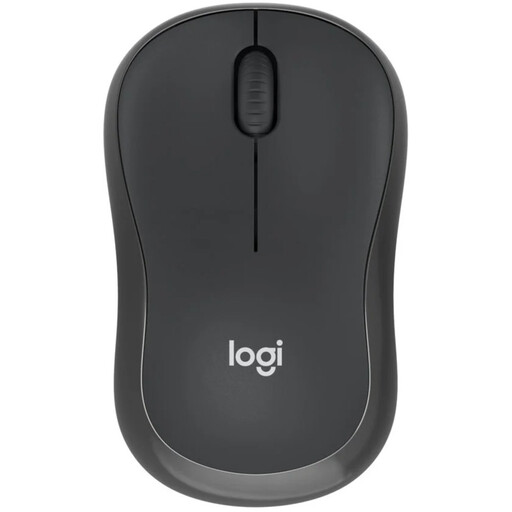
A Bluetooth option for anyone who wants quiet clicks and to keep a USB port free.
Your laptop needs to support Bluetooth. The description lists an AA battery and a compact shape suitable for both left- and right-handed users.
 No image available
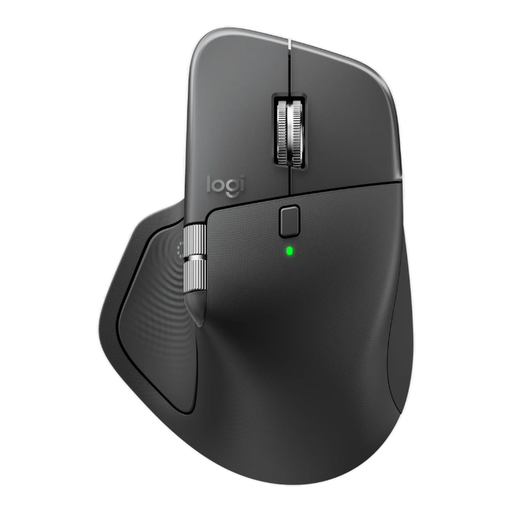
An option if you’re looking for extra scrolling controls and hand support as well as quiet operation.
The description lists Quiet Click, MagSpeed scrolling, a horizontal scroll wheel and a rechargeable battery. It’s designed for right-handed use; the included Logi Bolt receiver uses USB-C, and Bluetooth is also listed.
 No image available
A compact option for a small desk if you’re looking for quiet operation.
The description lists RF or Bluetooth connectivity and a design for both left- and right-handed users. The DPI can be adjusted up to 4020.
 No image available
A quiet mouse with a receiver for anyone with a compatible USB port to spare.
The title lists a 2.4 GHz connection, USB receiver and 1600 DPI. The receiver needs a USB port.
First, check whether your laptop supports Bluetooth and which USB ports are free. Logitech says the M240 Silent uses Bluetooth without a dongle; HP says the 280 Silent needs a spare USB-A port for its receiver. Always check the connection type for the exact version.
Check that the mouse is switched on and that the battery is fitted correctly. Pair a Bluetooth mouse through your laptop’s Bluetooth settings; for a model with a receiver, plug the included dongle into a compatible port. Logitech says the M240 Silent comes with a pre-installed AA battery.
This hasn’t been established for every user. Check whether the shape and hand size suit you, and take breaks from prolonged screen work. Arboportaal highlights repetitive movements and static strain as things to consider when working at a screen.
When you buy online from a business, you’ll usually have a 14-day cooling-off period, although some exceptions may apply. If a product is faulty, you should contact the seller. The Dutch government says there’s no fixed statutory guarantee period in the Netherlands.
Don’t put a used-up battery in your general waste; follow the instructions for battery recycling. The Dutch government says batteries must not be put in the bin.