Who is this buying guide for?

Students working through long tables

If you select observations individually and also need to scroll through lots of rows, a mouse with both precise and fast scrolling may be useful. Logitech describes these scrolling modes for the Signature M650 series and the MX Anywhere 3S.

Students in a shared room

If you want to keep the noise down while working through your counts, compare the click mechanism on the specific model. Logitech and Trust describe silent or quiet buttons on various models.

Students who spend long hours at a laptop

Hand size, which hand you use and posture can all matter when using a mouse repeatedly. Logitech describes the Lift as having a vertical shape designed to fit small to medium-sized hands; the Arboportaal also highlights the importance of changing your posture.

What should you look for when buying?

Quiet mouse with two scrolling modes

Best for: switching often between individual table rows and long lists, especially in a shared room.

Bear in mind: the right M650 version depends on your hand size and which hand you use; a conventional shape doesn’t guarantee comfort during long sessions.

Compact Bluetooth mouse

Best for: taking your laptop between your room and another study space without using a USB port for a receiver.

Bear in mind: the Logi Bolt receiver isn’t included with the MX Anywhere 3S. Also check whether its compact shape feels comfortable during longer sessions.

Vertical mouse

Best for: you’re mainly looking for a different hand position and the shape suits your hand.

Bear in mind: the shape takes some getting used to and won’t suit every hand; it’s still important to change your posture during long periods of computer work.

Simple wired mouse

Best for: you work in one place, have a suitable USB connection and don’t want to manage a wireless connection or batteries.

Bear in mind: the cable takes up desk space and makes the mouse less convenient to carry around.

What to consider What to look for Who is this important for?
Working with tables Check whether the scroll wheel can move both row by row and quickly, and whether it’s easy to switch between the modes you want. If I check counts row by row and also work through long lists, I want to be able to use both scrolling speeds. Around 27% of consumers give precise selection and fast scrolling their top priority.
Quiet clicks Check whether the specific version you’ve chosen has quiet buttons; this doesn’t tell you whether the scroll wheel or movement across the desk is quiet too. If I share a room, I want to keep clicking noise down while I study. Around 27% of consumers put quiet clicks first.
Fit and posture Check your hand size and which hand you use. If possible, try an unusual shape before buying, and change your posture and activities during long sessions. If I use a mouse for a long time, I want a shape that fits my hand and to pay attention to my posture. Around 20% of consumers name fit and posture as their main buying priority.
Laptop connections Check whether your laptop supports Bluetooth, which ports are available and whether a receiver is included. If I use my laptop in different study spaces, I want to know how the mouse connects and whether I need to bring a receiver. Around 13% of consumers prioritise connectivity and portability.
Buying and running costs Check what’s included and whether the model uses batteries, needs charging or comes with a receiver. If I want to avoid unnecessary spending or extra maintenance, I check what the mouse needs before buying. Around 13% of consumers give total purchase and running costs their highest priority.

Common pitfalls

  • Choosing based only on ‘ergonomic’ or ‘vertical mouse’

    The Logitech Lift is designed for small to medium-sized hands, and a left-handed version is also available. So the shape won’t fit every hand in the same way.

    Check your hand size and which hand you use before choosing. Also vary your posture and activities during long study sessions.

  • Assuming every wireless mouse comes with a usable USB receiver

    The Logi Bolt receiver isn’t included with the Logitech MX Anywhere 3S. Bluetooth is another connection option, if your laptop supports it.

    Check what’s in the box and compare it with the connections available on your laptop.

    If Bluetooth isn’t an option, you may need to buy a receiver separately.

  • Confusing an additional warranty with your statutory rights

    According to the Dutch government, there’s no fixed time limit for the statutory guarantee in the Netherlands. An additional warranty is separate from your statutory rights.

    Before paying, check what additional cover is being offered and the terms and conditions that apply.

Relevant brands

Logitech

For this buying guide, Logitech offers conventional models with different scrolling modes, a compact Bluetooth mouse and a vertical mouse.

  • Logitech describes the Signature M650 series as featuring SilentTouch and SmartWheel; the MX Anywhere 3S has Bluetooth and precise and fast scrolling.
  • Choose the M650 version to suit your hand size and which hand you use. The Logi Bolt receiver isn’t included with the MX Anywhere 3S.
  • Logitech positions the Lift for small to medium-sized hands; a vertical shape won’t suit everyone.

Trust

Trust offers the compact wireless Yvi+ Silent and the wired Basi, both described as having silent or quiet buttons.

  • Trust describes the Basi as suitable for both left- and right-handed users.
  • The Basi’s cable needs to suit your workspace. The Yvi+’s compact shape doesn’t guarantee comfort for every hand during long sessions.

HP

The HP 430 Multi-Device is an option if you want to connect devices using Bluetooth or a USB-A receiver.

  • HP lists customisable buttons and an AA battery for this model.
  • Consider whether you’ll use the customisable buttons and remember that you’ll need to replace the battery. The listed features don’t provide a basis for comparing its click noise with other mice.

Joybuy products for the task

This selection includes mice for quiet use, different hand shapes and various scrolling or laptop-use needs.

Logitech Signature M650 L Left White 910-006240

Logitech Signature M650 L Left White 910-006240

An option if you’re left-handed and want to scroll through tables both precisely and quickly; check that this version suits your hand.

Logitech describes the M650 series as featuring SilentTouch and SmartWheel for both precise and fast scrolling.

Joybuy

Logitech Lift Vertical Ergonomic Mouse Graphite

Logitech Lift Vertical Ergonomic Mouse Graphite

A vertical mouse to compare if you’re looking for a different hand position; check whether the shape suits your hand.

Logitech positions the Lift for small to medium-sized hands. A vertical mouse doesn’t replace changing your posture during long sessions.

Joybuy

HOFOTEK M311 2.4G+BT Silent Office Mouse, black and orange

HOFOTEK M311 2.4G+BT Silent Office Mouse, black and orange

An option to compare if you want quiet clicks and more than one way to connect.

The product name lists 2.4G+BT and an AA battery. Check which connection suits your laptop.

Joybuy
Trust Yvi+ wireless mouse with quiet buttons, blue

Trust Yvi+ Silent, 1600 DPI, blue

A compact option to compare if you want to take a mouse with quiet buttons between study spaces.

The wireless connection described uses a USB micro receiver; check that your laptop has a free port for it.

Joybuy
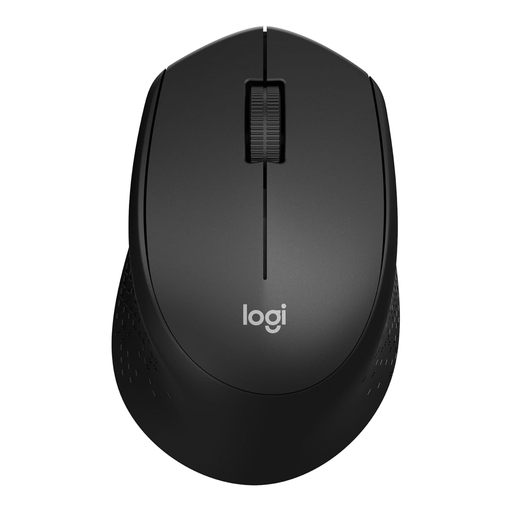
Logitech M330 Silent Plus wireless mouse, black

Logitech M330 Silent Plus Wireless Mouse, Black

A wireless option to compare if you want to keep clicking noise down while working through your counts.

The wireless connection described uses a nano receiver and requires a free USB port.

Joybuy

Frequently asked questions

Do I need a mouse with a high DPI for counting birds?

Not for this task alone. First, look for precise, easy-to-control pointing and a scroll wheel: Logitech describes both precise and fast scrolling for the M650 and MX Anywhere 3S. Check which controls feel right for you; a stated sensor sensitivity doesn’t measure how well you can carry out your analysis.

How do I connect a mouse if my laptop has few free ports?

Check whether your laptop supports Bluetooth and which connection any receiver uses. According to Logitech, the MX Anywhere 3S connects via Bluetooth; a Logi Bolt receiver isn’t included. HP describes the HP 430 as connecting via Bluetooth or a USB-A nano dongle.

Can a vertical mouse help if I spend a long time at my laptop?

A vertical shape gives you a different hand position, but fit varies. Logitech positions the Lift for small to medium-sized hands. The Arboportaal also highlights the importance of changing your posture during computer work; a mouse on its own doesn’t remove the need to do so.

What if a newly bought mouse is faulty?

According to the Dutch government, you’re entitled to a product that works properly in the Netherlands, and there’s no fixed statutory guarantee period. If a product is faulty, contact the seller to find a solution; normal wear and tear or damage caused by your own use isn’t automatically covered.

Can I return a mouse bought online if it doesn’t fit my hand?

According to the Dutch government, online purchases from a business usually come with a 14-day cooling-off period. Check the applicable terms and the seller’s returns information; purchases from private individuals aren’t covered by the same distance-selling rules.
