
Night-time gamer with a room-mate
Your main concern is making repeated clicks less disruptive, so you’re weighing specified silent switches against the controls your game requires. Razer lists silent switches for the Pro Click Mini.


If quiet clicks are your main concern for your room-mate, look for a mouse whose manufacturer specifies silent switches for the exact model. If you’re more interested in a shape and button layout that suit longer gaming sessions, compare gaming mice by their controls and connectivity, but don’t assume they’ll click quietly.
Your main concern is making repeated clicks less disruptive, so you’re weighing specified silent switches against the controls your game requires. Razer lists silent switches for the Pro Click Mini.
You’re thinking about how the shape, weight and power supply will work for you during longer gaming sessions. Logitech G lists the G309 LIGHTSPEED at 86 grams with one AA battery.
You want to assign actions to easy-to-reach extra buttons, and check that the software and button layout work with your computer and game. Trust lists six programmable buttons for the GXT 923 Ybar.
A good fit if: click noise matters more to you and your room-mate than a distinctly gaming-focused design.
The trade-off: silent switches don’t automatically tell you anything about scroll noise, fit or whether the button layout suits your game.
A good fit if: shape, extra gaming buttons or a particular power and connectivity setup are your priorities.
The trade-off: the specifications reviewed for the gaming models discussed here don’t confirm quiet clicks, so don’t choose one based on assumptions about noise.
| What to consider | What should you check? | Who is this important for? |
|---|---|---|
| Click noise | Check whether silent switches are specified for the exact model; bear in mind that this isn’t a measurement of scroll or desk noise. | If I play while my room-mate is asleep, I mainly want to reduce the noise of repeated clicking. Around 33% of consumers put click noise first. |
| Fit for long sessions | Compare your hand size, grip, reach to the side buttons and the mouse’s weight with the power setup you’ll actually use. | For long gaming sessions, I want a shape and weight that feel comfortable in my hand, not just a low number in the specifications. Around 27% of consumers give fit top priority. |
| Buttons for in-game actions | Check the button positions, the software required and whether the game supports the assignments you want. | If I want to perform several actions quickly, extra buttons need to be within reach and work with my game. Around 20% of consumers mainly choose a mouse for extra gaming controls. |
| Connectivity and power | Check whether your computer supports the required USB receiver or Bluetooth, and what type of power the model needs. | I don’t want to be caught out during a session by connectivity or power requirements that don’t suit my setup. Around 20% of consumers prioritise convenient connectivity and power. |
A silent-switch claim for one model doesn’t automatically apply to other mice from the same brand. For example, the quiet main buttons on the Trust Mydo tell you nothing about the click noise of the GXT 923 Ybar.
Check the claim for the exact model and weigh it against the fit and button layout.
Logitech G lists the G309 LIGHTSPEED at 86 grams with one AA battery and 68 grams with the POWERPLAY system instead of that battery.
Only compare weights for the same power setup you’ll use yourself.
The POWERPLAY setup requires that system instead of an AA battery, so remember to factor in the equipment needed.
A commercial guarantee doesn’t replace your rights with the seller. ACM ConsuWijzer explains that the seller must fix a problem free of charge if the product doesn’t meet what you could reasonably expect under normal use.
Keep your proof of purchase and report any fault under normal use to the seller.
The Pro Click Mini is a compact productivity mouse for anyone who values quiet clicks, but it isn’t marketed as a gaming mouse.
The G309 LIGHTSPEED is a gaming mouse for anyone looking for two wireless connection options and a design with a specified low weight.
The GXT 923 Ybar is a rechargeable gaming option with programmable buttons; the Mydo is a separate productivity mouse with quiet main buttons.
The Aerox 5 range is another gaming option for anyone who values multiple buttons.
These mice are designed for gaming, with differences in shape, button controls and connectivity; check whether each model’s features suit your gaming sessions.
 No image available
Could be a good fit if you want to assign in-game actions to extra buttons and prefer a wired mouse.
Optical sensor up to 26,000 DPI; 82 g; 23 buttons; Easy-Shift[+] and a 4D wheel. Wired connectivity.
The stated shape is designed for medium and large hands and a range of grip styles.
 No image available
Could be a good fit if you’re looking for a wireless gaming mouse with a rechargeable battery.
56 g; 26K DPI; PAW3395 sensor; 2.4G, USB-C and Bluetooth; 400 mAh battery.
The product name also mentions a magnetic base.
 No image available
Could be a good fit if you want to set up multiple in-game actions and choose between different connection options.
63 g; 24,000 DPI; PAW3311 sensor; six buttons; Bluetooth, 2.4G and USB-C.
The description mentions a magnetic charging dock and customisable buttons.
 No image available
Could be a good fit if you want to set up extra buttons and play wirelessly.
67 g; 12,000 DPI; PAW3311 sensor; seven programmable buttons; Bluetooth 5.0 and 2.4G; 400 mAh battery.
The product name also mentions USB-C, a Fire Button and 8KHz.
 No image available
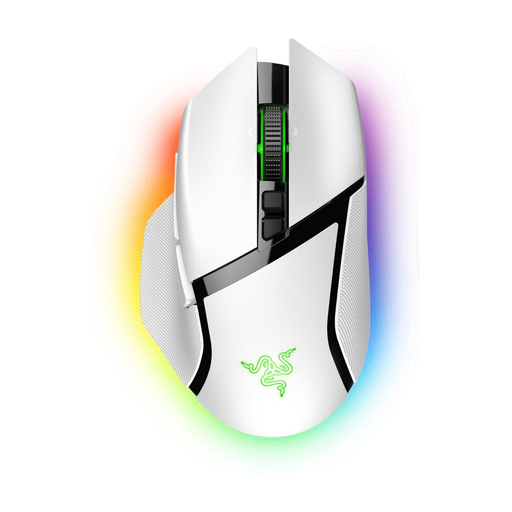
Could be a good fit if you want to assign lots of in-game actions and prefer wireless controls.
The product description lists 10+1 programmable buttons and connectivity via HyperSpeed or Bluetooth.
Battery life is listed as up to 90 hours with HyperSpeed Wireless. The Mouse Dock Pro for wireless charging is sold separately.
No. Razer lists silent switches for the Pro Click Mini, but positions it as a productivity mouse. Also check the fit, button layout and connectivity for your game; the available product specifications don’t provide a comparative noise measurement.
Before buying, check that your computer can use the required USB receiver or supports Bluetooth, and find out what type of power the model needs. Razer lists a dongle or Bluetooth for the Pro Click Mini; Logitech G lists both connection options for the G309 LIGHTSPEED.
Contact the seller. According to ACM ConsuWijzer, the seller must fix a fault free of charge if the product doesn’t meet what you could reasonably expect under normal use. This could mean a repair, replacement or refund. There isn’t one fixed statutory guarantee period for every mouse.
No. According to the Dutch Authority for Digital Infrastructure, Bluetooth uses frequencies that are licence-exempt, with no notification or registration requirement. Wireless radio equipment sold in the EU must also meet the requirements of the Radio Equipment Directive; when these are met, the manufacturer affixes the CE marking. This doesn’t confirm that an individual product offered for sale is compliant.