What should you look for when choosing?
Start with the controls you need every day: precise selection and document navigation, or a comfortable hand position and quieter clicks. Then compare the connection, customisation options and any software requirements for the specific model.
| What to consider |
What to look for when buying |
Who should pay particular attention? |
| Selecting text and scrolling |
Try the wheel, cursor speed and button placement to see if they suit your editing work. Check whether you actually use fast or horizontal scrolling. |
If I often switch between selecting small amounts of text and scrolling through long pages, I want to point accurately and navigate quickly. Around 31% of consumers say document navigation is their top priority. |
| Hand fit and posture |
Check your hand size, whether the model is designed for left- or right-handed use, and how easy the buttons are to reach. Also consider how your workspace is set up. |
For prolonged use, I want a shape and handedness that suit my hand, without expecting a different mouse on its own to improve my posture. Around 25% of consumers prioritise fit and posture. |
| Operating noise |
Check whether the claim about silent operation applies to the main buttons, the scroll wheel or both, and whether it applies to the exact model on offer. |
If I share my workspace, I want to reduce clicking noise without choosing features I don’t need. Around 19% of consumers say keeping their home space quiet is their top priority. |
| Connection and power |
Check Bluetooth support and available ports, and see whether the mouse needs a receiver, batteries or charging. Also check any software requirements. |
I want the mouse to connect to the computer I use without finding that a port is missing or the connection is incompatible. Around 13% of consumers prioritise connectivity. |
| Ease of use |
Decide which buttons and settings you’ll actually use; extra features may require software and aren’t automatically useful for editing text. |
If I mainly make straightforward text corrections, I want controls that suit my tasks without unnecessary settings. Around 12% of consumers say simplicity is their top priority. |
Joybuy products for document work
This selection includes conventional mice with scrolling features, a vertical mouse and options for anyone looking for silent or straightforward controls. The right model for you depends on factors including your hand, computer, connection and whether you need customisable features.
 No image available
Logitech MX Master 4 for Mac, Space Black
An option for working with long documents if you want fast vertical and horizontal scrolling and customisable buttons.
MagSpeed has free-spin and ratchet modes, while the side wheel supports horizontal scrolling. The description lists eight programmable buttons and an Actions Ring. Logi Options+ is required to customise them.
View at Joybuy
 No image available
Vertical wireless mouse with 6 buttons
A vertical model for anyone who wants to try a different hand position and adjust the cursor sensitivity.
The product name lists 800–1600 DPI and a 2.4 GHz connection. The description mentions three DPI settings and a 4-way scroll wheel; check the connection and power source for the exact model.
View at Joybuy
 No image available
AJAZZ AJ159 PRO, white
A wireless option if you want to adjust cursor sensitivity and are looking for a choice of connection types.
The product name lists 26K DPI, 2.4G, USB-C and Bluetooth, a 400 mAh battery and a weight of 56 g. The description mentions a magnetic base; according to the product warning, keep it away from pacemakers, medical implants and cards.
View at Joybuy
 No image available
HP 285 Silent Wireless Mouse
An option for anyone looking for basic wireless controls who values silent main buttons.
The product description lists noise reduction for the main buttons and a 2.4 GHz receiver. A wireless connection requires this receiver; also check which battery is needed and whether your computer has a compatible port.
View at Joybuy
 No image available
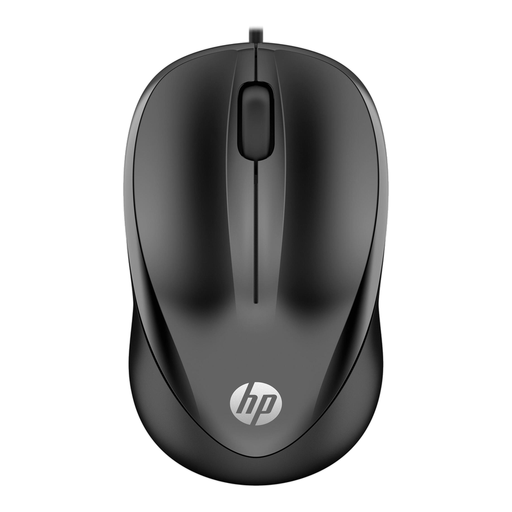
HP Wired Mouse 1000, USB Type-A
A wired option for a fixed workstation if you want to use a conventional mouse without a wireless connection.
The description lists a scroll wheel, three buttons, a 1200 DPI optical sensor and a 1.5-metre cable. According to the description, the symmetrical design is suitable for both left- and right-handed use; the connection is USB Type-A.
View at Joybuy
Frequently asked questions
Is a vertical mouse compulsory for a home workspace in the Netherlands?
The Dutch regulations cited don’t prescribe a specific mouse shape. Employers remain responsible for providing good and safe working conditions for employees, including when they work from home; the workspace should be suited to the work and the individual.
What applies if you spend more than two hours a day working on reports on a laptop?
For employees who do screen work for more than two hours a day, Arboportaal describes requirements stating that the screen and keyboard must not be attached to each other. Laptop users must therefore be able to use a separate screen or keyboard; a new mouse alone won’t sort out the rest of the workspace.
How do you set up a mouse for precise editing?
Choose a cursor speed that lets you select text reliably. For customisable buttons, check the software requirements for the exact model; Kensington says the Orbit Wireless has buttons that can be configured using KensingtonWorks.
What can you do if using a mouse causes discomfort?
Arboportaal recommends varying screen-based tasks, taking short breaks and adjusting your workspace. Don’t assume that a different mouse alone will prevent or resolve discomfort; if needed, discuss early signs with an appropriate professional.
What are your rights if a mouse bought online doesn’t fit or breaks too soon?
For a standard online consumer purchase, you’ll generally have a 14-day cooling-off period from delivery, subject to applicable exceptions. This is separate from your statutory guarantee: if the mouse doesn’t perform as you could reasonably expect under normal use, the seller must provide an appropriate solution. In the Netherlands, there isn’t one fixed guarantee period that applies to every mouse purchase.


