Who is this choice relevant to?

Designers with a glass desk

Want to check how the cursor moves on your own surface? Check whether the manufacturer specifies glass tracking for the exact model. Glass tracking says nothing about how easy your screen is to read in sunlight; Arboportaal provides separate advice on setting up workstations with display screens.

Designers who repeat tasks frequently

A scroll wheel and customisable buttons can be useful when working with long pages, multiple windows or recurring tasks. Logitech says that customisable actions work with Logi Options+; check that you can use the software on your computer.

Designers who prioritise hand position or space

If fit or limited room to move is your main concern, compare a vertical mouse, a trackball and a compact design as different ways of controlling your cursor. Logitech specifies a hand size for the Lift and offers a left-handed version; the ERGO M575S is controlled with your thumb.

What should you look for when choosing?

What to consider What should you check? Who should prioritise this?
Tracking on your desk Check that glass tracking is specified for the exact model, then test the mouse on your own surface. If my desk is made of glass, I want to know whether the sensor works on it before adding a mouse mat. Around 33% of consumers prioritise tracking on their own desk.
Page navigation and task controls Check that the scroll wheels and customisable buttons work with your software and computer. When working with long pages and recurring tasks, I want to navigate quickly without choosing features I won’t use. Around 25% of consumers prioritise design controls.
Fit for your hand Compare the shape with your hand size and check that the version is suitable for your preferred hand. For long design sessions, I want a grip that suits my hand, not just a mouse described as ergonomic. Hand position and fit are the top priority for around 25% of consumers.
Space and connectivity Check how much room you need to move the mouse, and whether Bluetooth is enough or you’ll need a receiver. At a small desk or between workstations, I want to know how much space the mouse needs and how it connects. Around 17% of consumers prioritise space and changing work setups.

Common mistakes when choosing

  • Confusing glass tracking with a solution to screen glare

    Glass tracking relates to the surface beneath the mouse; bright light can still make it difficult to see your landing page.

    Assess tracking and screen readability separately. If glare is a problem, adjust the position of your screen in relation to the window.

    Even with a mouse that works on glass, you may still need to adjust your workstation or use blinds.

  • Assuming a high dpi figure means the mouse tracks on glass

    The maximum dpi figure alone doesn’t prove that a sensor works on glass. For example, Trust’s product information for the Ozaa+ doesn’t specify glass tracking, although it is specified for certain other models.

    Check the claim about compatible surfaces for the exact model, or use a suitable mouse mat.

  • Choosing a compact or vertical mouse without checking the fit

    A compact shape, hand support and room to move address different needs, and not every option will suit every hand.

    Decide which need matters most and, if possible, try the grip and make some small cursor movements.

  • Assuming the receiver and customisable features will always work straight away

    Logitech says that the Logi Bolt receiver isn’t included with the standard MX Anywhere 3S. Some customisable features also require software.

    Before buying, check the connections, what’s in the box and the software options available on your computer.

    If you can’t use Bluetooth, you may need to buy a separate compatible receiver for the MX Anywhere 3S.

Brands to compare

Logitech

The range mentioned includes models for customisable design controls, compact use, a vertical grip and trackball control.

  • Logitech specifies glass tracking for the MX models mentioned, including the MX Master 4 and MX Anywhere 3S; this claim doesn’t automatically apply to every model from the brand.
  • According to Logitech, the Lift has a specified hand size and a separate left-handed version. Advanced customisation may require compatible software; check the fit and support on your own computer.

CHERRY

The MW 8C ADVANCED is a compact option for anyone looking for a mouse that works on a glass table, with a choice of Bluetooth or receiver connection.

  • For this model, CHERRY specifies four dpi settings up to 3000 dpi, glass tracking and an included nano receiver.
  • The glass-tracking specification is the manufacturer’s claim for this model. Check that the compact shape feels comfortable in your hand.

Trust

According to Trust, the Ozaa+ is designed for use with multiple devices and has a side scroll wheel.

  • For the Ozaa+, Trust specifies receiver or Bluetooth connectivity, quiet buttons and a sensor of up to 3200 dpi.
  • The product information provided doesn’t confirm glass tracking. So if you work on glass, don’t choose this model based on its dpi figure alone.

Joybuy products

This Joybuy selection includes mice with customisable design controls, a vertical grip and compact navigation. Check each model to make sure its connection, controls and shape suit your computer and workspace.

Logitech MX Master 4 for Mac, Space Black

Logitech MX Master 4 for Mac, Space Black

Suited to design work involving lots of horizontal navigation and assigning recurring tasks to buttons.

The description specifies eight programmable buttons and a MagSpeed scroll wheel. Logi Options+ is required for customisable features.

View at Joybuy
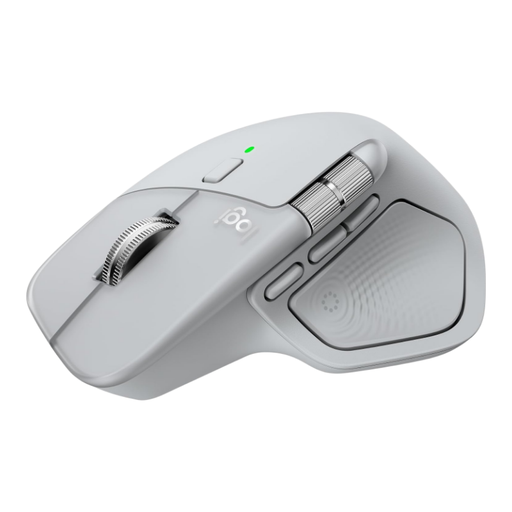
Logitech MX Master 4 Light Grey

Logitech MX Master 4 Light Grey

Suited to working with long pages and recurring tasks if you’ll make real use of horizontal scrolling and the customisable controls.

The description specifies eight programmable buttons, a thumb scroll wheel and MagSpeed scrolling. Check that you can use the required software on your computer.

View at Joybuy

Vertical wireless mouse with USB-C charging and three dpi levels

Vertical wireless mouse with USB-C charging

An option to compare if you’re looking for a vertical grip for office or home working; check for yourself whether the shape suits your hand.

The product name specifies three dpi levels: 800, 1200 and 1600. The description mentions Bluetooth and a 2,4 GHz connection.

View at Joybuy

Wireless vertical mouse with six buttons and USB-C

Wireless vertical mouse with six buttons

Suited to anyone looking to compare a vertical shape for office, home or laptop use; fit is a personal matter.

The product name specifies three dpi levels from 800 to 1600 dpi and two wireless connection options: Bluetooth and 2,4 GHz.

View at Joybuy

Microsoft Surface Arc Mouse Violet

Microsoft Surface Arc Mouse Violet

A compact option to compare if you want to carry a mouse between workstations. Check that the specified connection is compatible with your device.

The product information specifies a Bluetooth connection with Windows 10 and Windows 11.

View at Joybuy

Frequently asked questions

Will a mouse with glass tracking also prevent sunlight from shining on your screen?

No. Glass tracking relates to the surface beneath the mouse. For problems caused by reflections or glare, Arboportaal recommends adjusting the position of your workstation in relation to the window and using suitable blinds.

Do you need to install extra mouse software for design software?

Only if you want to use the relevant customisable features. Logitech says that the customisable features on the MX Master 4 require Logi Options+; also check compatibility with your operating system and any installation restrictions on your work computer.

What can you do if the cursor stutters?

First, check the power supply, connection and sensor. Logitech also recommends trying a different surface if tracking stutters; the troubleshooting guidance in question relates to gaming mice and isn’t a model-specific diagnosis for the mice in this article.

What are your rights if you’re unhappy with a mouse bought online or it breaks too soon?

For a standard online purchase in the Netherlands, you generally have a 14-day cooling-off period after delivery, although exceptions may apply. A faulty product is also covered by the legal guarantee for as long as you could reasonably expect it to last with normal use; this isn’t automatically exactly two years. ACM ConsuWijzer explains these consumer rights.

Are there legal requirements for a workstation beside a bright window?

For employers, Arboportaal describes requirements for safe workstations with display screens and protection from direct sunlight. There’s no general requirement for private buyers to choose a particular type of mouse; whether the rules for employers apply depends on your working relationship and workplace.
