
Designer with a crowded workspace
Wants to work without an extra mains plug and check whether available USB ports also need to remain free.


A Bluetooth mouse can free up a USB port if your computer supports Bluetooth; a wired USB mouse, meanwhile, doesn’t need its own mains plug. Then choose based on the controls, fit and power supply: a rechargeable model needs to be charged at a convenient time, while adjustable features are only useful if they suit your system and way of working.
Wants to work without an extra mains plug and check whether available USB ports also need to remain free.
Compares cursor settings, scrolling controls and customisable buttons when building and reviewing a landing page.
Considers hand size and left- or right-handed use, as well as the connection and variety of tasks.
First, decide whether mains sockets or USB ports are in shorter supply. Then compare the controls, fit and how the mouse is powered.
| What to consider | What should you check? | Which consumers does this matter to? |
|---|---|---|
| Connection | Check whether your computer supports Bluetooth and whether a USB port is free for a receiver or cable, if needed. | If I want to keep my workspace usable with limited connections, I first check which connection is actually in short supply. Connection is the main concern for around 40% of consumers. |
| Design controls | Check which features you use and whether the relevant software works with your operating system. | Those who want to tailor cursor movement, scrolling or commands to design work should focus on the controls. Around 30% of consumers give this the highest priority. |
| Fit and controls | Consider hand size, which hand you use and how much desk space the mouse or trackball takes up. | During longer screen sessions, I want a shape that suits my hand and the way I control it. This is the main concern for around 20% of consumers. |
| Power supply | Check how a rechargeable mouse is charged and whether a model with replaceable batteries suits the way you use it. | If I want to avoid charging during work, I compare recharging with replacing batteries. Around 10% of consumers put power supply first. |
Bluetooth, a USB receiver and a USB cable each make different demands on your workspace. Bluetooth can free up a USB port on a compatible computer; a receiver or cable will use one.
Before choosing a connection method, note how many mains sockets and compatible USB ports you actually have available.
A maximum DPI figure alone doesn’t tell you how comfortable the cursor controls will be for your design work. Customisable features are only useful if they suit your system and way of working.
Compare the features you actually need and check the software requirements for your operating system.
Hand size, which hand you use and the way you control a mouse or trackball all vary. A vertical mouse or trackball won’t automatically be the right shape for every user.
Check the size and whether it’s designed for left- or right-handed use; try the shape first if possible.
Logitech describes the MX Master 4 as having customisable features and MagSpeed scrolling. The Lift is a vertical mouse and is also available in a left-handed version.
Trust offers the compact Puck, which has Bluetooth and a USB receiver, as well as the rechargeable vertical Bayo+.
According to Rapoo, the MT350 offers Bluetooth and a USB receiver, adjustable DPI and replaceable batteries.
Kensington offers trackballs such as the SlimBlade Pro, with Bluetooth, a receiver and a wired connection.
This selection includes wireless mice with Bluetooth, a USB receiver or both, powered by rechargeable or replaceable batteries. Check each model to make sure its connection, controls and power supply suit your workspace.
 Image unavailable
Suited to anyone looking for Bluetooth and extra scrolling and control options for design work.
The description lists a built-in rechargeable battery, MagSpeed scrolling, horizontal scrolling and eight programmable buttons. Some customisations require Logi Options+; check the software and system requirements.
 Image unavailable
Suited to anyone looking for Bluetooth and adjustable controls; check first which connection works with your computer.
The description lists six programmable buttons and adjustable DPI. The stated battery life is up to 450 hours; actual battery life may vary depending on use. The shape is described as symmetrical for left- and right-handed use.
 Image unavailable
Suited to anyone looking for a rechargeable mouse with adjustable controls; check which connection is intended for your setup.
The product title lists Bluetooth, 2.4 GHz, USB-C, 26K DPI and a 400 mAh battery. The description mentions programmable buttons and a design for small to medium-sized hands. The manufacturer advises keeping the magnetic base away from pacemakers and certain other objects.
 Image unavailable
Suited to anyone looking for a wireless mouse with replaceable batteries who can use a USB receiver.
The description lists AA batteries and a wireless USB receiver. According to the description, this model doesn’t work via Bluetooth, so bear in mind that it will occupy a USB port.
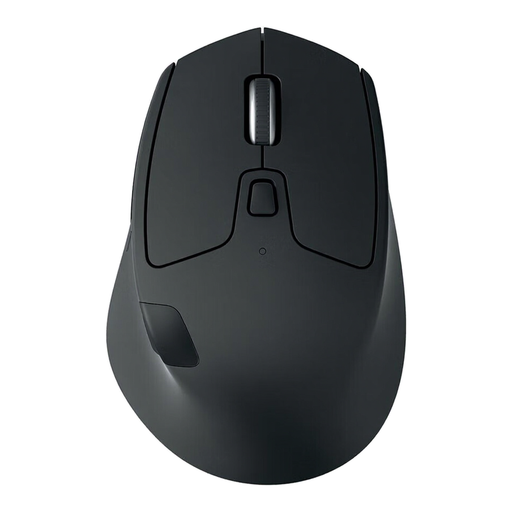 Image unavailable
Suited to anyone looking to combine Bluetooth, replaceable batteries and control across multiple computers.
The description lists Bluetooth, AA battery power and switching between up to three computers. The title specifies a right-handed version.
No. A wired USB mouse uses a compatible USB port and doesn’t need its own mains plug. If USB ports are in short supply, Bluetooth can free one up on a computer that supports it; a rechargeable mouse will still need charging later.
That depends on the model and its software. Logitech lists Logi Options+ for certain customisations to the MX Master 4 on Windows and macOS; check whether the features you want to use are available on your system.
No. Hand size and preferred way of using a mouse vary. Arboportaal describes repetitive hand movements and static strain when working at a screen; that doesn’t mean one mouse shape suits everyone. Check the size and which hand it’s designed for, and try a different shape first if possible.
The Dutch Government directs people to collection points for flat batteries and says not to put them in the bin. According to the Dutch Government, you can take discarded electrical appliances to designated collection points.
Don’t assume this applies to every model. The European Commission includes mice among the product categories covered by common charging requirements since 28 December 2024; check how the specific model charges. A mouse with replaceable batteries doesn’t automatically have a USB-C charging port.