
Precision-focused page designer
You move elements around and navigate long or wide design canvases. Adjustable controls and scrolling features may matter more than an unusual mouse shape. (Arboportaal; Logitech.)


Choose a mouse that suits your hand and the way you navigate long pages and wide design canvases. A traditional productivity mouse, a vertical mouse and a trackball each offer a different way to work. You should also readjust your workstation when switching between sitting and standing. None of these mice can, on its own, prevent problems caused by prolonged screen work.
You move elements around and navigate long or wide design canvases. Adjustable controls and scrolling features may matter more than an unusual mouse shape. (Arboportaal; Logitech.)
You use a mouse for long periods and want a grip that suits your hand. A vertical mouse may be worth considering, but it is no guarantee against discomfort. Make sure your workstation is set up properly when you sit or stand, too. (Arboportaal; Logitech.)
You want to control the cursor without repeatedly moving the mouse around your desk. A stationary trackball may be worth comparing. (Kensington.)
| What matters when buying? | What should you look for? | Who is this most relevant to? |
|---|---|---|
| Precise control and navigation | Check the adjustable cursor sensitivity, scrolling options, and whether the features work with your operating system and design app. | When I navigate long or wide design canvases, I want to be able to tailor the cursor and controls to the way I work. Around 31% of consumers prioritise navigation and precision above all else. |
| Hand fit and posture | Check your hand size, whether the model is designed for left- or right-handed use, and whether you can reach the buttons comfortably at both desk heights. | I want a grip that suits my hand and to be able to use my mouse without reaching too far, whether I’m sitting or standing. Around 31% of consumers put hand fit and posture at the top of their list. |
| Space next to the keyboard | Measure the available space with the desk at sitting and standing height. For a wired model, check that the cable can run freely in both positions. | If my desk has little room to move a mouse around, I want to know whether a stationary option will work for me. Around 23% of consumers prioritise limited mouse space. |
| Connectivity and software | Check which port or wireless connection you need, the software requirements and the power source for the exact model. | I want to know in advance whether the mouse works with my computer and whether the features I need are available. Around 15% of consumers put connectivity, software and running costs at the top of their list. |
A different mouse shape changes your grip, but it doesn’t replace setting up your workstation or varying your posture. A vertical mouse may also take some getting used to.
Try the grip where possible, check that the mouse suits your hand, and set up your workstation for both sitting and standing. Arboportaal recommends alternating between sitting and standing.
The 8K DPI tracking specified by Logitech for the MX Master 4 is a sensor specification, not proof that you’ll design a page more precisely with it.
Check that you can set the cursor speed to a comfortable level and that the scrolling and button features suit your workflow.
Kensington’s wired Orbit trackball has a 150 cm USB cable. Check that this length works with your desk and connection.
Check the cable route with the desk at both sitting and standing height, and make sure the cable won’t be pulled taut.
The MX Master range focuses on adjustable navigation, while the Lift offers a vertical grip. Each model caters to different priorities.
The Orbit with scroll ring is a stationary alternative if you have limited space to move the mouse around.
The Verto range offers vertical mice to compare with other shapes, such as the Lift.
This selection includes traditional productivity mice, a vertical mouse and a trackball, so you can compare different ways of working on design projects.
 Image unavailable
A traditional productivity mouse to compare if you spend a lot of time navigating long pages and wide design canvases.
According to Logitech, this model features 8K DPI tracking and MagSpeed scrolling. You’ll need Logi Options+ to customise features; specific haptic actions in apps may require supported plug-ins.
 Image unavailable
A vertical mouse to compare if you’d like to try a different grip.
This model is designed for right-handed use. Check that its shape suits your hand and that the controls feel comfortable while you work.
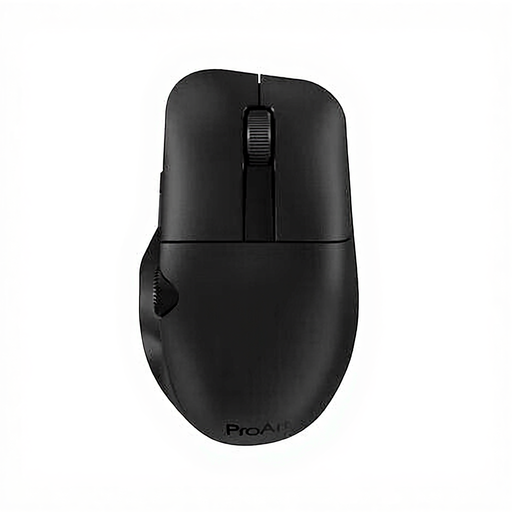 Image unavailable
A productivity mouse to compare if you want to tailor the controls to your design workflow.
Check which features and connections are available on the exact model and whether they work with your computer.
 Image unavailable
An option to compare if you’re looking for a left-handed mouse. The product description says this version is designed for left-handers with larger hands.
Check that the model and controls suit your hand and the way you work.
 Image unavailable
A trackball to compare if you have limited room to move the mouse around; you control the cursor with your thumb.
This model is designed for right-handed use. Check that its controls suit your preferences.
Dutch government guidance doesn’t specify a particular mouse shape. Employers do have responsibilities relating to healthy screen work and workstation setup, so choose a mouse that suits the work and the user. Arboportaal recommends alternating between sitting and standing.
In both positions, check that you can use the mouse without reaching too far, and adjust your furniture to suit your body measurements. Arboportaal recommends paying attention to reach distances and alternating between sitting and standing; a different mouse shape won’t replace setting up your workstation properly.
You’ll need Logi Options+ to customise the features described by Logitech. Specific haptic actions in apps also require supported plug-ins; check that these work with your operating system and design app.
For online consumer purchases in the Netherlands, ACM ConsuWijzer says you generally have up to 14 days from delivery to change your mind, although there are exceptions. If a product is faulty, the seller must offer a solution; according to the Dutch government, there is no fixed statutory guarantee period in the Netherlands.