
People planning cycle routes
You regularly zoom in and out and drag the map, so a wheel that’s easy to control precisely is worth prioritising. The OpenStreetMap Wiki describes how to zoom using a mouse wheel.


For planning cycle routes, a mouse with well-controlled scrolling and comfortable controls for dragging is a sensible starting point; a high DPI rating alone doesn’t tell you how precisely you can work with a map. In a shared office, click noise and connectivity matter too. If you use a mouse for long periods, hand size and the differences between a standard mouse, a vertical mouse and a trackball are also important.
You regularly zoom in and out and drag the map, so a wheel that’s easy to control precisely is worth prioritising. The OpenStreetMap Wiki describes how to zoom using a mouse wheel.
You want to keep clicking noise to a minimum and check that the mouse works with your office computer or laptop. The available connections and any workplace restrictions may affect your choice.
You use a mouse frequently and want to choose a shape that suits your hand and the work you do. A vertical mouse or trackball works differently from a standard mouse, so it’s worth considering the fit and how it operates.
When planning routes in a shared office, four different buying priorities could make all the difference.
| What to consider | What to look for | Who should give this extra thought? |
|---|---|---|
| Controlled zooming | Compare a wheel with precise increments or multiple scrolling modes, and try zooming and dragging in your own mapping software. | If I often switch between a map overview and street-level details, I want to be able to control small zoom increments. Around 33% of consumers prioritise precise map control above all else. |
| Quiet clicks | As well as the buttons, consider the sound of the scroll wheel. Descriptions such as ‘quiet’ aren’t a noise measurement for your office. | When colleagues work near me, I want my clicks to be as unobtrusive as possible without compromising comfortable map control. Around 27% of consumers prioritise a quiet shared workspace. |
| Fit for your hand | Compare the shape, hand size and preferred hand. A vertical mouse and a trackball are operated differently from a standard mouse. | When I use a mouse a lot, I want a shape that suits my hand and the way I work; I don’t see a different shape as a solution to discomfort. Around 27% of consumers say fit for their hand is their main concern. |
| Connectivity | Check Bluetooth support, available USB ports, IT rules and which receiver or accessories are included. | If I want to use the mouse with a shared work computer, its connection needs to work with the permitted ports. Around 13% of consumers put connectivity and management ahead of their other buying concerns. |
How zooming feels also depends on the mapping application and the scrolling mode you choose.
Try small zoom increments and dragging in the route-planning software you actually use. Don’t choose a mouse based solely on its advertised scrolling speed.
Logitech says the Lift is designed for small to medium-sized hands; CHERRY offers a separate MW 4500 LEFT version.
Check your hand size and whether you need a left- or right-handed version. Try the grip if you can.
Bluetooth and USB receivers are different connection options. The standard Logitech MX Anywhere 3S does not include a compatible Logi Bolt receiver.
Check which connections are permitted, which ports are available and what’s included with the exact version.
Logitech’s product ranges include standard mice with different scrolling features and sizes, as well as a vertical mouse.
The Orbit Wireless Trackball with scroll ring is an alternative to try if you’d prefer a stationary pointing device.
CHERRY describes the MW 4500 and MW 4500 LEFT as vertical mice, with a separate version for left-handed use.
This selection includes standard mice for scrolling and connecting to a shared workstation, as well as a vertical mouse for anyone who wants to try a different grip.
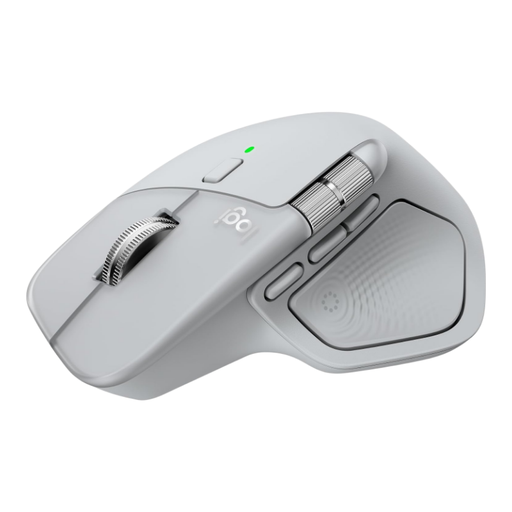 Image unavailable
The free-spin and ratchet modes give you different ways to scroll with the wheel. Try them in your mapping software to see which offers the best control.
The description mentions horizontal scrolling, quiet buttons and connectivity via Bluetooth or a USB-C receiver.
 Image unavailable
A vertical shape to compare with a standard mouse. Check whether the size and grip suit your hand.
The product name mentions USB-C charging, Bluetooth and 2.4 GHz, plus three DPI settings: 800, 1200 and 1600.
 Image unavailable
An option to consider if you want to compare different connections and adjustable cursor sensitivity. A DPI setting alone doesn’t tell you how well a mouse will work for route planning.
The product name mentions Bluetooth, 2.4 GHz, a Type-C cable connection and six DPI levels.
 Image unavailable
The product description mentions an ergonomic shape and fast scrolling for long documents. Try it for yourself to see if the controls suit your map work.
The description says a USB receiver is included and that there’s no Bluetooth connection.
 Image unavailable
An option to consider if click noise and connecting to multiple devices matter at a shared desk.
The description mentions quiet clicks, Bluetooth and 2.4 GHz connectivity for up to three devices, and one AA battery.
Not on the basis of DPI alone. You can zoom with the mouse wheel in the OpenStreetMap map viewer. Try adjusting the cursor speed and zoom increments in your route-planning software to see if you can control them comfortably.
It depends on the connection and the work computer. Check Bluetooth support, available USB ports and your IT policy. You may need additional software to customise certain features. Logitech says the standard MX Anywhere 3S is supplied without a Logi Bolt receiver.
Choose a mouse and workstation that suit your hand and the work you do. As the Arboportaal advises, take regular breaks from screen work or switch to another task. A different mouse shape isn’t a guarantee that discomfort will go away; if it persists, contact an appropriate healthcare professional.
No. The Dutch government says there is no fixed statutory guarantee period in the Netherlands. What you can expect from a product depends on the product and the circumstances; any manufacturer’s warranty is separate. Contact the retailer if a product is faulty.
The Dutch government lists collection points and recycling centres for unwanted electrical appliances. When private individuals buy a similar new appliance, they can use the old-for-new scheme. Used batteries must not go in general waste and can be taken to shops that sell batteries, among other places.