
Comparing wide timetables
You compare tables side by side and want to move smoothly both horizontally and vertically. Trust and Kensington describe scrolling controls for these different directions.


For wide timetable tables, a mouse with side-scrolling controls is worth considering; for long web pages, standard vertical scrolling may be enough. If you use your mouse for long periods, focus on how it fits your hand and how your workspace is set up. If you have little room to move a mouse around, a trackball could be an alternative. Also check that your chosen model’s connection is compatible with your computer.
You compare tables side by side and want to move smoothly both horizontally and vertically. Trust and Kensington describe scrolling controls for these different directions.
You use a mouse for extended periods and want a shape that suits your hand and workspace. The Arboportaal recommends a relaxed working posture and varying your tasks; Logitech offers the Lift in versions for left- and right-handed users.
You check timetables on, for example, a laptop and a second computer, and want the connection and switching options to suit your setup. Trust and HP describe mice that connect to multiple devices.
| What to consider | What to look for | Who is this important for? |
|---|---|---|
| Scrolling through wide and long tables | Check whether you need to scroll horizontally. Trust specifies a side scroll wheel for the Ozaa+. For vertical scrolling, Kensington mentions a scroll ring on the Orbit. | When I compare wide tables side by side, I mainly want to navigate horizontally with ease. Around 31% of consumers prioritise scrolling controls. |
| How it fits your hand during extended use | Consider your hand size and whether you need a left- or right-handed version. Also set up your workspace for a relaxed posture and vary your tasks. | When using a mouse for long periods, I want a shape and handed version that suit me. Around 25% of consumers prioritise how the mouse fits their hand over extra scrolling features. |
| Connecting to multiple devices | Check Bluetooth support, the available USB ports and how many devices the specific mouse supports. HP says the HP 435 supports up to two devices. | When I check timetables on different computers, I want a connection that works with all my devices. Around 19% of consumers give switching between devices top priority. |
| Limited desk space or ambidextrous use | Check whether a trackball with a wired USB connection suits your workspace and whether it is compatible with your computer. Kensington states that the Orbit K72337EU does not support ARM-based Windows computers. | At a desk with little space, I want to control the cursor without moving the whole mouse, or I’m looking for a mouse I can use with either hand. Around 13% of consumers put this need first. |
| Simple controls and power | Decide which features you’ll actually use and check whether the exact model has a rechargeable battery, a replaceable battery or a wired connection. | If I don’t need extra scrolling or switching features, I mainly want simple controls and a practical power option. Around 12% of consumers give simplicity and power top priority. |
A mouse’s shape alone is no proof that it will prevent or treat aches and pains. The Arboportaal also emphasises the importance of a suitable working posture, a well-adjusted workspace and varying your tasks.
Choose a version that suits your hand, and also pay attention to your posture and take breaks from prolonged screen work by switching tasks.
Connections and included accessories can vary between versions. Logitech describes the Bluetooth edition of the MX Master 3S separately from the business version.
Before buying, check the full model name, connection, packaging and available ports on your computer.
ACM ConsuWijzer explains that the Dutch legal guarantee does not have a fixed standard term of two years. What matters is what you could reasonably expect from the product.
Keep your proof of purchase and contact the seller if a fault develops after normal use.
The Lift and MX Master 3S Bluetooth edition offer different shapes and scrolling controls. Compare the specific version with your hand preference and how you plan to use it.
The Ozaa+ is designed for wide documents and connecting to multiple devices; the Zaya version reviewed offers simpler rechargeable operation.
The Orbit K72337EU is a trackball with a scroll ring, designed for those who want to control the cursor without moving the mouse across the desk.
The HP 435 is a conventional mouse for use with up to two devices.
These models suit a range of needs when comparing timetables, including horizontal scrolling, control in multiple directions, a vertical shape or connections to multiple devices.
 No image available
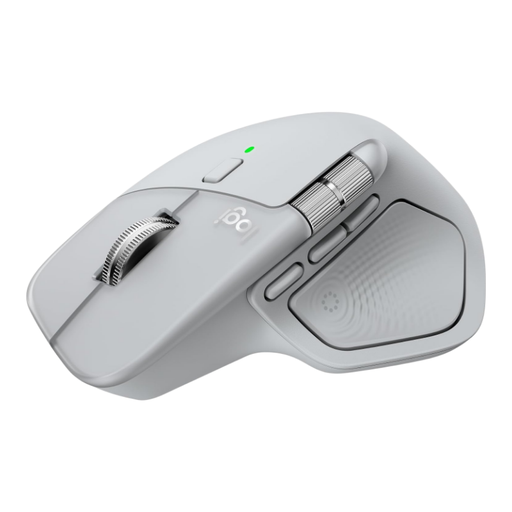
An option to compare if you’re looking for horizontal and vertical scrolling and connections to multiple devices.
The product description mentions a thumb wheel for horizontal scrolling, MagSpeed for vertical scrolling and up to three paired devices. This version is designed for right-handed use.
 No image available
An option if you want to scroll horizontally and vertically using a single control.
The product description mentions Bluetooth and a scroll surface that works in both directions. The stated compatibility is with Surface devices or Bluetooth devices running Windows 10/11.
 No image available
A vertical option to compare if you’re looking for a different mouse shape for extended use.
The product description mentions Bluetooth 5.3, an HP dongle, a rechargeable battery and connections to up to three devices. This version is for right-handed use.
 No image available
An option for wide tables if you want to scroll horizontally and switch between devices.
The product description mentions a side scroll wheel, a rechargeable battery and connections via a 2,4GHz receiver or Bluetooth to up to three devices. The title specifies a right-handed version; the mouse is described as large.
 No image available
A vertical mouse to compare if you’re looking for a version for small to medium-sized right hands.
The product description mentions Bluetooth or a USB receiver, four customisable buttons and SmartWheel scrolling. Check that the size and handed version suit you.
A side scroll wheel can be useful for comparing tables, especially if they’re wider than your screen. If you mainly read long web pages, consider standard vertical scrolling too. Trust specifies a side scroll wheel for the Ozaa+, while Kensington specifies a vertical scroll ring for the Orbit.
Check the connection options for the specific model and the ports or Bluetooth support on your computer. HP lists Bluetooth or a USB-A nano dongle for the HP 435; the Kensington Orbit K72337EU has a wired USB connection.
No. A mouse’s shape alone isn’t enough to ensure good posture. The Arboportaal recommends a relaxed posture, a well-adjusted workspace and varying your tasks. The shape Logitech describes for the Lift is no proof that the mouse will prevent or treat aches and pains.
According to ACM ConsuWijzer, when you buy as a consumer online, you generally have a statutory cooling-off period of up to 14 days after delivery; exceptions may apply. If a product breaks during normal use sooner than you could reasonably expect, you can make a claim against the seller under the legal guarantee. In the Netherlands, this guarantee does not have a fixed standard term of two years.
The official rules consulted do not prescribe a specific mouse model. According to the Arboportaal, the Working Conditions Decree requires employees to alternate screen work at set intervals with other work or a break. There are also requirements for workstation setup for employees who work with screens for more than two hours a day. These workplace rules do not automatically apply as purchasing rules for private individuals.