What should you look for?
Conventional productivity mouse
Choose this option if: you often navigate long or wide calendars and want to switch between scrolling and precise pointing. Logitech lists MagSpeed scrolling and customisable controls for the MX Master 4.
Bear in mind: extra features don’t prove that you’ll work faster or prevent discomfort, and the shape changes your hand position less than a vertical mouse does.
Vertical mouse
Choose this option if: your hand position is your main concern. Compare the shape with your hand size and choose the right-handed or left-handed version. Logitech’s Lift is designed for small to medium-sized hands and is also available for left-handed users.
Bear in mind: you may need time to get used to the different grip. Check that you can comfortably point to small calendar elements with it.
Trackball
Choose this option if: you have little room to move a mouse or want to try a stationary pointing device. The Kensington Expert Mouse Wireless has a scroll ring and four configurable buttons.
Bear in mind: it works differently from a regular mouse. Check the fit and try it out to see whether you can point accurately.
When designing calendars at a sit-stand desk, your main priority may be precise navigation, hand position, space, connectivity or configurable controls.
| What to consider |
What to look for when buying |
Who is this important for? |
| Precise pointing and navigation |
Check the cursor speed, available scrolling directions and how the mouse works with your design software. A high maximum dpi rating alone doesn’t prove that you’ll work more accurately. |
If you place lots of small elements and move around long or wide calendars, you’ll want to point precisely and navigate smoothly. Around 36% of consumers prioritise accuracy and navigation. |
| Hand position and fit |
Compare the mouse shape with your hand size and preferred hand, and check that you can point to small elements comfortably. |
If you’re mainly looking for a different hand position, size and handedness matter more than extra scrolling features. Around 29% of consumers prioritise hand position and fit. |
| Space next to the keyboard |
Check how much room the device itself takes up and whether its controls work for you when placing elements precisely. |
If you have little room to move a mouse, a trackball may be worth trying. Less mouse movement doesn’t automatically mean it will work better for you. Around 21% of consumers prioritise limited desk space. |
| Connectivity and configurable controls |
Check the operating system, required ports, and the software and connectivity requirements for the exact version. |
If you rely on specific connections or shortcuts, you’ll want to know in advance whether the mouse works with your computer and workflow. Around 14% of consumers prioritise connectivity and button customisation. |
Mice at Joybuy
This selection includes conventional productivity mice and vertical mice for navigation, configurable controls and a different hand position.
 No image available
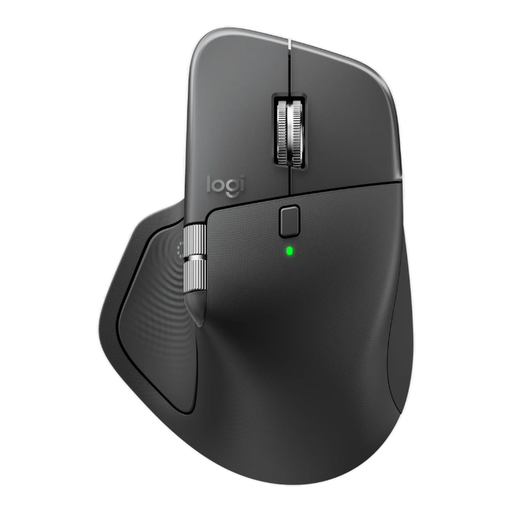
Logitech MX Master 4 Graphite
An option to compare if you navigate calendar overviews frequently and want to customise the controls.
MagSpeed scrolling with free-spin and ratchet modes, horizontal scrolling and eight programmable buttons. The description also mentions Bluetooth or a USB-C receiver, and a right-handed shape.
View at Joybuy
 No image available
Vertical wireless mouse with USB-C charging
An option to compare if you’re looking for a vertical shape and adjustable cursor speed.
The description lists Bluetooth and a 2.4 GHz receiver, six buttons and three dpi settings: 800, 1200 and 1600.
View at Joybuy
 No image available
Vertical wireless mouse with six buttons
An option to compare if you’re looking for extra scrolling and navigation controls as well as a vertical mouse.
The description lists a four-way scroll wheel, forward and back buttons, a 2.4 GHz connection, USB-C charging and dpi settings from 800 to 1600.
View at Joybuy
 No image available
Logitech MX Master 4 for Business
An option to compare if you want to scroll horizontally through wide calendar overviews and customise the buttons.
The description lists an 8K-dpi sensor, MagSpeed, haptic feedback and eight programmable buttons. Connects via Bluetooth or a Logi Bolt USB-C receiver; the shape is designed for right-handed use.
View at Joybuy
 No image available
HP 925 Ergonomic Vertical Mouse
An option to compare if you’re looking at a vertical mouse with extra buttons.
The description lists six buttons, Bluetooth and a USB receiver, connection to up to three devices and USB-C charging. This version is designed for right-handed use.
View at Joybuy
Frequently asked questions
Do you need a different type of mouse when standing at a sit-stand desk?
No, not necessarily. Adjust the desk height and mouse position so you can work comfortably without reaching too far, and change your posture regularly. This is workstation guidance, not a requirement to buy a particular type of mouse.
Do programmable buttons work the same way on every Mac and PC?
No, software and connectivity requirements vary by model. For example, Kensington says TrackballWorks works on Mac only via the 2.4 GHz connection. Check the requirements for the exact version and whether your calendar software uses the shortcuts you want.
What can you do if a mouse you bought online doesn’t fit or develops a fault?
According to the Rijksoverheid, when you buy online from a business you’re often entitled to a 14-day cooling-off period. If a product is faulty, you can contact the seller; in the Netherlands, there is no fixed statutory two-year guarantee period. The cooling-off period for changing your mind is separate from your rights if a product is faulty.
What should you look for in the product safety of a wireless mouse?
For a product with Bluetooth or a radio-frequency module, Ondernemersplein lists the Radio Equipment Directive as a relevant European directive. The manufacturer must assess the applicable conformity requirements and affix the CE marking. Check the information for the exact version; a brand name alone doesn’t prove that a specific product complies.


