Who is this relevant to?

Website creator working at a glass table

You want to point and select accurately on the surface you actually use. Bear in mind that screen glare is different from a mouse sensor problem. Logitech lists glass compatibility for certain models, but the stated glass requirements vary by model.

Club volunteer who spends a long time using a mouse

You regularly work with text, images and page layouts, and want to choose a mouse that suits your hand. Arboportaal points out that screen-based work involves repetitive movements and static strain on the neck, shoulders and arms, among other areas.

Creator with limited desk space

You have little room to move your mouse beside your laptop and want to know whether a stationary trackball would suit your work. A trackball stays in place, but you control the cursor with a ball instead of moving the mouse.

What should you consider when choosing?

Conventional mouse with glass compatibility

A good fit if: you actually use the mouse on glass and the specification applies to the exact version.

Keep in mind: glass compatibility does not mean your screen will remain easy to read in bright light; the Logi Bolt receiver is not included with the MX Anywhere 3S.

Vertical mouse

A good fit if: you want to try a different hand position during longer sessions and find the grip comfortable.

Keep in mind: you still need to move the mouse across your desk; glass compatibility has not been confirmed for the Trust Bayo II mentioned here.

Stationary trackball

A good fit if: you have little room to move the mouse itself.

Keep in mind: you control the cursor with a ball, so check that this way of working and the required connection suit your needs.

What to consider What to look for Who might find this more important?
Surface and light Check whether you work on glass and what glass requirements apply to the exact model. To reduce screen glare, Arboportaal recommends, among other things, positioning your line of sight parallel to the window and using suitable blinds if needed. If I work at a glass table, I want to control the cursor accurately on that surface, and I don't want to confuse screen glare with a sensor problem. Around 36% of consumers say the surface is their main concern when buying.
Hand position Consider whether the shape suits your hand and preferences; vary your tasks rather than relying on an ergonomic label alone. During long sessions involving text and page layouts, I want to choose a mouse grip that feels comfortable to me. Around 29% of consumers give hand comfort top priority.
Room to move the mouse Check how much space you have and whether you can comfortably select and scroll with a trackball. If I can barely move the mouse across my desk, I look for a way to control the cursor without moving the mouse itself. Around 21% of consumers put limited room to move the mouse first.
Connection and navigation Check Bluetooth or USB support, which receiver is included, and whether extra buttons or a scroll function would suit your work. I want the mouse to connect to my computer and work well for navigating pages. Around 14% of consumers make connection and navigation their main buying concern.

Things to watch out for when buying

  • Confusing glass compatibility with protection from bright light

    Tracking describes how the mouse sensor follows the surface beneath it; it says nothing about how easy your screen is to read. For screen glare, Arboportaal recommends considering your line of sight and using suitable blinds.

    First, work out what is causing the problem. Choose glass tracking only if you actually need to use the mouse on glass.

  • Choosing a vertical mouse based on the ‘ergonomic’ label alone

    The 57-degree angle is a Trust specification; the manufacturer's claim that it reduces wrist strain is not a proven outcome for every user. Your own hand, grip and workstation still matter.

    Consider whether the shape suits your hand, and remember to vary your activities during long sessions.

  • Assuming every wireless mouse comes with a USB receiver

    Logitech states that the Logi Bolt receiver is not included with the MX Anywhere 3S. Bluetooth may be an alternative if your computer supports it.

    Before buying, check which connections your computer supports and what comes with the exact version.

    If you want to use the mouse with a receiver, you may need to buy one separately.

Brands to consider

Logitech

The MX Master 3S and MX Anywhere 3S are conventional mice to consider if you need explicit glass compatibility.

  • For the MX Master 3S, Logitech specifies glass tracking on glass at least 4 mm thick. For the MX Anywhere 3S, Logitech mentions use on glass and Bluetooth pairing with up to three devices.
  • The Logi Bolt receiver is not included with the MX Anywhere 3S. Neither of these specifications guarantees that your screen will remain easy to read in direct sunlight.

Trust

The wireless Bayo II is a vertical option if you want to try a different hand position and can use a USB receiver.

  • Trust specifies a 57-degree angle, a rechargeable battery and a 2.4 GHz USB receiver for this model.
  • The claim about reducing wrist strain comes from the manufacturer and does not automatically apply to every user. Glass compatibility has not been confirmed for this model.

Kensington

The Orbit with Scroll Ring is a stationary alternative if you have little room to move a mouse.

  • Kensington specifies a symmetrical shape, a scroll ring and a 150 cm USB cable for the Orbit with Scroll Ring.
  • You control the cursor with a ball instead of moving the mouse. The manufacturer does not guarantee comfort for every user.

Joybuy products

These Joybuy mice offer different options for scrolling, connecting and working on websites. Check which features and connections suit your computer and workstation for each model.
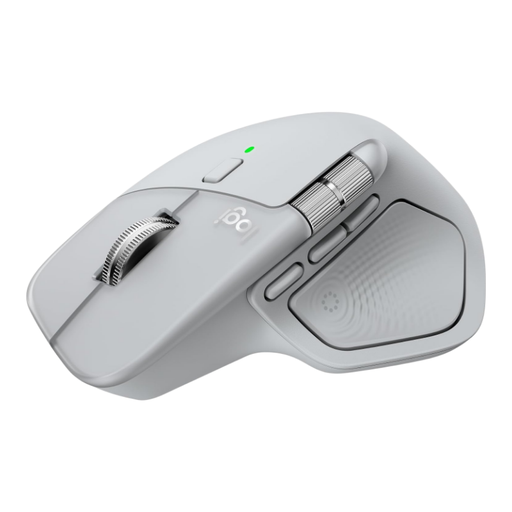
Logitech MX Master 4 Light Grey

Logitech MX Master 4 Light Grey

The scroll wheel and horizontal thumb wheel may come in handy when navigating pages and documents.

The product description lists Bluetooth and a USB-C receiver, with pairing for up to three devices.

The shape described is designed for right-handed use.

View at Joybuy

AJAZZ AJ159 PRO wireless mouse

AJAZZ AJ159 PRO

The product title lists three connection options: 2.4G, USB-C and Bluetooth.

The title lists a PAW3395 sensor, 26K DPI and a magnetic charging base; the description says it is designed for small to medium-sized hands.

The product description warns you to keep the magnetic charging base away from pacemakers and medical implants.

View at Joybuy

HOFOTEK M311 silent office mouse

HOFOTEK M311 2.4G+BT

The product description mentions quiet clicks and connection via Bluetooth or 2.4 GHz.

According to the description, the mouse can connect to up to three devices; Windows, macOS and Android are also listed.

The product title specifies an AA battery.

View at Joybuy

AJAZZ AJ200 AI MC wireless mouse

AJAZZ AJ200 AI MC

The product description lists six programmable buttons, which may help when working with pages and documents.

The title lists USB-C, 2.4G and Bluetooth connection options, along with a PAW3311 sensor with 24,000 DPI.

The product title describes an ergonomic shape for medium to large hands.

View at Joybuy

Logitech G G309 LIGHTSPEED wireless mouse

Logitech G G309 LIGHTSPEED

The product description lists six programmable buttons and wireless connection via LIGHTSPEED or Bluetooth.

The description mentions an AA battery or the optional POWERPLAY system.

According to the product description, glass is not supported.

View at Joybuy

Frequently asked questions

Will a mouse that works on glass prevent glare from the window?

No. Glass tracking relates to the surface beneath the mouse. To reduce screen glare, Arboportaal recommends, among other things, positioning your line of sight parallel to the window and using suitable blinds.

Do I need a separate receiver for the Logitech MX Anywhere 3S?

Not if you use compatible Bluetooth. Logitech lists Bluetooth pairing with up to three devices; the compatible Logi Bolt USB receiver is not included.

What should I check about a trackball's connection?

Check that you have a suitable USB port and enough room for the cable. The wired Kensington Orbit with Scroll Ring uses a ball to move the cursor, so also consider whether this way of working suits your selection tasks.

Can I return a mouse bought online in the Netherlands?

According to ACM ConsuWijzer, online consumer purchases generally come with a statutory cooling-off period of up to 14 days after delivery. Check which exceptions and returns conditions apply to your purchase; buying in a physical shop does not automatically give you the same right.

Is the manufacturer's warranty the limit of my rights as a consumer in the Netherlands?

No. ACM ConsuWijzer explains that your statutory warranty applies in addition to any manufacturer's or seller's warranty. If a product is faulty under normal use, the seller must put it right free of charge, according to ConsuWijzer; the statutory period is not a fixed number of years for every mouse.
