
Frequent spreadsheet analyst
You regularly work with large counting spreadsheets and want to move smoothly through the data and point to individual values accurately.


Choose a mouse based on what matters most to you: scrolling through long tables, finding a shape that suits your hand or tracking directly on glass. Glass tracking won’t reduce glare on your screen. If a window is causing a problem, Arboportaal advises positioning your workstation so that you look parallel to the window, or managing the incoming light in another way.
You regularly work with large counting spreadsheets and want to move smoothly through the data and point to individual values accurately.
You use a mouse for long periods and want to choose a shape that suits your hand and working posture. A different mouse is no substitute for varying your tasks or taking breaks.
You may use your mouse directly on glass and want to know whether tracking on that surface is specified for the exact model. This is separate from glare on your screen.
Decide which task matters most, then check that the controls, fit and connection suit your workspace.
| What to consider | What should you check? | Who is this important for? |
|---|---|---|
| Hand position when pointing for long periods | Check the fit for your hand and preferred hand; try the shape if possible. | If you point for long periods, you’ll want a shape that suits your hand and working posture. Around 30% of consumers put hand position first. |
| Navigating long tables | Check that the scroll wheel and any horizontal controls suit the way you work. | If you work with lots of rows or wide counting spreadsheets, suitable scrolling controls can help you navigate the data. Around 30% of consumers also give this priority. |
| Tracking on glass | Check whether the manufacturer specifies glass tracking for the exact model and whether you’ll actually be using it on glass. | If you use a glass desk without a mouse mat, tracking on that surface may influence your choice. Around 20% of consumers put this first; screen glare needs a separate adjustment to your workspace. |
| Connectivity and power | Check Bluetooth support, the type of receiver, available ports and what’s included in the box. | If you want to connect and charge your mouse in a way that suits you, check the connection options in advance. For around 20% of consumers, practical connectivity comes first. |
Glass tracking relates to the surface beneath your mouse. Daylight reflecting off your screen affects how easy it is to read, regardless of the mouse.
If you’ll actually be using your mouse on glass, check the specification for the exact model. Reduce distracting glare by repositioning your screen or using a blind; Arboportaal advises positioning your workstation so that you look parallel to the window.
A mouse shape may suit your hand, but that doesn’t guarantee you’ll avoid discomfort or make prolonged, uninterrupted use suitable. TNO explains that mouse use can increase the risk of problems affecting the shoulders, arms, wrists and hands.
Check your hand size and preferred hand, and try the shape if possible. Break up long periods of screen work with other tasks or a break, as Arboportaal advises.
Models vary in their connectivity and software features. If a receiver is missing or incompatible, you may need to use another connection method or buy a separate receiver.
Before buying, check what’s included in the box, which computer ports are available and whether your operating system is supported.
If you need to buy a receiver separately, it means extra hassle.
Logitech offers models for different needs: the compact MX Anywhere 3S for glass tracking, and the MX Master 4 for more extensive scrolling controls. The Lift is a vertical option.
The compact, rechargeable MW 8C ADVANCED is worth comparing if you’re looking for glass tracking and a choice of connection options.
The wireless Verto is a vertical mouse for anyone who wants to consider its shape and hand position.
The Orbit Wireless Trackball with scroll ring is a stationary alternative. You control the ball instead of moving the mouse across your desk.
This selection includes mice with scrolling features for long tables, as well as vertical models for anyone who wants to consider hand position.
 No image available
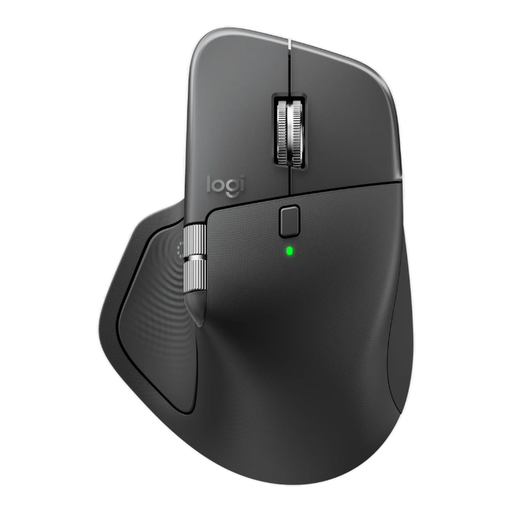
Worth comparing if you’re looking for scrolling controls for long counting spreadsheets.
Logitech specifies MagSpeed scrolling and glass tracking for the MX Master 4. Glass tracking relates to the surface beneath the mouse, not glare on your screen.
 No image available
Compare this version if its listed connection options and specifications suit your computer and workspace.
The product name lists 8K DPI, a Logi Bolt receiver, Bluetooth and USB-C charging.
 No image available
A vertical mouse worth comparing if hand position is an important factor for you.
 No image available
A wired vertical mouse worth comparing if you’re looking for a different hand position and a cable connection suits your workspace.
 No image available
A vertical option if its shape suits your hand and preferred hand.
Logitech describes the Lift as designed for small to medium-sized hands; this Joybuy version is for right-handed use. Check that this version suits you.
No. Glass tracking relates to the surface beneath the mouse. If glare is a problem, Arboportaal advises positioning your workstation so that you look parallel to the window. You could also adjust the screen position or use a blind.
That depends on the model and the features you want to customise. Logitech specifies Logi Options+ for customisable features on the MX Master 4 for Windows and macOS; check the manufacturer’s requirements for other models.
For a faulty product bought by a consumer in the Netherlands, you should be able to contact the seller for a solution. The Dutch Government states that the Netherlands has no fixed statutory warranty period. Online purchases from a business also often come with a 14-day cooling-off period, although exceptions apply; check which terms apply to your purchase.
No. There’s no rule requiring employees or private users to choose a particular type of mouse. However, employers do have obligations concerning safe screen work. Arboportaal mentions, among other things, alternating screen work with other tasks or taking a break, as well as requirements for the workstation.