For long bird-count tables, a suitable scroll wheel is important. If you also work with wide spreadsheets, check whether the mouse supports horizontal scrolling. For extended use, hand size, hand preference and controls may matter more, while a shared desk calls for a connection that’s allowed on your work computer. A vertical mouse or trackball changes how you operate the pointer, but it doesn’t replace varying your tasks and posture.
Who is this guide for?
Analysing long count tables
If you spend a lot of time navigating rows, columns and reports, pay attention to the scroll wheel. If your spreadsheets are wide, check for horizontal scrolling too. Logitech describes several vertical scrolling modes for the Signature M650, while HP lists four-way scrolling for the HP 480 Comfort.
Using a mouse for extended periods
When using a mouse for long periods, hand size and hand preference can influence your choice of shape. Arboportaal notes that working at a screen can involve repetitive movements and static strain, and that varying your working posture is important.
Hot-desking at a shared desk
If you move between workspaces or computers, check the connection, whether a USB receiver can be used and whether you’re allowed to install configuration software on your work computer. Click noise may also be a consideration at a shared desk.
What should you look for in a mouse for analysing bird counts?
Conventional mouse
A good fit if: you want familiar controls for working through lots of table rows and documents.
Keep in mind: fast vertical scrolling isn’t the same as horizontal scrolling. Check which direction you need to navigate your spreadsheet.
Vertical mouse
A good fit if: you want to try a different hand and forearm position, and the shape suits your hand.
Keep in mind: check which hand the model is designed for, and don’t treat manufacturers’ claims about reducing strain as a guarantee against discomfort.
Trackball
A good fit if: you want to control the pointer without moving the whole device across your desk.
Keep in mind: it may take time to get used to the controls, and the ball housing needs to be kept clean to prevent dirt building up.
| What to consider |
What should you check? |
Who is this important for? |
| Navigating tables |
Check the scrolling modes and, for wide spreadsheets, whether four-way or horizontal scrolling is available. |
If I often switch between rows and wide tables, I want to navigate in both directions; around 33% of consumers put table navigation first. |
| Fit and posture |
Check the hand size and hand preference for the exact model; try out the shape if possible. |
When using a mouse for long periods, I want a shape that suits my hand, without losing sight of my working posture; around 27% of consumers put fit and posture first. |
| Connecting at work |
Check Bluetooth support, available USB ports, IT approval and which accessories are included. |
If I move between shared workspaces, I want to know which connections are allowed there; around 20% of consumers put workplace connectivity first. |
| Click noise |
Check whether the exact model has quiet buttons; try the scroll wheel too, if possible. |
If I work close to colleagues, quieter clicks may help keep the surrounding area calm; around 20% of consumers put this first. |
Common buying mistakes
-
Confusing fast vertical scrolling with horizontal scrolling
A scroll wheel for fast vertical navigation won’t automatically take you to other columns in a wide spreadsheet.
For spreadsheets, check specifically whether the mouse supports horizontal or four-way scrolling. HP lists this feature for the HP 480 Comfort, while Logitech describes vertical scrolling modes for the M650.
-
Assuming every ergonomic model suits every hand
Hand size and hand preference vary by model, even within the same product range.
Check the exact model and variant. Logitech offers separate left-handed versions of the M650 and Lift, among others.
-
Checking whether the connection works only after you’ve bought it
A shared or managed computer may have restrictions on Bluetooth, USB receivers or configuration software.
Check which ports are available and ask which connections and software are permitted. According to Trust, the Trust Bayo II uses a USB micro receiver; don’t assume this version supports Bluetooth.
-
Seeing a vertical mouse as a complete solution for screen work
A different mouse won’t automatically change how your workspace is set up or how often you vary your posture and tasks.
Assess your workspace as a whole, and vary your tasks and posture. Arboportaal emphasises the importance of changing things up when working at a screen.
Brands to consider
Logitech
The models mentioned range from conventional and compact mice to vertical designs.
- For the Signature M650, Logitech describes SmartWheel and separate size and hand options. The brand also lists a vertical design and a left-handed version for the Lift.
- According to Logitech, the MX Anywhere 3S can connect to up to three devices via Bluetooth.
- According to Logitech, the consumer version of the MX Anywhere 3S mentioned here doesn’t include a Logi Bolt receiver.
HP
The HP 480 Comfort is worth considering if four-way scrolling is important for your spreadsheets.
- HP lists four-way scrolling, Bluetooth and connections to up to three devices for this model.
- Check whether the programmable features you want are available on your work computer; HP says they require Accessory Center software.
Trust
The Bayo II is a vertical option for a workspace where a USB receiver and quiet buttons are suitable.
- Trust lists a stowable 2.4GHz receiver and two quiet buttons.
- Reduced strain is a claim made by Trust; don’t treat it as a guarantee against discomfort. Bluetooth isn’t listed for this model.
Kensington
The Orbit Wireless with scroll ring is a trackball alternative for anyone who’d rather not move the device across their desk.
- Kensington lists a design for left- and right-handed use, a scroll ring and a choice of Bluetooth or 2.4GHz.
- Kensington warns that dirt and dust in the ball housing can affect cursor movement; cleaning is part of its upkeep.
Joybuy products for this type of workspace
This selection includes conventional mice for navigating documents and vertical mice for anyone looking for a different way to work. When choosing, also check the hand preference, connection options and any software requirements for the exact model.
 No image available
HP 925 Ergonomic Vertical Mouse
A vertical mouse for right-handed use, with connectivity for switching between multiple computers.
The product description lists Bluetooth, an included receiver and connections to up to three devices. The wrist rest is detachable.
Joybuy
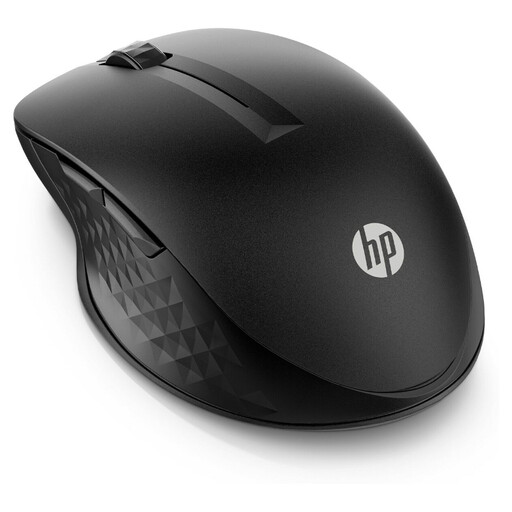 No image available
HP 430 Multi-Device Wireless Mouse
A conventional mouse to consider if you want adjustable scrolling speed and connectivity to multiple devices.
The product description lists Bluetooth or a USB-A receiver, adjustable scroll wheel speed and four programmable buttons. The stated cursor tracking is up to 4000 dpi.
Joybuy
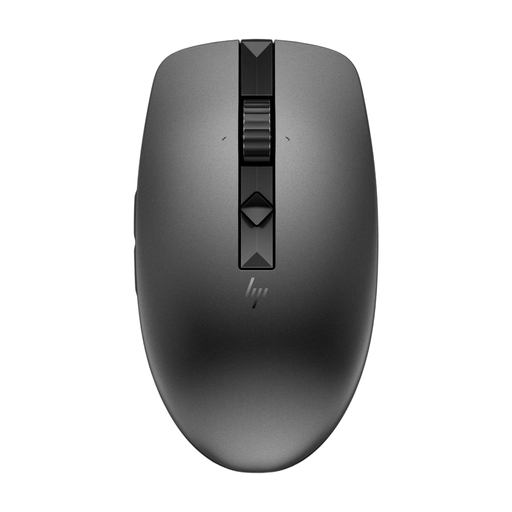 No image available
HP 635 Multi-Device Wireless Mouse
A conventional mouse for anyone who switches between devices and wants adjustable scrolling speed.
The product description lists quiet buttons and connections to up to three devices via Bluetooth or a receiver. HP says programmable buttons require Accessory Center software.
Joybuy
 No image available
Logitech Signature M650 L Left White 910-006240
This left-handed model is designed for anyone who wants to scroll through long documents row by row or at speed.
The product description lists SmartScroll, quiet clicks and connectivity via Bluetooth or Logi Bolt. This version is described as suitable for larger hands and has two customisable side buttons.
Joybuy
 No image available
Logitech Lift Vertical Ergonomic Mouse Graphite
A vertical mouse for anyone looking to try a different way of working, with a fit described as suitable for small to medium-sized right hands.
The product description lists a 57-degree angle, SmartWheel, quiet clicks and Bluetooth or an included USB receiver. The description says Logitech software is needed to customise the buttons.
Joybuy
Frequently asked questions
What should you check when setting up a mouse on a shared work computer?
Check which connection the exact model uses. If the computer is managed, ask whether Bluetooth, a USB receiver and any configuration software are allowed. According to Logitech, the Signature M650 supports Bluetooth Low Energy and Logi Bolt; according to Trust, the Trust Bayo II uses a USB micro receiver.
How do you maintain a trackball if the cursor moves jerkily?
Check the ball and its housing for dirt, and follow the manufacturer’s cleaning instructions. Kensington says that built-up dirt can cause cursor movement to become less smooth or jerky.
Does choosing a different mouse mean you can ignore workplace health and safety requirements for screen work?
No. Choosing a mouse doesn’t replace assessing your workspace and screen-based work. Arboportaal outlines requirements for safe screen work, varying your activities and setting up your workspace; what’s needed also depends on the specific workspace and how it’s used.
Is the legal guarantee on a mouse bought in the Netherlands always exactly two years?
No. According to the Dutch government, the Netherlands has no fixed statutory guarantee period: a product must be fit for purpose, and if it develops a fault, the seller is your point of contact. A manufacturer’s guarantee is in addition to this.


