Who is this guide for?

Regular spreadsheet analyst

You navigate tables, counts and long documents as you analyse data. Check whether the scroll controls work with the software and files you use; RTINGS notes that a good scroll wheel is useful when working with documents and spreadsheets.

Home worker who prioritises hand position

You use your mouse for long periods and want to consider its fit, which hand you use and your desk setup. A different mouse shape is no guarantee against aches and pains; Arboportaal also highlights the importance of a relaxed working posture and varying your tasks.

Analyst with limited desk space

You want to control the cursor without sliding a standard mouse around the desk, and are open to trying a trackball. Check that the ball controls and fit feel comfortable for your hand.

What should you consider when choosing?

Conventional productivity mouse

Choose this option: if you often navigate long documents or wide tables and the shape feels comfortable in your hand. RTINGS describes the MX Master 4 as a right-handed mouse with vertical and horizontal scroll controls.

Bear in mind: a thumb wheel is most useful if your software supports the scroll action you want; the shape will not necessarily suit every hand preference.

Vertical mouse

Choose this option: if you want to try a more upright hand position and the mouse suits your hand size. Logitech recommends the Lift for small to medium-sized hands and also offers a left-handed version.

Bear in mind: check you have the right-handed version and that pointing and scrolling remain comfortable for your work.

Trackball

Choose this option: if you have little room to move a standard mouse around. Kensington lists Bluetooth and a USB receiver for the Expert Mouse Wireless Trackball.

Bear in mind: using a ball feels different from using a standard mouse; Kensington says it is designed to fit medium to large hands.

What to consider What to look for Who is this important for?
Hand position and fit Check the size of your hand, whether the mouse is for left- or right-handed use, and where it will sit next to your keyboard. If I use the mouse for long periods, I first want to know whether the grip suits my hand and workspace. Around 36% of consumers prioritise hand position and fit.
Scrolling through tables Check vertical and horizontal scrolling in the analysis software you use. When working with long documents or wide tables, I want to navigate quickly to the relevant data. Around 36% of consumers make table navigation their top priority.
Limited desk space Consider how much room you have next to your keyboard and whether you would find a trackball comfortable to use. At a small desk, I want to control the cursor without constantly moving the mouse. Around 18% of consumers say limited room to move is their main consideration.
Connectivity and power Check your computer’s connections, what is included and how the exact model is powered. If I want to connect the mouse easily and keep it ready to use, I check these details in advance. Around 10% of consumers prioritise connectivity and keeping the mouse ready to use.

Common buying pitfalls

  • Assuming ‘ergonomic’ means no aches and pains

    A mouse’s shape is only one part of the picture: your working posture, desk setup and the variety of tasks you do all matter too. If you use a screen and mouse for long periods, it is important to consider all these factors together.

    Consider the fit and your desk setup together. If you start to experience discomfort, speak to a professional if necessary rather than relying on a product claim alone.

  • Choosing extra buttons without checking your analysis needs

    Extra wheels and customisable actions are not automatically useful; it depends on your work and the settings you use.

    Before choosing extra controls, check which scroll actions and shortcuts your analysis software supports.

  • Ordering a vertical mouse without checking the hand version

    The Logitech Lift is designed for small to medium-sized hands and is also available in a left-handed version. The different versions are not necessarily interchangeable.

    Before ordering, check the exact version and which hand it is designed for, and review the seller’s returns policy.

Brands to consider

The features mentioned apply to the product ranges reviewed and are not an endorsement of every model from a brand.

Logitech

The MX Master 4 we reviewed is designed for navigation and customisable controls; the Lift has a vertical grip for small to medium-sized hands and is also available in a left-handed version.

  • RTINGS describes the MX Master 4 as having a right-handed shape and two scroll wheels.
  • Logitech’s time-saving claim for Actions Ring is based on its own research involving specific tasks. It does not establish a time saving when analysing bird counts.

Kensington

The Expert Mouse Wireless Trackball we reviewed is an option for anyone looking for a trackball to use in a fixed position.

  • Kensington lists Bluetooth and a USB receiver as connection options.
  • The manufacturer says it is designed to fit medium to large hands; check whether it suits your hand.

Trust

The wireless Verto we reviewed is a vertical mouse with adjustable sensitivity.

  • Trust lists three sensitivity settings for the Verto: 800, 1200 and 1600 DPI.
  • The 60-degree angle and comfort benefits mentioned are the manufacturer’s descriptions, not independent clinical findings or features of every Trust mouse.

Mouse options at Joybuy

These product options include conventional and vertical mice for scrolling and use in a home office.

Logitech MX Master 4 for Mac, Space Black

Logitech MX Master 4 for Mac, Space Black

A conventional mouse option for anyone looking for a model with scroll controls and Bluetooth.

The product name lists Bluetooth, USB-C charging and compatibility with macOS, iPadOS and Windows.

View at Joybuy
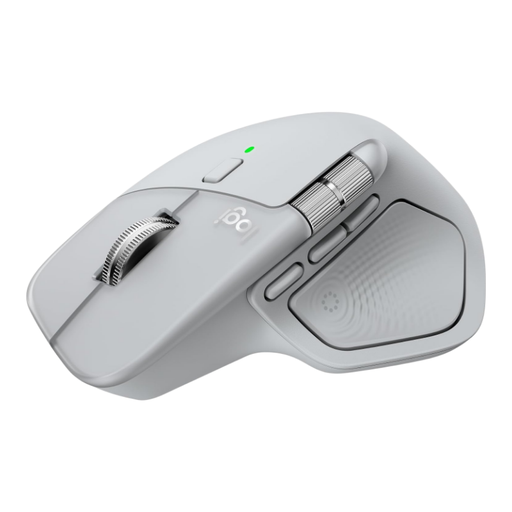
Logitech MX Master 4, Light Grey

Logitech MX Master 4, Light Grey

A conventional productivity mouse option for anyone looking for the MX Master 4 in Light Grey.

View at Joybuy

Wireless vertical mouse with USB-C charging

Wireless vertical mouse with USB-C charging

A vertical option for anyone who wants to try this grip at work or at home.

The product name lists Bluetooth and 2.4 GHz, along with three DPI settings: 800, 1200 and 1600.

View at Joybuy

Vertical wireless mouse with 6 buttons

Vertical wireless mouse with 6 buttons

A vertical mouse option for work at the office or home; the product name also mentions use with a PC.

The product name lists 2.4 GHz, USB-C and a sensitivity range of 800–1600 DPI.

View at Joybuy

NAXSIR rechargeable wireless mouse

NAXSIR rechargeable wireless mouse

A general-purpose wireless mouse option for anyone looking for a choice of connection methods.

The product name lists Bluetooth, 2.4 GHz, a Type-C cable connection and six DPI settings.

View at Joybuy

Frequently asked questions

Do you need a mouse with a horizontal scroll wheel for bird counts?

Only if you navigate wide tables and your software supports it. Sovon provides area data as an Excel spreadsheet; RTINGS says a side scroll wheel can help with spreadsheet work, but it is not essential for every analyst.

What should you look for in a vertical mouse or trackball?

For a vertical mouse, check the fit and make sure you have the right version for your hand; choose a trackball only if you find the ball controls comfortable to use. A trackball lets you control the cursor without sliding the whole mouse across the desk, but it works differently from a standard mouse.

What should you check about connectivity and power?

For the exact model, check that your computer can use the listed Bluetooth connection or USB receiver, what is included and how the mouse is powered. Kensington lists Bluetooth and a USB receiver for the Expert Mouse Wireless Trackball we reviewed.

Who is responsible if a mouse bought online does not work properly?

According to the Netherlands Authority for Consumers and Markets (ACM), the seller is responsible for the statutory guarantee if a product is faulty or does not conform to its description. This may include a free repair or replacement; a manufacturer’s guarantee is separate.

Can you return a mouse bought online if you do not like its shape?

For online purchases, ACM ConsuWijzer says you generally have a statutory 14-day cooling-off period after delivery, subject to legal exceptions. Check the seller’s returns information too; any additional returns period offered by a shop is separate from your statutory rights.
