
After tiny details in moss
You want individual structures to fill the frame, so you compare the magnification offered by the complete camera and lens combination.


If you want to photograph damp moss up close without carrying a separate lens, a compact camera with a built-in close-up mode could be a good fit. For individual details and more control over magnification and framing, a mirrorless camera with a suitable macro lens is another option. First decide whether you want to capture a whole cushion of moss or tiny structures. Then check the magnification, the space in front of the lens for lighting and, with a mirrorless camera, whether the right lens is included in the kit.
You want individual structures to fill the frame, so you compare the magnification offered by the complete camera and lens combination.
You want to show both the moss and some of the garden, and need control over framing and focus without always using maximum magnification.
You want to take photos close to the ground with minimal equipment, even when the moss or its surroundings are damp.
First, choose between a fixed-lens close-up camera and a mirrorless camera with a separate macro lens. Then compare magnification, focusing options and the protection offered by the complete setup.
A good fit if: you want to work close to moss on damp ground without changing lenses. According to OM SYSTEM, the TG-7 focuses from 1 cm in Microscope mode.
Keep in mind: the fixed lens gives you less flexibility to change lenses later. Also check whether there is room to position a light at close range.
A good fit if: you want to switch between garden scenes and close-ups. Canon specifies a maximum magnification of 1:2 for the RF 35mm F1.8 MACRO IS STM.
Keep in mind: the lens must be included in the offer or factored into your choice separately. Canon states that the EOS R50 does not have in-body image stabilisation.
A good fit if: you want to make tiny moss structures appear larger and place the focus precisely. According to their manufacturers, the M.Zuiko 60mm and Nikon Z MC 50mm lenses offer 1:1 magnification when used with a compatible camera body.
Keep in mind: the body and lens must be compatible. Nikon states that at the Z MC 50mm's minimum focusing distance, there is approximately 5 cm between the front of the lens and the subject.
| What to consider | What should you check? | Who should pay particular attention? |
|---|---|---|
| Magnification and framing | Check the maximum magnification of the exact lens or close-up mode, and think about whether you want to capture a cushion of moss or a tiny detail. | If you want individual structures to fill the frame, the magnification of the complete setup is crucial; around 36% of consumers prioritise magnification and framing. |
| Focus and lighting | Check that your chosen camera supports the focus-point sequence you want, and that there is room to position a light near the lens. | If you want the moss to appear sharp throughout its depth, precise focusing and practical lighting both matter; around 29% of consumers prioritise these points. |
| Convenience and equipment | Check whether the kit includes a suitable macro lens; a fixed-lens camera does not require you to change lenses. | If you want to head into the garden quickly with minimal kit, the equipment included makes a difference; around 21% of consumers prioritise convenience and size. |
| Protection from moisture | Read the protection specifications for both the camera body and lens. Don’t assume that one component’s protection applies to the other. | If you often take photos when the moss and garden are damp, check the whole setup; around 14% of consumers make protection their first consideration. |
Maximum magnification varies between specific lenses and cameras. Canon specifies 1:2 for the RF 35mm F1.8 MACRO IS STM, while OM SYSTEM lists 1:1 for the 60mm macro lens mentioned above.
Start with the size of the detail you want to photograph, then compare the maximum magnification of the exact model.
With a mirrorless camera, the body and lens work together to determine which close-ups are possible. The lens mount must also be compatible.
Check what the offer includes and whether the macro lens is suitable for the body before comparing the complete setups.
With a mirrorless camera setup, a suitable macro lens may be a separate part of your equipment.
Nikon lists a minimum focusing distance of 0.16 m for the Z MC 50mm, but at this setting there is approximately 5 cm between the front of the lens and the subject.
Check the working distance at your desired magnification and make sure there is still room to position a light near the moss.
Offers both a compact fixed-lens option and a mirrorless camera with a separate macro lens.
The EOS R50 with the RF 35mm F1.8 MACRO IS STM is a stated combination for switching between garden scenes and close-ups.
The NIKKOR Z MC 50mm f/2.8 is a 1:1 macro lens for a compatible Nikon Z camera.
The FE 90mm F2.8 Macro G OSS is a macro lens option for a compatible Sony camera with an E-mount.
Below are portable cameras described in their product names as being for vlogging or action use. Before choosing, check whether the camera is suitable for close-ups of moss and whether its macro capabilities are explicitly stated.
 No image available
The product name describes this model as a portable vlogging camera; check whether its close-up capabilities suit your moss photography.
The product name mentions a 360° rotating lens.
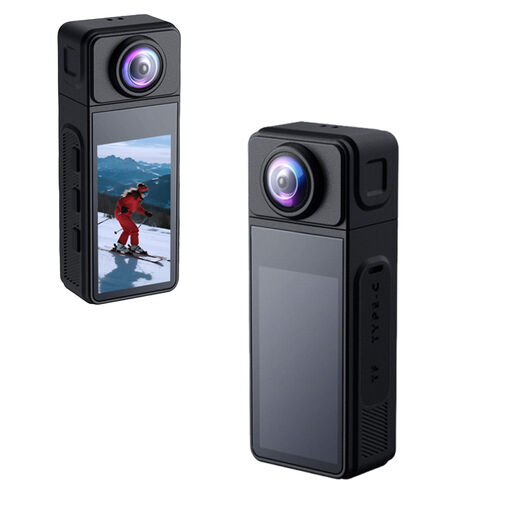 No image available
The product name describes this model as a mini action camera; check whether its close-up capabilities are suitable for photographing moss.
The product name mentions a 1.86-inch IPS screen, Wi-Fi and a Type-C connection.
 No image available
The product name describes this model as a vlogging camera; check whether its close-up capabilities are suitable for the details you want to capture in moss.
The product name mentions 4K, 64 MP, Wi-Fi and a lens that rotates through 330°.
 No image available
The product name describes this model as a camera for vlogging and photography; check whether its close-up capabilities suit your subject.
The product name mentions a 1-inch CMOS sensor, 4K/120fps video, 3-axis stabilisation and a 2-inch rotating touchscreen.
No. Choose the magnification to suit the framing you want. Less magnification may work for a whole cushion of moss; 1:1 can be useful for a tiny detail. Check the maximum magnification of the specific lens or close-up mode, not just whether it is labelled ‘macro’.
Choose your focus point carefully and, for a still subject, consider taking a series of shots with different focus points. Focus stacking combines these shots to create greater depth of field; check whether your chosen camera supports the sequence and any merging required.
If you’re buying a mirrorless camera, check whether the intended macro lens is included and which seller handles the purchase. ACM ConsuWijzer states that online purchases generally come with a statutory cooling-off period of up to 14 days after delivery, subject to exceptions. According to the Dutch government, there is no fixed general statutory two-year warranty period in the Netherlands; however, the seller must provide a product that is fit for purpose.
The Dutch Data Protection Authority describes an exception for images that you keep private or share only with a very limited group. That exception does not apply when publishing images of recognisable people more widely; in that case, consider which rules apply. This does not apply to a photo showing only moss.