
Maker creating a colour-critical portfolio
You want the tiles and grout to look realistic and consistent across a series of photos. Canon Europe explains that RAW files give you room to adjust the white balance afterwards.


For a portfolio photo, first try taking an overview and a close-up of your mosaic sample with your current camera, using a stable setup and carefully positioned lighting. If you decide to buy a camera, a mirrorless camera lets you choose a different lens later; a compact camera has a fixed lens, so check its focusing distance at the zoom setting you want to use. Colour, reflections and working distance are important considerations with both types of camera.
You want the tiles and grout to look realistic and consistent across a series of photos. Canon Europe explains that RAW files give you room to adjust the white balance afterwards.
As well as the whole sample, you want to show individual tiles, edges and grout lines. Nikon Netherlands and Canon Netherlands publish focusing information for specific lenses; check that the lens you use suits your working distance.
You want to create a useful overview without buying unnecessary extra equipment. The Consumers’ Association describes compact cameras as cameras with a fixed lens; first see whether your current camera and setup will do the job.
| What to consider | What should you check? | Who is this important for? |
|---|---|---|
| Colour reproduction | Check the white balance settings and, if you edit your photos, RAW support for the exact model. Take a test shot under the lighting you plan to use for the photo series. | I want the tile colours to look realistic and consistent across different photos. Around 36% of consumers say accurate colour reproduction is their top priority. |
| Fine details | Measure the sample and the available camera-to-subject distance; check the focusing range of the exact lens and take a test crop of the smallest detail. | I want grout lines, edges or small tiles to be clearly visible, not just the whole piece. Around 29% of consumers prioritise sharp detail. |
| Reflections and presentation | Try different lighting positions with a stable camera pointing straight at the work. If you’re using a filter, check that it fits the lens. | For glossy tiles, I want to control distracting reflections and present the work evenly. Around 21% of consumers place particular importance on managing reflections and achieving a neat presentation. |
| Extra equipment | First take a test overview and close-up with what you already have. If you’re considering a kit, check which items, such as a lens, memory card and lighting, you still need. | I only take portfolio photos occasionally and want to buy something new only if my current setup falls short. Around 14% of consumers prioritise keeping extra purchases to a minimum. |
A high resolution won’t correct a colour cast, distracting reflections or a focusing distance that doesn’t suit your workspace.
Assess a test shot for its colours, the framing of the whole piece and the smallest details you want to show.
For autofocus on the Sony RX100 VII, Sony gives a range of approximately 8 cm at the wide-angle end and approximately 100 cm at the telephoto end, measured from the front of the lens. So the wide-angle figure doesn’t tell you whether an enlarged detail will be in focus from the same position.
Check the distance and framing at the zoom setting you actually want to use.
A camera with a lens won’t automatically solve problems with lighting or an unstable setup.
Compare what’s included in the exact kit with the equipment you already have, and try a test setup before you decide.
The Canon EOS R50 kit with RF-S 18-45mm is an option if you’re looking for a mirrorless camera with a standard zoom lens.
The Nikon Z 30 with NIKKOR Z DX 16-50mm VR is a mirrorless camera kit. Nikon primarily targets the Z 30 at video creators, but the kit is also worth considering for portfolio photos.
The RX100 VII is a compact camera with a fixed zoom lens, ideal if you don’t want to change lenses.
This Joybuy selection includes cameras for photography, from compact models to mirrorless cameras with a zoom lens. Take a test shot to see whether the overview and close-up you want work with your working distance and setup.
 No image available
A pocket vlogging camera to consider if you’re looking for a compact device; test whether its photo mode captures the whole mosaic and the details you want.
The product listing mentions a 1″ CMOS sensor, 2× lossless zoom and 107 GB of built-in storage. The video specifications listed don’t, on their own, tell you whether a mosaic photo will have the framing you want.
 No image available
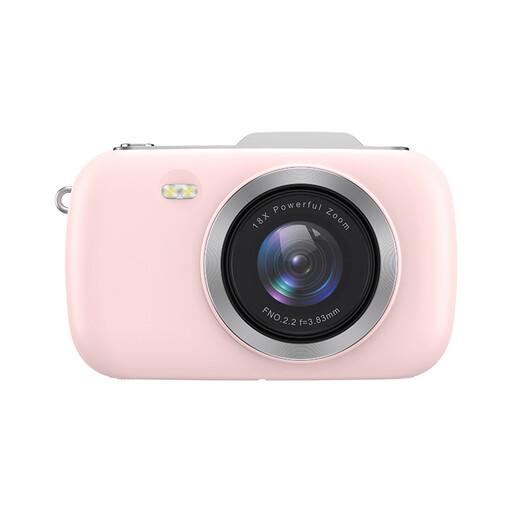
A digital camera to consider if you’re looking for a separate compact device; use a test photo to check whether you can work at the distance and with the framing you want.
The product name lists 4K, 80MP and 18× zoom. These specifications don’t show how small a detail the camera can capture sharply.
 No image available
A pocket camera to add to your comparison if you’re looking for a compact model; take a test shot of both the overview and the smallest detail.
The product listing mentions 16× digital zoom. Digital zoom alone doesn’t tell you how sharp a detail will be in the final crop.
 No image available
A mirrorless camera kit to compare if you want to use an interchangeable lens; test whether the supplied zoom lens suits the close-up and working distance you need.
The product description lists a 24.2MP APS-C sensor and a 16–50mm lens. According to the description, an SD memory card and adapter/charger are not included.
 No image available
A mirrorless camera kit to consider if you want an interchangeable lens and different framing options; check the close-up capabilities of the exact lens at your working distance.
The product description lists a 24.2MP APS-C sensor and a 16–50mm lens.
First, take a photo of the whole piece, then a close-up. Set the camera up securely and move the light around to see how the shadows and reflections change. Compare the colours in the photo with the piece under the same lighting.
No, not necessarily. First test whether the lens can capture the detail you want, large and sharp enough, from your working distance. The minimum focusing distance is useful when assessing this, but on its own it doesn’t tell you how large a tile will appear in the final image.
According to the Dutch government, a product must match the agreement and the seller must offer an appropriate solution if it is faulty; the Netherlands has no fixed statutory warranty period. A manufacturer’s warranty may also apply. Online purchases from a business generally come with a 14-day cooling-off period, subject to applicable exceptions; this is separate from your rights if a product is faulty.
The Dutch government states that you may only distribute or publish other people’s copyright-protected photos with the creator’s permission. Check the rights to any material you didn’t create yourself separately; this general rule doesn’t automatically determine the rights to every mosaic design shown.