
Vandaag of morgen in huis

Kwaliteit gegarandeerd

Welkomstaanbiedingen ontgrendelen: GRATIS bezorging | Tot 80% korting | Gratis 30 dagen JoyPlus-proefperiode
Download de app
A monitor stand can make your desk more organised and help position your screen at a comfortable viewing height. However, not every model is suitable for every monitor, desk or workspace. A stand selected based solely on screen size may, for example, have insufficient load capacity, be incompatible with your monitor or take up too much space.
The most common pitfalls when choosing a monitor stand for your desk are:
First, decide which problem you want to solve. A simple riser is suitable when your monitor is stable on the desk but needs to be raised. A monitor arm or monitor mount offers greater freedom of movement and frees up space on the desktop. For a laptop, a laptop stand is often more practical than a monitor holder.
You place a monitor riser or adjustable monitor stand directly on the desk. Pay attention to the maximum load and the platform dimensions. The Neomounts NSMONITOR20 supports screens and laptops weighing up to 10 kg, is suitable for screens from 10 to 32 inches and has a height range of 4.6 to 16.8 cm. The storage space and cable routing are useful when you want to keep accessories on your desk.
A riser is generally easy to install, but offers less freedom of movement than a monitor arm. So check whether you only need additional height or also want to rotate, swivel and tilt the screen.
With a VESA monitor stand or monitor arm, you need to check the hole pattern on the back of the screen. Many models in this selection use VESA 75 × 75 mm or 100 × 100 mm. Some screens have a different pattern and may require a separate VESA adapter plate.
Also consider:
The Neomounts FPMA-D650BLACK, for example, is suitable for one screen from 17 to 27 inches weighing up to 7 kg. The arm has a height range of 11 to 42 cm, depth adjustment of up to 49.4 cm and supports VESA 75 × 75 and 100 × 100 mm.
For two screens, you need a dual monitor arm or a suitable monitor mount. Check not only the weight of each screen but also the stability of the central mounting point. Two screens increase the load on the clamp and may require more space behind the desk.
The FPMA-D650DBLACK supports two screens of up to 27 inches. The product information specifies a load capacity of 7 kg per screen, VESA 75 × 75 and 100 × 100 mm, and height and depth adjustment. Move both screens carefully when adjusting them and check the mounting points regularly.
A metal monitor arm may feel sturdy, but the construction is only as stable as the mounting system and the desk itself. Therefore, check the following:
A PC holder under the desk can free up space. The Neomounts CPU-M100BLACK is adjustable for computer cases from 12 to 21 cm wide, supports up to 10 kg and has four castors, two of which can be locked. Measure the case beforehand and check that the ventilation openings remain clear.
The Neomounts THINCLIENT-01 is designed for a mini PC or thin client behind a monitor. This holder supports up to 3 kg and uses VESA 75 × 75 or 100 × 100 mm. This is a different application from a stand for a full-sized desktop tower.
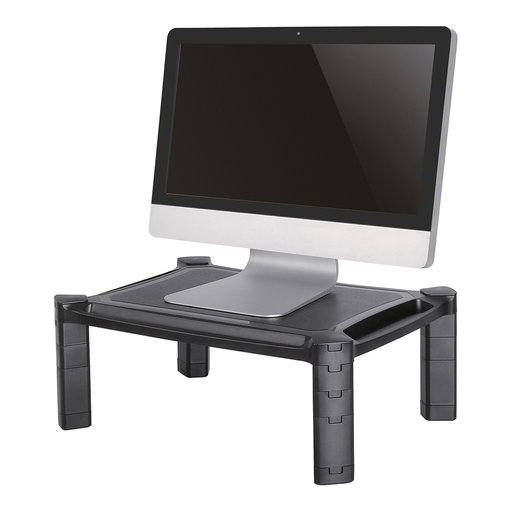
Why it suits this profile: A practical choice for anyone who wants to raise a monitor or laptop without mounting an arm to the desk.
The product specifications state both the 10 kg load capacity and the 4.6 to 16.8 cm range. This allows you to check its suitability in advance.
Suitable for screens from 10 to 32 inches, with storage compartments and cable routing.
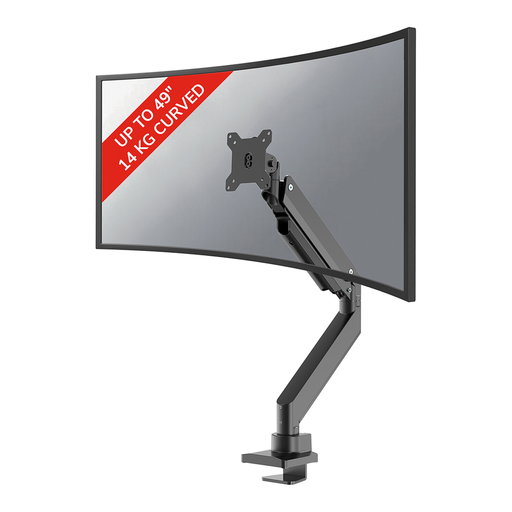
Why it suits this profile: Designed for a large or curved screen where load capacity, range of movement and cable routing are important.
The arm specifies a load capacity of up to 18 kg, support for curved screens up to 49 inches and a 180° stop mechanism.
Gas spring, height adjustment of up to 60 cm, depth adjustment of up to 63 cm and cable management.
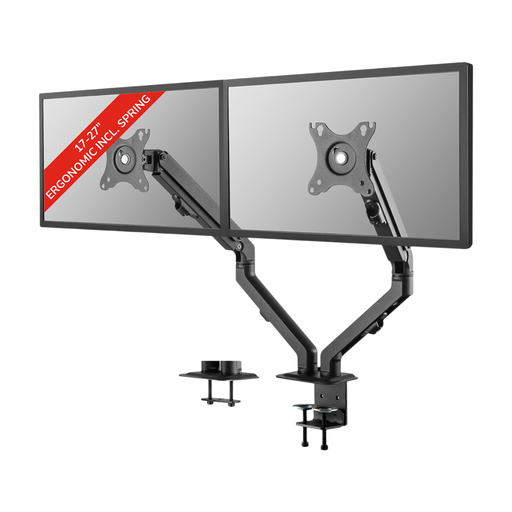
Why it suits this profile: Ideal for home workers, IT environments and multitaskers who use two screens side by side.
The load capacity of up to 7 kg per screen and the VESA patterns 75 × 75 and 100 × 100 mm are clearly stated.
Suitable for two screens up to 27 inches, with height and depth adjustment and cable clips.
We have put together a complete, up-to-date list of products that fully meet these strict selection criteria and the applicable European safety regulations.
No. A monitor riser on which you place the existing monitor stand does not require VESA holes. A monitor arm or monitor mount usually does require VESA compatibility. Check the distance between the mounting holes and the weight of your screen before placing your order.
That depends on the construction and the installation instructions. A clamp can put pressure on the desktop. Therefore, check the permitted desk thickness and only use a mounting system that the manufacturer states is suitable for your surface. If in doubt, a freestanding monitor stand is an alternative.
Choose a dual monitor arm that explicitly supports two screens. Check the maximum weight per screen, the total load, the size and the VESA pattern. Also make sure that the desk mounting system is sturdy enough to handle the additional leverage created by two monitors.
