
Vandaag of morgen in huis

Kwaliteit gegarandeerd

Welkomstaanbiedingen ontgrendelen: GRATIS bezorging | Tot 80% korting | Gratis 30 dagen JoyPlus-proefperiode
Download de app
A monitor stand can free up space, organise cables and bring your screen to a comfortable viewing height. Yet many people in the Netherlands buy a model that is not suitable for their monitor or desk. A compact stand may seem suitable at first glance, but insufficient load capacity, missing VESA mount or limited adjustability can lead to instability and additional costs later on.
In this buying guide, the Joybuy Product Recommendation Officer explains what to look for in a monitor stand, monitor arm or monitor riser. The recommendations are based on verifiable product specifications, not general marketing claims.
A 27-inch monitor is not automatically suitable for every stand designed for 27-inch screens. The weight, including the original monitor stand when using a monitor riser, remains the deciding factor. Always check the maximum load capacity. For a monitor arm, this applies per screen, not just to the system as a whole.
Many monitor arms and VESA monitor stands use VESA 75 x 75 mm or 100 x 100 mm. Measure the screw holes on the back of your monitor before ordering. A monitor without suitable VESA holes may require an adapter. Also check that you have the correct screws and that the monitor housing is designed to support the mount.
A model may be described as “adjustable” even though only the tilt can be changed. For a flexible desk monitor stand, look at the individual functions: height adjustment, rotation, swivelling, tilting and, where applicable, 90-degree rotation. With a dual monitor stand, the distance between the two screens is also important.
Choose a stand with sufficient capacity above the weight of your monitor. For example, the iiyama DS1002C-B1 supports two screens up to 30 inches and a maximum of 10 kg per monitor, with a total load capacity of 20 kg. A dual monitor stand must not only support the weight, but also remain stable when both arms are positioned forwards or to the side.
For a single monitor, the specifications can vary considerably. The Neomounts NSMONITOR20 is a monitor riser for screens and laptops up to 32 inches, with a maximum load capacity of 10 kg. Always position the device centrally on a flat, stable desk.
Check that the monitor and mount have the same mounting pattern. Many models are suitable for:
The Neomounts FPMA-LIFT100BLACK supports VESA 75 x 75 and 100 x 100 mm and can raise the monitor by up to 17,7 cm. According to the product specifications, the model is suitable for screens up to 27 inches and a maximum of 8 kg. A separate VESA conversion plate is required for larger patterns.
A monitor arm usually uses a desk clamp or grommet mount. Check the following beforehand:
A monitor stand for 2 screens can save space, but a wide base takes up more surface area. Measure the available depth and width first. If your desk has a thin, hollow or fragile top, a heavy clamp construction may be less suitable.
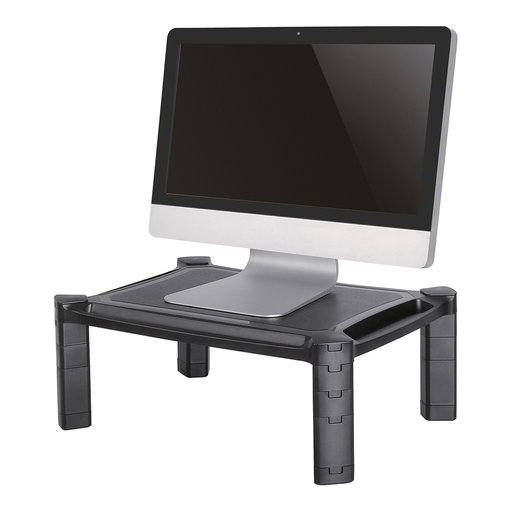
Why it suits this profile: This monitor riser is suitable for a simple setup with one monitor or laptop, without VESA mounting or a desk clamp. The height is adjustable from 4,6 to 16,8 cm.
The product specifications clearly state a load capacity of 10 kg and a range of 10 to 32 inches. This allows you to check compatibility in advance.
Height adjustable, with cable routing at the rear and additional storage space at the front and back.
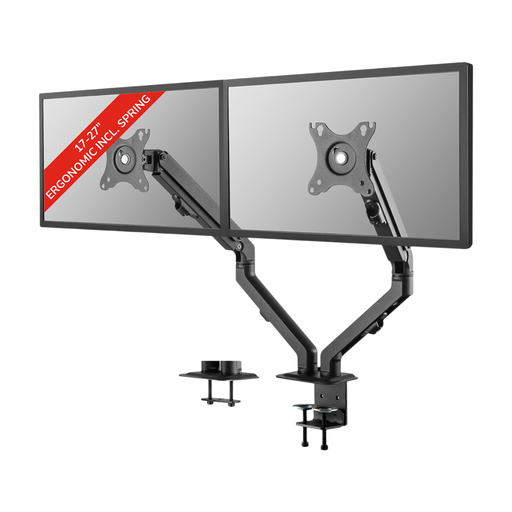
Why it suits this profile: If you frequently adjust two screens, this monitor arm offers multiple movement options and a spring-assisted adjustment system.
The mount specifies a load capacity of 7 kg per screen and support for VESA 75 x 75 and 100 x 100 mm. This makes it easy to check compatibility beforehand.
Tilts up to 130 degrees, rotates up to 360 degrees, swivels up to 180 degrees and includes cable clips for tidy cable management.
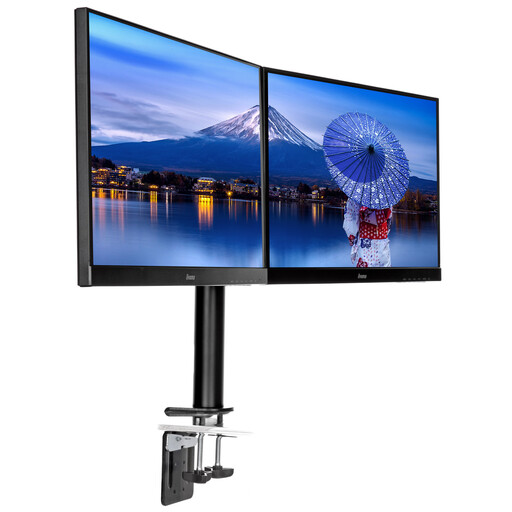
Why it suits this profile: This dual monitor stand is designed for two screens up to 30 inches and suits a workspace where desk space is important.
The specifications state 10 kg per monitor, 20 kg in total, and VESA 75 x 75 and 100 x 100 mm. The maximum screen size is 30 inches.
Height adjustable from 200 to 400 mm, with tilt, swivel and pivot functions and integrated cable management.
We have put together a complete, up-to-date list of products that fully meet these strict selection criteria and the applicable European safety regulations.
Place a desk monitor stand on a level surface and check after assembly that all screws are securely tightened. With a monitor arm:
A height-adjustable monitor stand does not automatically transform your entire workspace. Adjust your chair, desk and screen position in relation to one another as well. The top edge of the screen can be positioned approximately at eye level, depending on your personal preference and the monitor you use.
That depends on the type of product. A monitor arm and many desk mounts use VESA 75 x 75 or 100 x 100 mm. A monitor riser on which you place the existing monitor stand usually does not require VESA mounting. Always check the product details and the back of your screen.
No. The desk clamp must be suitable for the thickness and construction of the desktop. A sturdy solid or adequately reinforced desktop is generally more suitable than a thin, hollow one. Also check that the edge is accessible and that the total load remains within the specified limit.
Its lifespan depends on the materials, load, installation and use. Keep the stand within its specified load capacity and regularly check moving parts and fixings. According to the product specifications, a statutory minimum two-year warranty applies to several of the models mentioned; some products also state a longer manufacturer’s warranty. Always consult the terms and conditions on the product page.
