If you regularly want to see your draft and revision notes side by side, compare an ultrawide screen with an adjustable QHD monitor. For a single document and a smaller workspace, a compact Full HD screen may be enough. Measure the space available and check the text size at your usual viewing distance. If you use a laptop, also check whether the connections support video and, if you want it, charging.
Which screen is right for you?
Writer working with revision notes
You often keep your draft and comments on screen at the same time, so your first consideration is the space available for side-by-side windows. According to Philips, the Philips 346B1C/01 is a 34-inch ultrawide model with a resolution of 3440 × 1440.
Text editor working for long periods
You write or read for long stretches and want to be able to position your screen comfortably. Arboportaal highlights the importance of a well-set-up workstation when working with a screen.
Laptop user with a dedicated workspace
You want to connect a monitor to your laptop, so you need to check that video, charging and the cables you need are all compatible. Dell describes various USB-C features for the P2425H and P2725DE.
What should you look for when choosing?
First, decide whether you usually read one document or work with several windows side by side. Then measure the space available and check the adjustability and connections of the exact model you’re considering.
| What to consider |
What should you check? |
Who is this most important for? |
| Draft and notes side by side |
Compare 2560 × 1440 with 3440 × 1440, measure the width of your desk and try your preferred window layout at your chosen text scale. |
I want to see my draft and revision notes at the same time, so I can arrange the windows to suit the way I work. Around 36% of consumers say having a clear overview is their main concern when buying. |
| Posture when working with text for long periods |
Check the height adjustment and tilt, and consider where the screen will sit in relation to light sources. |
When I write for long periods, I want to be able to adjust the screen to suit my workspace and reduce distracting reflections. Around 29% of consumers give posture the highest priority. |
| Connecting a laptop |
Check whether your laptop outputs video through the port you plan to use, whether the monitor accepts video through it, and how much charging power is available if you want to charge your laptop. |
I want to connect my laptop without assuming that every USB-C port carries both video and power. Around 21% of consumers say connecting a laptop is their main concern when buying. |
| Screen size for your workspace |
Decide whether you usually use one or two windows, and measure the space available before comparing models. |
I want enough screen space for my documents without taking up more room than my desk allows. Around 14% of consumers prioritise compact size and cost. |
Common mistakes
-
Assuming a USB-C port is a complete laptop dock
USB-C features vary between monitors. Dell lists a USB-C downstream port for data on the P2425H; according to Dell, the P2725DE has USB-C with up to 90 W Power Delivery.
Check the exact port features on both the monitor and laptop before relying on a single cable.
-
Assuming more pixels mean larger, more readable text
At a higher resolution, your chosen text scale can affect how much text and how many windows fit comfortably on screen at once.
At your usual viewing distance, try two windows with a text scale you find comfortable.
Brands to consider
The features mentioned apply to the specific models reviewed and aren’t a general assessment of every model from these brands.
Dell
The models reviewed include the compact P2425H and a 27-inch QHD model, the P2725DE.
- Dell lists USB-C with up to 90 W Power Delivery for the P2725DE.
- According to Dell, the P2425H’s USB-C downstream port is for data and doesn’t support laptop video over a single cable.
Philips
The 346B1C/01 reviewed is a 34-inch ultrawide model for anyone who wants to arrange windows side by side.
- Philips specifies a resolution of 3440 × 1440, USB-C and a height-adjustable stand.
- The wide screen needs plenty of desk space; Philips’ productivity and comfort descriptions are manufacturer claims.
LG
The models reviewed include a QHD monitor with a clamp arm and a 27-inch 4K monitor.
- LG lists a C-clamp for the 27QN880-B, and height adjustment and pivot for the 27UP850K-W.
- LG marks the 34WR55QK-B as discontinued; this doesn’t in itself say anything about the availability of other LG models.
Samsung
The Essential S4 S40GD reviewed is a 24-inch Full HD model for a more compact workspace.
- Samsung lists an IPS panel, 100 Hz and height adjustment for this model.
- Samsung’s description of eye comfort isn’t a guarantee of an individual user’s experience.
ViewSonic
The VG2708-4K is an adjustable 27-inch 4K option for working with text while also viewing fine detail.
- ViewSonic specifies a resolution of 3840 × 2160, two HDMI inputs and DisplayPort.
- These connections don’t show that a laptop can be connected using a single USB-C cable.
Monitors on Joybuy
This selection includes compact Full HD models, a 27-inch QHD monitor, a 27-inch 4K monitor and ultrawide models. Compare the screen space with the dimensions and connections that suit your workspace.
 No image available
Philips 27E1N1800AE/00 27-inch 4K UHD IPS monitor
An option to consider if you write and also view highly detailed images.
3840 × 2160 pixels; 60 Hz; HDMI and DisplayPort; height-adjustable stand.
Joybuy
 No image available
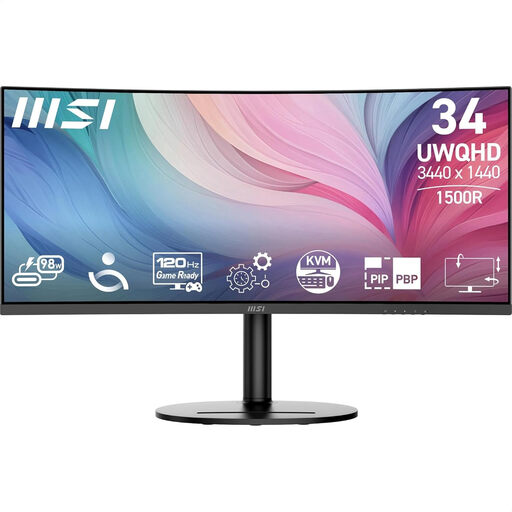
MSI Modern MD342CQP 34-inch ultrawide monitor
An option for viewing story text and revision notes side by side, if you have enough desk space.
34 inches; 3440 × 1440 pixels; curved screen; height, tilt and swivel adjustment.
Joybuy
 No image available
KTC H27E6S 27-inch QHD monitor
An option for switching between your draft and revision notes without choosing a 34-inch screen.
2560 × 1440 pixels; Fast IPS; height-adjustable stand.
Joybuy
 No image available
Philips 24E1N1100A 24-inch Full HD IPS monitor
A compact option if you mainly work with one text document.
1920 × 1080 pixels; IPS panel; 100 Hz; built-in speakers.
Joybuy
 No image available
LG UltraWide 34U511A-B 34-inch monitor
A 34-inch ultrawide option to compare if you want to view your story and notes at the same time.
Check the resolution and connections of the exact version before deciding.
Joybuy
Frequently asked questions
Do you need an ultrawide screen for revision notes?
No, choose a width that suits the way you arrange your windows. A 3440 × 1440 screen has more horizontal pixels than a 2560 × 1440 screen, but it also takes up more physical space. Try your preferred text size before deciding.
How should I set up a monitor for long writing sessions?
Position the screen so you can read the text comfortably, and adjust the height if the model allows it. Arboportaal states that for employees who spend more than two hours a day working with a screen, the screen and keyboard must not be attached to one another. An adjustable monitor doesn’t replace a well-set-up workstation.
Can every USB-C monitor also charge my laptop?
No. Check whether the exact model accepts video over USB-C and provides Power Delivery, and check your laptop and cable too. Dell lists up to 90 W Power Delivery for the P2725DE; according to Dell, the P2425H’s USB-C downstream port is for data only.
What returns and warranty rights apply to an online purchase in the Netherlands?
According to ACM ConsuWijzer, online purchases generally come with a statutory cooling-off period of up to 14 days after delivery, subject to exceptions. The Dutch government states that there is no fixed statutory warranty period in the Netherlands; if a product is faulty, contact the seller. Also check the terms that apply to your purchase.


