Monitors at Joybuy
These Joybuy picks focus on providing a wide workspace for viewing a scanned letter and an index side by side. Compare resolution, screen layout and connections with your own computer and preferred scan zoom.
 No image available
Philips 34B2U5900C/00 34-inch Curved Dual-Mode Business Monitor
The 21:9 workspace could suit you if you want to position a scan and an index window side by side across a wide screen; check how it looks with one of your own scans.
34 inches; WUHD 5120 × 2160 at 120 Hz or WFHD 2560 × 1080 at 240 Hz. These are alternative modes. The description also lists USB-C power delivery up to 140 W, an adjustable stand and a built-in KVM switch.
Joybuy
 No image available
Dell UltraSharp U4924DW 49-inch monitor
This wide model could suit you if you want to keep a scan and an index side by side and switch between two computers; check that your computer supports this setup.
49 inches; 5120 × 1440 pixels. The product description lists use as two separate screens, a KVM function and 90 W USB-C power delivery.
Joybuy
 No image available
Iiyama ProLite 34-inch UWQHD Curved Monitor
The 21:9 aspect ratio could suit you if you want one wide screen for a scan and an index window; check the window widths with your own software.
34 inches; 3440 × 1440 pixels. The description lists a USB-C dock with power delivery up to 95 W, RJ45, KVM and 15 cm of height adjustment.
Joybuy
 No image available
LG 34WR50QK-B 34-inch monitor
The wide screen format could suit you if you want to place windows side by side; check that the available space and your preferred zoom level work for your scans.
34 inches; 3440 × 1440 pixels and 21:9. The description lists Picture-by-Picture for two video sources, Reader Mode and Flicker Safe; the installation information mentions height and tilt adjustment.
Joybuy
 No image available
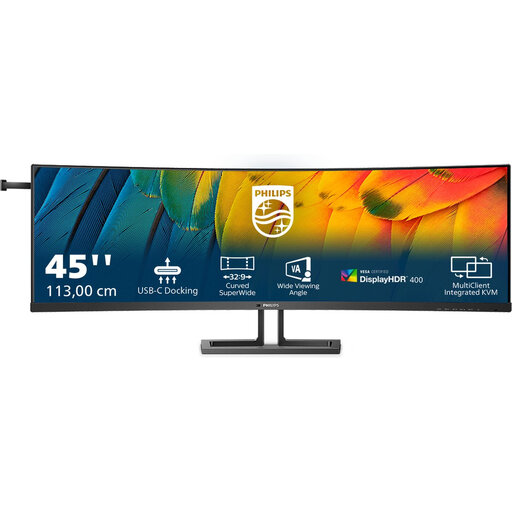
Philips 45B1U6900C/00 44,5-inch Curved Business Monitor
The 32:9 aspect ratio offers a wide screen area to consider if you want to place several work windows side by side; measure your desk space beforehand.
44.5 inches; 5120 × 1440 pixels. The product description lists USB-C, HDMI, DisplayPort, tilt adjustment and VESA mounting.
Joybuy
Frequently asked questions
Do you need a monitor with built-in split-screen functionality for a scan and an index?
Not if you are using both windows on one Windows computer: Windows Snap can place windows side by side, as Microsoft Support explains. If you are using two computers as video sources, check that the exact monitor supports displaying and controlling them.
How do you set up two separate monitors?
Connect both screens, let Windows detect them, then arrange the numbered displays in the display settings to match their positions on your desk. Microsoft Support explains these settings; check in advance that your computer or dock supports both screens.
What should you consider when working at a screen for long periods as an employee in the Netherlands?
Arboportaal states that if you work at a screen for more than two hours a day, the screen and keyboard must not be fixed together. This is a workplace consideration for employees, not a product specification for every private buyer.
What guarantee and cooling-off period apply to an online purchase in the Netherlands?
For a consumer purchase, the statutory guarantee covers what you could reasonably expect from the product; the retailer is your point of contact. According to ACM ConsuWijzer, online purchases generally come with a cooling-off period of up to 14 days after delivery, subject to the stated conditions and exceptions.
How do you compare the running costs of monitors?
Compare the EU energy label and model details in EPREL for the exact versions. The energy label for electronic displays runs from A to G; to work out your own annual cost, you will also need the model-specific energy consumption and your hours of use.


