
Vandaag of morgen in huis

Kwaliteit gegarandeerd

Welkomstaanbiedingen ontgrendelen: GRATIS bezorging | Tot 80% korting | Gratis 30 dagen JoyPlus-proefperiode
Download de app
A monitor mount can free up space, keep cables tidier and make it easier to position your screen. Yet many people buy a model that is not suitable for their monitor, desk or wall. For example, a monitor arm that is too heavy-duty may slowly sink, while a wall mount with the wrong VESA size may not fit at all.
The biggest pitfalls are usually not about appearance, but about the technical details.
A 27-inch monitor is not automatically suitable for every monitor arm. The weight including the stand and the VESA pattern are just as important. An ultrawide or curved screen may, for example, be heavier than a traditional screen of the same size.
Always check:
VESA refers to the distance between the mounting holes on the back of the screen. Many smaller monitors use 75 x 75 mm or 100 x 100 mm. Larger screens may use 200 x 200, 400 x 400 or even 800 x 600 mm.
A VESA mount with a range of 75 x 75 to 100 x 100 mm will therefore not fit a television with a 400 x 400 mm pattern. Also check that the correct screws are included and that the screw length is suitable for your screen.
An adjustable monitor arm or full-motion monitor mount often allows you to tilt, turn and swivel the screen. This does not mean that every model is suitable for frequent repositioning or heavy screens.
Gas springs and spring systems need to be adjusted to the screen’s weight. A screen that is too light or too heavy may prevent the arm from staying in position properly. For a fixed setup, a simple monitor stand may therefore be more practical than a fully featured monitor arm.
Choose a model whose maximum load capacity is comfortably above the weight of your screen. For multiple screens, the stated weight limit often applies per screen, not to the complete structure. A dual monitor arm with a limit of 7 kg per screen is therefore designed for two screens weighing up to 7 kg each.
Also consider the strength of your desk. A thin desktop, glass surface or fragile chipboard may not provide enough support for a desk monitor mount holding one or more heavy screens.
A desk arm is usually attached with a clamp to the edge of the desk or using a through-desk mount. Measure the thickness of the desktop beforehand and check that there is enough room for the cables and mounting plate.
For a wall monitor mount, the wall itself is the deciding factor. The mounting options for concrete, brick and wooden studs generally differ from those for a hollow partition wall. Use suitable wall plugs and screws for the type of wall in question. Do not mount a heavy screen directly onto plasterboard without checking that it can support the load.
Some models are adapters only. The Neomounts AWL75-450WH, for example, is designed to attach specific DS70 and DS75 monitor arms to a wall. The adapter does not mount the screen independently.
Pay attention to the individual specifications for:
A 180° stop mechanism can prevent an arm from turning into a wall or partition. It is not a substitute for correct installation.
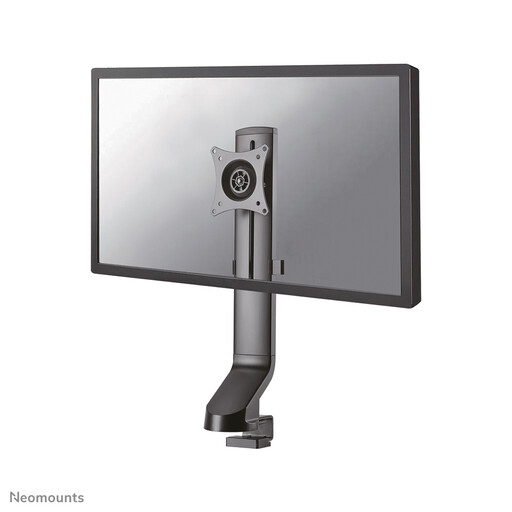
Why it suits this profile: For one standard monitor, this model provides a tidy desk solution with clamp or through-desk mounting, manual height adjustment and included installation materials.
The specifications clearly state an 8 kg limit and VESA 75 x 75 and 100 x 100 mm compatibility. Check these figures against your screen’s specifications before buying.
Suitable for screens from 10 to 32 inches, with cable management and manual height adjustment from 26 to 45 cm.

Why it suits this profile: This monitor arm is aimed at users who place a high value on adjustability for a flat or curved screen of up to 35 inches.
The 9 kg load capacity, VESA 75 x 75 and 100 x 100 mm compatibility and gas spring range are listed separately. This makes it easy to compare whether the arm is suitable for your setup.
Gas spring height adjustment from 21.5 to 49.5 cm, depth adjustment up to 52.5 cm, cable management and a 180° stop mechanism.

Why it suits this profile: A practical choice for home workers, traders and office workstations with three screens of up to 27 inches.
The specification states a maximum load of 6 kg per screen and supports VESA 75 x 75 and 100 x 100 mm. The 180° stop limits contact with a wall or partition.
Supports three screens, allows tilting, rotating and swivelling, and features a Quick-Fix system for mounting.
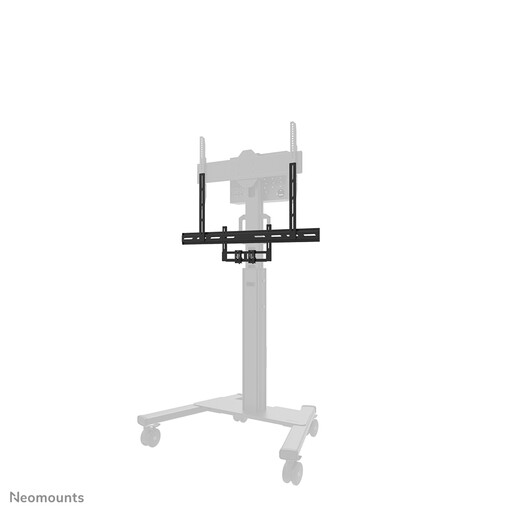
Why it suits this profile: For meeting rooms and business screen setups where a videobar, PTZ camera or soundbar needs to be positioned above or below the screen.
The model supports screens from 43 to 110 inches, VESA patterns from 200 x 200 to 800 x 600 mm and up to 10 kg. It is a screen-mounting accessory, not a complete wall mount.
Independent height adjustment of the videobar bracket and VESA backplate; suitable for mounting above or below the screen.
We have compiled a complete, up-to-date list of products that fully meet these strict selection criteria and the applicable European safety regulations.
Use a monitor stand when you want to place the screen on a desk without a clamp or drilled hole. A model such as the Neomounts FPMA-D890WHITE supports one screen of up to 30 inches and offers manual height adjustment, tilting, rotation and swivelling.
A monitor arm is more suitable when you want to free up space or regularly reposition the screen. For two screens, look for a dual monitor arm; for three screens, a triple monitor arm such as the DS60-600BL3 may be suitable.
A wall-mounted model makes sense when the desk does not have a suitable edge or when you want to free a television or monitor from the workstation. A standard monitor mount is not always suitable for a larger television. In that case, look for a TV wall mount with the appropriate VESA range and sufficient load capacity.
A product warranty is no substitute for correct installation. Always follow the instructions and use mounting hardware suitable for the surface.
No. The screen must have a suitable VESA hole pattern or be compatible with a suitable adapter plate. Also check the size and weight. Some monitor arms support only 75 x 75 and 100 x 100 mm, while larger screens require a wider VESA range.
Its lifespan depends on the materials, load, installation and how often you move the arm. A correctly installed steel or aluminium structure can be used for a long time, but regularly check the screws, clamp and pivot points. A gas spring may need readjustment over time.
The price varies depending on the number of screens, load capacity, VESA range and adjustability. A simple stand is generally less expensive than a full-motion monitor mount with a gas spring. Do not compare only the purchase price; also check whether installation accessories, cable management and the correct adapter are included.
