
Vandaag of morgen in huis

Kwaliteit gegarandeerd

Welkomstaanbiedingen ontgrendelen: GRATIS bezorging | Tot 80% korting | Gratis 30 dagen JoyPlus-proefperiode
Download de app
A monitor arm can free up desk space and position your screen more flexibly than a conventional monitor stand. However, not every model is suitable for every monitor or desk. An overly heavy ultrawide monitor, an unusual VESA pattern or a thin desktop can make installation unsafe or impractical.
As a Joybuy Product Recommendation Officer, I therefore focus mainly on verifiable specifications. These points help home workers, gamers, office employees and businesses distinguish marketing claims from practical information.
A 32-inch monitor is not automatically suitable just because the monitor arm supports “up to 32 inches”. The weight of the screen and the position of its centre of gravity also matter. A heavy curved monitor may place different loads on the arm than a flat screen.
Always check:
Most models in this selection support VESA 75 × 75 mm and 100 × 100 mm. These are the distances between the mounting holes on the back of the screen. If your monitor has a different pattern, an adapter plate may be required. Without a suitable VESA connection, the monitor bracket will not fit directly.
Also look out for recessed mounting holes. Spacers may sometimes be needed to attach the VESA plate flat and securely.
A desk-mounted monitor arm usually uses either a clamp on the edge or a grommet mount through a cable port. A thin, fragile or uneven desktop is not always suitable. Do not place a clamp on glass or unstable chipboard.
When mounting close to a wall, the range of movement is also important. A 180° stop can prevent the arm from hitting a wall or partition panel as it turns. This does not replace a sturdy installation, but it is a practical safeguard against collisions.
Choose a monitor arm with some capacity to spare. If your screen weighs 7 kg, a load capacity of exactly 7 kg is formally sufficient according to the product specification, but it leaves little room for uncertainty around accessories or cable strain. With a dual monitor arm, you should check the weight of each screen separately.
Examples from the range:
An adjustable monitor arm can offer height, depth, tilt, rotation and swivel adjustment. A gas spring monitor arm is particularly useful when you move the screen regularly. However, the gas spring must be adjusted correctly to the monitor’s weight. If the screen slowly drops, the tension may be too low; if it moves upwards, the tension may be too high.
A model with manual height adjustment is often sufficient for a fixed workstation. A coil spring or spring mechanism provides a different type of support, as with the Neomounts FPMA-D650BLACK for one screen or the FPMA-D650DBLACK for two screens.
A monitor arm with cable management prevents power and display cables from hanging along the arm. However, check that the cables have enough slack when you turn the screen or pull it forwards. A cable routed too tightly can put strain on the connection.
For small desks, a space-saving construction is worth considering. According to its product specifications, the DS60-425BL2 uses a short upper arm and has a wall distance of 12.8 to 46 cm. This can help when the desk is positioned close to a wall.
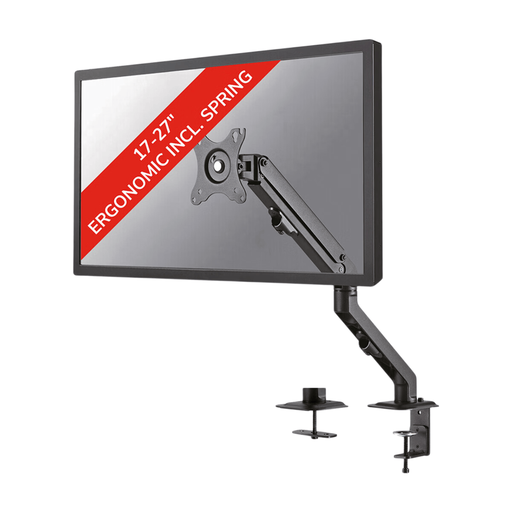
Why it suits this profile: For one standard monitor, this model offers a straightforward combination of manual adjustment and spring support, without requiring an elaborate setup.
The product specifications clearly state a 7 kg load capacity, a screen range of 17 to 27 inches, and VESA 75 × 75 and 100 × 100 mm.
One screen, 360° rotation, 180° swivel, spring-assisted height adjustment and cable clips.

Why it suits this profile: This gas spring monitor arm is designed for a larger single screen and offers plenty of movement for a home office, workplace or reception desk.
The 9 kg load capacity and support for flat and curved screens are clearly stated. The 180° stop limits contact with a wall.
17–35 inches, height adjustment from 21.5–49.5 cm, depth adjustment and integrated cable management.

Why it suits this profile: This model is ideal for users with a curved or ultrawide monitor who need a high load capacity.
The product information distinguishes between flat screens up to 18 kg and curved screens up to 14 kg. This prevents confusion when choosing an ultrawide monitor.
Supports screens up to 49 inches, gas spring, 180° stop, cable management and height adjustment from 26.1–55.5 cm.

Why it suits this profile: For IT professionals, traders or offices with multiple information windows, this monitor arm supports three screens side by side.
The limit of 6 kg per screen and the range of 10 to 27 inches are clearly defined. This prevents three screens that are too heavy from being mounted.
Three screens, full-motion adjustment, VESA 75 × 75 and 100 × 100 mm, welded base and cable management.
We have put together a complete, up-to-date list of products that fully meet these strict selection criteria and the applicable European safety regulations.
A monitor arm for 2 screens or a monitor arm for 3 screens requires extra attention to the total load and the width of the desk. With vertical installation, you should also check that the screens do not touch one another, the wall or a desk lamp.
No. Check the VESA pattern, weight and screen size. This selection mainly includes VESA 75 × 75 mm and 100 × 100 mm. An unusual pattern may require an adapter.
Not necessarily. A gas spring is practical when you move the screen frequently. For a fixed workstation, manual height adjustment may be sufficient. What matters is that the mechanism is suitable for the monitor’s actual weight.
Its lifespan depends on the construction, load, installation and how often it is adjusted. Do not exceed the load capacity and check the mounting points regularly. The statutory guarantee is at least two years under EU consumer rules; some manufacturers also state a longer commercial warranty.
