
Vandaag of morgen in huis

Kwaliteit gegarandeerd

Welkomstaanbiedingen ontgrendelen: GRATIS bezorging | Tot 80% korting | Gratis 30 dagen JoyPlus-proefperiode
Download de app
A monitor arm can free up desk space and give you more flexibility when positioning your screen. However, not every monitor mount is suitable for every monitor or desk. An arm may offer plenty of adjustment options on paper, yet have insufficient load capacity in practice, fail to fit your desk or leave too little room for cables.
The most common purchasing pitfalls are:
First check the monitor’s size and weight, without its stand but including any accessories attached to the monitor. A monitor arm for an ultrawide monitor often needs a reinforced head, particularly with curved screens.
Examples from the range:
Never use the total weight alone as your guide. With multiple screens, you must also consider the load per arm and the leverage exerted on the desk.
VESA refers to the distance between the mounting holes on the back of the screen. The most common patterns in this range are:
Measure the horizontal and vertical distance between the holes before ordering. A monitor without VESA holes can sometimes be mounted using an adapter, but make sure that the adapter is suitable for your screen’s weight and model.
A VESA 75x75 monitor arm and a VESA 100x100 monitor arm are not automatically the same as a universal arm for every screen. The product page should explicitly mention both patterns.
A monitor arm for a desk is usually attached with a desk clamp or a grommet mount. Measure:
An adjustable monitor arm with tilt, swivel and rotation is practical when several people use the same screen. A gas spring makes height and depth adjustment easier, but requires the tension to be set correctly. Also check the cable management. Cable clips or an internal channel prevent cables from becoming taut when you move the screen.
For a fixed setup, a monitor stand may be sufficient. If you do not want to lose desk space, consider a monitor wall mount. For wall mounting, always check the surface, mounting materials and the wall’s load-bearing capacity.
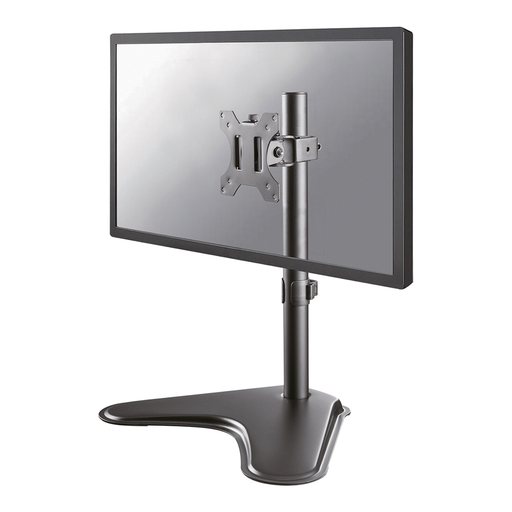
Why it suits this profile: This monitor stand is suitable for one screen from 13 to 32 inches and can be placed on the desk without wall mounting.
The specifications clearly state a maximum capacity of 8 kg and VESA 75x75 and 100x100 mm. This means you do not have to rely on vague claims about “universal” mounting.
Manual height adjustment from 5.6 to 41.9 cm, quick-release VESA and cable routing.

Why it suits this profile: This gas-spring monitor arm offers plenty of movement for a flat or curved screen up to 35 inches.
The maximum load of 9 kg, the VESA range and the adjustment ranges are clearly specified. The 180° stop helps prevent contact with a wall or partition.
Gas-spring height from 21.5 to 49.5 cm, depth adjustment and clamp or grommet mounting.

Why it suits this profile: Designed for large, curved ultrawide screens used with workstations, trading dashboards or intensive multitasking.
The product details distinguish between flat screens up to 18 kg and curved screens up to 14 kg. This is more important than simply focusing on the stated 49-inch size.
Reinforced head, gas-spring height from 26.1 to 55.5 cm and support for VESA 75x75 and 100x100 mm.
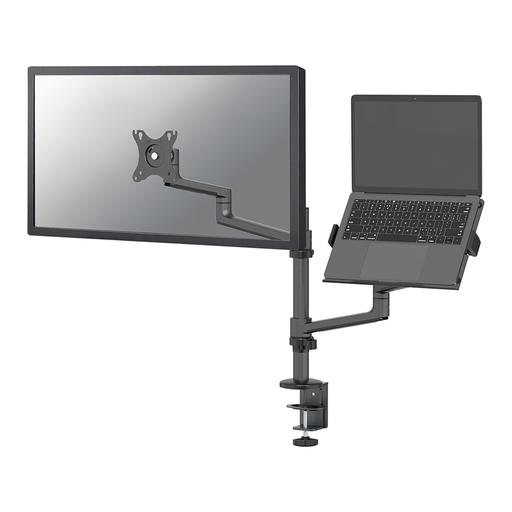
Why it suits this profile: A practical monitor arm for a laptop and external screen when you use one workstation for both devices.
The load capacity is specified separately: up to 8 kg for the screen and 5 kg for the laptop. This allows you to check both devices individually.
Suitable for monitors up to 27 inches and laptops up to 17.3 inches, with manual height and depth adjustment.
We have put together a complete, up-to-date list of products that fully meet these strict selection criteria and the applicable European safety regulations.
A dual monitor arm is suitable for two screens positioned side by side. Check whether the arms can be adjusted independently and whether the desk can support the combined load. For three screens, a triple monitor arm such as the DS60-600BL3 is worth considering if you use fixed screen positions.
A CPU holder can position a desktop computer case underneath the desk. The Neomounts CPU-M100BLACK can be adjusted for cases from 12 to 21 cm wide and has a maximum load capacity of 10 kg. For a mini PC or thin client, a mini PC holder with VESA mounting is more practical. The THINCLIENT-01 supports up to 3 kg; the THINCLIENT-05 supports up to 10 kg. Always check the computer’s ventilation openings and dimensions.
No. The monitor must have VESA holes, usually 75x75 or 100x100 mm, and fall within the specified size and weight range. An additional VESA adapter may be required for non-standard patterns.
A gas spring does not require power, but the mounting and tension setting should still be checked regularly. Retighten the screws if the arm develops play and adjust the tension to match the actual weight of the screen.
Not always. Check the construction, desktop thickness and available space at the back. Do not attach a clamp to glass, a weak surface or an uneven area. If in doubt, a monitor stand or suitable monitor wall mount may be an alternative.
