
Vandaag of morgen in huis

Kwaliteit gegarandeerd

Welkomstaanbiedingen ontgrendelen: GRATIS bezorging | Tot 80% korting | Gratis 30 dagen JoyPlus-proefperiode
Download de app
A monitor arm can free up desk space and make it easier to position your screen at the right height and viewing angle. However, not every monitor mount is suitable for every screen, desk or use case. An arm that looks like a good fit on paper may prove unstable in practice, have insufficient load capacity or offer too little range of movement.
So don’t focus only on the price or the number of adjustment points. Before buying a monitor arm, monitor stand or desk mount, check for these common pitfalls.
A monitor’s size doesn’t tell you enough about its weight. For example, a 34-inch ultrawide screen may be heavier than a smaller model with a sturdy stand. Curved screens may also need a special mount.
So check:
It’s sensible to leave a safety margin. If an arm supports up to 7 kg, you shouldn’t leave it supporting a screen weighing exactly 7 kg for long periods if you adjust it frequently.
Most monitor arms use a VESA mounting pattern, such as 75 × 75 mm or 100 × 100 mm. Larger monitors and TVs often use patterns such as 200 × 200 mm or 600 × 400 mm.
Measure the distance between the mounting holes on the back of the screen. Then check that the measurement falls within the mount’s supported range. A VESA monitor arm for 75 × 75 and 100 × 100 mm won’t automatically fit a screen with a larger pattern. You may need a separate adapter plate.
A desk clamp distributes the load across a relatively small area. This can cause problems with a thin desktop, glass top or fragile chipboard. In some situations, a through-desk mount, also known as a grommet mount, may provide a more stable fit.
For a monitor wall mount, check whether the wall is made of concrete, brick or timber studs. Screwing into plasterboard alone isn’t suitable for heavy screens unless you use the correct fixings behind it. A monitor ceiling mount also requires you to check the load-bearing capacity of the ceiling structure.
The stated screen size is a guide, not a substitute for checking the maximum weight. For example, a monitor arm for 17 to 27 inches may support a maximum of 7 kg. A reinforced arm with a higher load capacity is a better choice for an ultrawide screen up to 49 inches.
If you’re mounting multiple screens, check the load capacity for each arm. A dual monitor arm may support 7 or 8 kg per screen, while a monitor arm for 3 screens often has a lower weight limit per screen.
An adjustable monitor arm may offer several functions:
A gas spring or spring mechanism makes frequent adjustments easier, but the tension needs to suit the screen’s weight. For a fixed workstation, a manually adjustable arm may be all you need.
A desk mount is usually fitted with a clamp or grommet. Check the maximum desktop thickness and the space available behind the desk. An arm with a 180° stop can be useful if your desk is close to a wall or partition.
Cable management keeps cables tidy along the arm. This is especially useful with two or three screens, a laptop and peripherals. There are also solutions for larger screens that mount to a wall, ceiling or floor. A TV mount or video bar mount often uses different VESA sizes from a standard monitor arm.
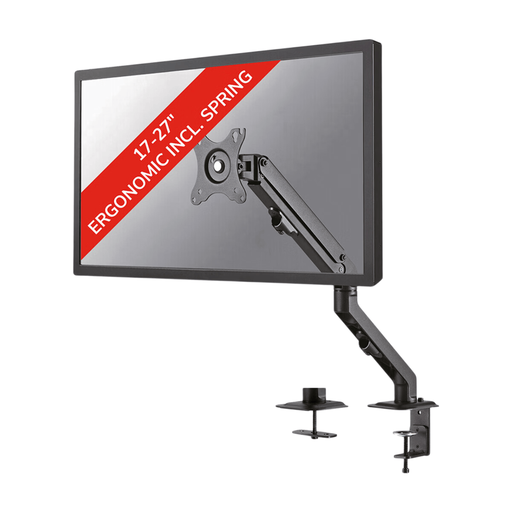
Why it suits this user: This single monitor arm offers practical flexibility for a typical home office or desk. The set includes both a desk clamp and a grommet mount.
The product specifications state a load capacity of up to 7 kg, support for 75 × 75 and 100 × 100 mm VESA patterns, and a screen size range of 17 to 27 inches.
Tilts up to 130°, rotates 360°, swivels 180° and offers spring-assisted height adjustment from 11 to 42 cm.

Why it suits this user: This arm is designed for large, curved ultrawide screens and offers greater load capacity than many compact models.
The specifications distinguish between a maximum of 18 kg for flat screens and 14 kg for curved screens. Always check these figures against your screen’s actual weight.
Gas spring adjustment, a height range of 26,1 to 55,5 cm, a Topfix clamp or grommet mount, and a 180° stop for positioning near a wall.

Why it suits this user: This monitor arm for 3 screens offers a central solution for workstations with three screens, with separate VESA mounts for each one.
The stated load capacity is 6 kg per screen, making it clear in advance which screens fall within the specifications.
Suitable for three screens from 10 to 27 inches, with 75 × 75 and 100 × 100 mm VESA support, cable management and a 180° stop.
If you use a laptop and monitor side by side, you could choose a laptop and monitor arm. According to the product specifications, the Neomounts FPMA-D550NOTEBOOK supports a screen weighing up to 8 kg and a notebook weighing up to 4,5 kg, with 75 × 75 and 100 × 100 mm VESA support for the screen.
For a fixed wall-mounted setup, the Neomounts NM-W25BLACK is a compact option for screens from 10 to 30 inches. It has a depth of 1,2 cm and supports a load of up to 25 kg. Always check the wall, plugs and screws before installation.
Ceiling-mounted models are available for meeting rooms or large displays. The CL35-340BL12 supports screens from 23 to 42 inches and has a load capacity of 50 kg. For larger screens up to 70 inches, the CL35-440BL16L is an alternative within the stated VESA and weight limits.
We’ve put together a complete, up-to-date list of products that meet these strict selection criteria and the applicable European safety regulations.
No. Check the VESA pattern, weight and screen size. If a monitor doesn’t have VESA holes, you may need an adapter. Also check that the mounting screws are the right length.
It depends on the desk’s construction and the mounting method. A clamp may put pressure on the glass. Only use a solution that is specifically suitable for the desktop in question, and follow the installation instructions.
Its lifespan depends on the load, how it’s mounted and how often it’s adjusted. Regularly check the clamps, screws, VESA mounts and cables. Stop using the arm if any parts become loose, distorted or damaged.
