
Vandaag of morgen in huis

Kwaliteit gegarandeerd

Welkomstaanbiedingen ontgrendelen: GRATIS bezorging | Tot 80% korting | Gratis 30 dagen JoyPlus-proefperiode
Download de app
A monitor arm can free up desk space and give you more flexibility when positioning your screen. However, not every monitor mount is suitable for every desk or screen. The wrong VESA size, a construction that is too lightweight or an unsuitable desk mounting method can leave your screen wobbling, prevent it from rotating properly or put too much weight on the arm.
For home workers, gamers, IT managers and office planners, these three pitfalls are particularly important:
VESA refers to the distance between the mounting holes on the back of your screen. Measure both horizontally and vertically. Many models in the range support VESA 75 × 75 mm and 100 × 100 mm.
Next, check the weight of your monitor without its stand. With a dual monitor arm, pay attention to the load capacity per screen as well as the total load capacity. An arm rated at 6 kg per screen is not suitable for an 8 kg monitor, even if the screen size is within the stated limit.
There are separate solutions for devices mounted behind the screen:
A fixed monitor holder takes up very little space, but offers hardly any flexibility. An adjustable monitor arm can usually tilt, rotate and swivel. Check the stated ranges, for example:
A gas spring or spring-assisted mechanism often makes adjustment easier, but check that your screen’s weight falls within the stated range. A screen that is too light or too heavy can be difficult to adjust and keep stable.
A desk monitor arm is usually attached with a desk clamp or a grommet, also known as a through-desk mount. A clamp is practical if you do not want to drill a hole in the desk. A grommet can provide a secure solution if your desk is suitable for it.
Check the following before buying:
A monitor stand with an integrated base can be an alternative when drilling or clamping is not possible. Special solutions are also available for meeting rooms, such as a videobar bracket for large-format screens.

Why it suits this profile: This desk monitor arm is suitable for one screen measuring 17 to 35 inches and supports up to 9 kg. The top-fix clamp or grommet can be useful for a home office with limited space.
The product specifications state the screen size, load capacity, VESA 75 × 75 and 100 × 100 mm and adjustment ranges. This allows you to check in advance whether your monitor is compatible.
Support for flat and curved screens, gas spring height adjustment from 21.5 to 49.5 cm and integrated cable management.
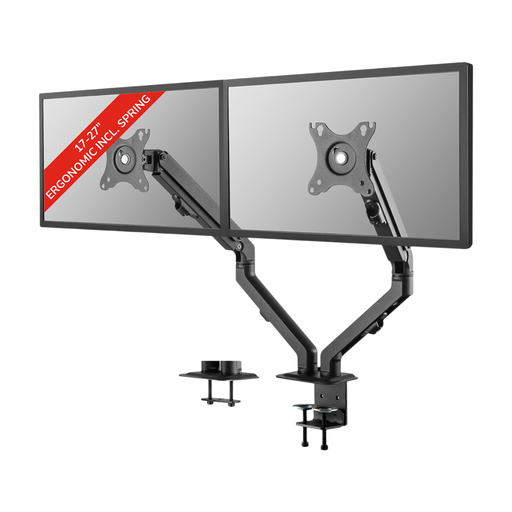
Why it suits this profile: This dual monitor arm is designed for two screens up to 27 inches, with a maximum of 7 kg per screen. The spring-assisted adjustment is ideal for workstations where screens are repositioned regularly.
The maximum load is stated per screen. Both a desk clamp and a grommet are included, so you can choose the most suitable mounting method.
Tilts up to 130°, rotates up to 360°, swivels up to 180° and includes cable clips for tidy cable management.
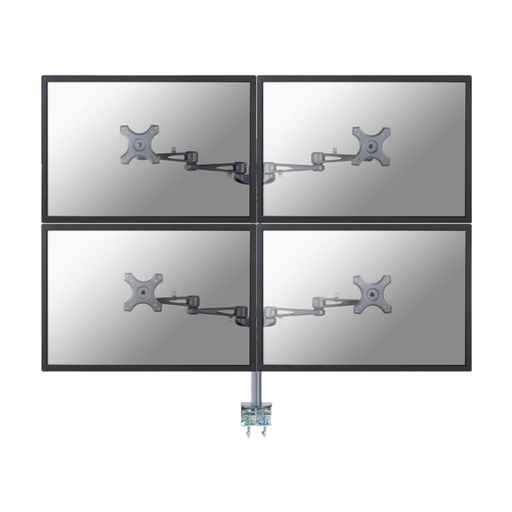
Why it suits this profile: This monitor arm for four screens supports four screens measuring 10 to 27 inches, with a maximum of 6 kg per screen. It is well suited to trading desks, control rooms and multitasking.
The total load is specified as a maximum of 24 kg, excluding the weight of the arm. Check in advance that your desk can support this total weight.
Height adjustment of up to 80 cm, VESA 75 × 75 and 100 × 100 mm and cable management for four screens.
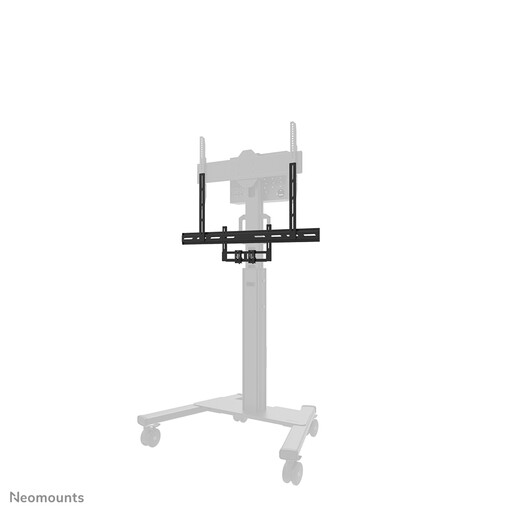
Why it suits this profile: This videobar bracket is designed for screens measuring 43 to 110 inches and VESA patterns from 200 × 200 to 800 × 600 mm. The videobar can be positioned above or below the screen.
The kit does not mount the screen itself. You must therefore check that the existing wall, ceiling or desk mount is suitable for the total weight.
Maximum load capacity of 10 kg, independent height adjustment and wide-ranging VESA adjustment.
We have put together a complete, up-to-date list of products that fully meet these strict selection criteria and the applicable European safety regulations.
A monitor arm does not have to support just a screen. A mini PC holder can position a computer behind the monitor. Check the maximum weight: the Neomounts THINCLIENT-01 supports up to 3 kg, while the THINCLIENT-05 is rated for up to 10 kg. The NM-TC100BLACK also supports VESA 50 × 50 to 100 × 100 mm.
For Apple computers, the Neomounts FPMA-VESAMAC2127 iMac VESA Mount Adapter is suitable for iMac screens measuring 21.5 to 27 inches, with a stated maximum load of 15 kg. Always check your iMac generation before placing an order.
No. Check the VESA size, weight and screen size. The monitor mount must also be suitable for the number of screens you want to mount.
This is usually not something you can assume. The clamp applies pressure to the desk surface. Check the mounting instructions and only use a surface that the manufacturer confirms is suitable. If in doubt, a monitor stand may be a safer alternative.
Its lifespan depends on the load, how it is mounted and how often you adjust the arm. Check the screws, clamps and pivot points regularly. Always stay below the stated load capacity and replace any damaged or bent parts.
