
Vandaag of morgen in huis

Kwaliteit gegarandeerd

Welkomstaanbiedingen ontgrendelen: GRATIS bezorging | Tot 80% korting | Gratis 30 dagen JoyPlus-proefperiode
Download de app
A monitor arm can free up desk space and let you position your screen flexibly. However, many people buy a model that does not fit properly once installed. A monitor that is too heavy can make the arm sag, an incorrect VESA pattern can make installation impossible, and a clamp can damage a thin desktop.
For home workers, gamers, office workers and receptionists, these three pitfalls are particularly important:
Check the weight of your monitor without its original stand. Compare this with the maximum load capacity per screen. With a dual monitor arm, the weight applies to each monitor; with a triple monitor arm, you should also check whether the desk can support the total weight of three screens and the arm.
Also pay attention to the stated screen size in inches. An arm for screens from 13 to 32 inches is not automatically suitable for every ultrawide or curved screen within that range. The shape, mounting points and weight remain decisive.
VESA refers to the distance between the mounting holes on the back of the screen. Many models in this range support 75 x 75 mm and 100 x 100 mm. Measure the horizontal and vertical distance between the holes before ordering.
Does your monitor have a larger pattern? A VESA monitor arm with a suitable conversion plate may provide the solution. However, check that the adapter plate supports the screen weight and that the screws are the correct length.
A monitor arm for a desk is usually attached with a desk clamp or grommet mount. A desk clamp is practical if you do not want to drill a hole. A grommet mount can be stable, but requires a suitable hole in the desktop.
Check the following in advance:
A gas spring monitor arm is useful when you want to move the screen regularly. A model with manual height adjustment may be more suitable if the screen usually stays in one position.
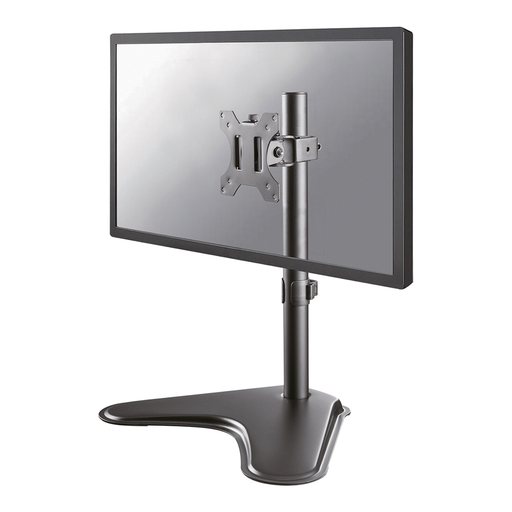
Why it suits this profile: This monitor stand offers manual height adjustment and multiple viewing directions for one screen, without a gas spring mechanism.
The product specifications state both the screen range and a load capacity of 8 kg, as well as VESA 75 x 75 and 100 x 100 mm.
Suitable for 13- to 32-inch screens, 5.6-41.9 cm height adjustment, tilting, turning and swivelling.

Why it suits this profile: A business user or gamer with a large flat or curved screen gets a wide adjustment range and a higher load capacity.
The arm is specified for up to 9 kg and features a 180° stop mechanism. This helps limit contact with a wall or partition panel, but does not lock the arm in place.
Gas spring height of 21.5-49.5 cm, depth adjustment from 7-52.5 cm and support for screens up to 35 inches.

Why it suits this profile: For traders, business workstations and multitaskers who want to position three screens side by side.
The load capacity is specified as 6 kg per screen. Also check that your desk is suitable for the total weight and the wide 142.4 cm set-up.
Space for three 10-27-inch screens, full-motion adjustment, cable management and a quick-release system.
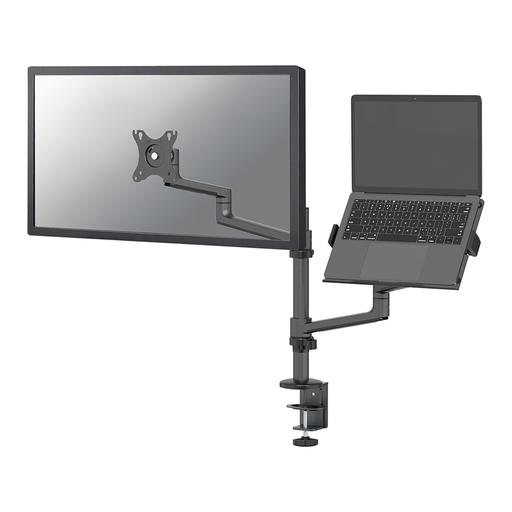
Why it suits this profile: This combination is ideal for anyone who alternates between using a monitor and a laptop and wants to lift both devices off the desktop.
The product specifications state separate limits: up to 8 kg for the screen and 5 kg for the laptop. This allows you to assess both devices separately.
Supports a monitor up to 27 inches and a laptop up to 17.3 inches, with tilt, turn and swivel adjustment.
Not every desk needs a monitor mount. A monitor riser is a simple choice when you only want to raise the screen and rarely change its viewing angle. The Neomounts NSMONITOR20 supports a monitor or laptop weighing up to 10 kg and is adjustable from 4.6 to 16.8 cm. The built-in storage space and cable management help keep your desk tidy.
A monitor holder or monitor stand is usually easier to install than an arm. However, you have less flexibility when turning, swivelling or pulling the screen forwards.
A wall-mounted monitor bracket can save desk space. Always check that the wall is suitable and use fixings designed for concrete, masonry or wooden studs. An adapter such as the Neomounts AWL75-450WH is intended for specific DS70, DS70PLUS and DS75 models; it is therefore not a universal monitor arm.
For large screens, a ceiling-mounted monitor bracket may be relevant, for example at a reception desk, in a showroom or in a waiting area. According to the product specifications, the Neomounts CL35-440BL16L is suitable for screens from 37 to 70 inches, VESA sizes from 150 x 200 to 600 x 400 mm and a maximum weight of 50 kg. It must be mounted to a suitable ceiling structure.
We have put together a complete, up-to-date list of products that fully meet these strict selection criteria and the applicable European safety regulations.
No. Check the VESA pattern, weight and screen size. If the mounting pattern differs, a suitable VESA adapter plate may be required.
That depends on how you use it. A gas spring is practical if you move the monitor frequently. For a fixed workstation, manual height adjustment may be sufficient. Always compare the minimum and maximum screen weight with that of your monitor.
Its lifespan depends on the installation, load and how often you move the screen. Do not exceed the load capacity, retighten the screws periodically, and check the clamp, joints and cables. The statutory guarantee in the EU is at least two years; some models also come with a longer manufacturer’s warranty, as stated in the product information.
