
Vandaag of morgen in huis

Kwaliteit gegarandeerd

Welkomstaanbiedingen ontgrendelen: GRATIS bezorging | Tot 80% korting | Gratis 30 dagen JoyPlus-proefperiode
Download de app
A monitor arm can free up desk space and give you more flexibility when positioning your screen. However, not every monitor mount is suitable for every desk or screen. An arm that appears adjustable on paper may have insufficient load capacity in practice, take up too much space or be incompatible with your monitor’s VESA mounting pattern.
For home workers, gamers, office workers and IT professionals, three pitfalls are particularly important:
By checking everything in advance, you can avoid a wobbly screen, limited range of movement or an arm that does not remain properly balanced after installation.
VESA refers to the distance between the mounting holes on the back of the screen. Many models in this selection support VESA 75 x 75 and 100 x 100 millimetres. If your monitor has a larger or unusual mounting pattern, check whether a suitable VESA conversion plate is available.
Also check the weight of the monitor without its stand. A VESA monitor arm with a load capacity of 9 kg is not automatically suitable for every screen up to 35 inches. With a curved ultrawide monitor, both the size and weight can increase significantly. Remember to allow for a laptop holder or other accessories as well.
A simple monitor stand or monitor riser may be enough if you mainly want to adjust the height. An adjustable monitor arm offers greater freedom of movement, including tilting, rotating, swivelling and adjusting the depth.
A gas-spring monitor arm is designed to provide smoother height and depth adjustment. However, the gas spring must be correctly adjusted to match the weight of your screen. If the screen is too light or too heavy, the arm may rise upwards or fail to stay in position properly.
Pay attention to the adjustment ranges. For example, the Neomounts DS70-250BL1 has a height adjustment range of 21.5 to 49.5 cm and a depth range of 7 to 52.5 cm. This is particularly relevant if your desk is close to a wall.
A desk monitor arm is usually attached using a desk clamp or a grommet mount, also known as a through-desk mount. A clamp is practical if you want to install the arm without drilling a hole. A grommet mount can provide a neat solution when your desk is suitable for it.
Measure the following in advance:
A 180° stop mechanism can prevent an arm from rotating into a wall or partition. This mechanism is not a substitute for sturdy mounting or correct installation.
A single-monitor arm is suitable if you mainly want greater flexibility and a tidier desk. For two screens, the position of the arms is important: placing them side by side requires more width, while a vertical arrangement requires more height.
A monitor arm for 3 screens is useful for dashboards, programming, financial applications or multitasking. When choosing one, do not just check the maximum number of screens. Also check the maximum load per screen and the overall width of the assembly.
Do you use a laptop? A combination of a monitor arm and laptop stand can help save space. Make sure the laptop holder has its own load capacity. For example, the Neomounts DS20-425BL2 supports a screen up to 27 inches and a laptop up to 17.3 inches, with separate maximum weight limits.
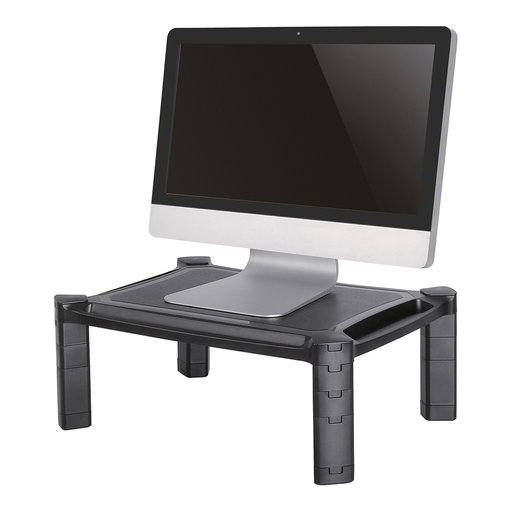
Why it suits this profile: This monitor riser is a simple choice for anyone who mainly needs extra height without attaching an arm to the desk. It supports a monitor or laptop weighing up to 10 kg.
There is no need to check for VESA mounting holes or a desk clamp. However, make sure you place the riser on a level, stable surface and stay within the maximum weight limit.
Height adjustable from 4.6 to 16.8 cm, suitable for screens from 10 to 32 inches and fitted with cable management.

Why it suits this profile: This gas-spring monitor arm is designed for users who regularly want to adjust a larger screen, for example between working and viewing positions.
The specifications state both the screen size and load capacity: up to 35 inches and 9 kg. This allows you to compare its suitability directly with your own monitor.
Gas-spring height adjustment from 21.5 to 49.5 cm, depth adjustment from 7 to 52.5 cm and support for VESA 75 x 75 and 100 x 100 mm.
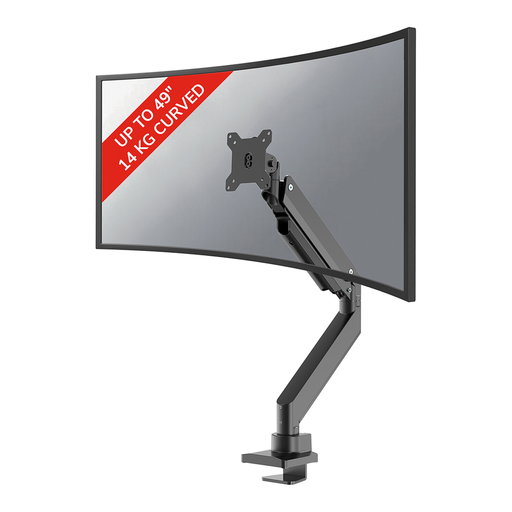
Why it suits this profile: This arm is designed for large, curved screens and ultrawide setups that require greater load capacity and a wider range of adjustment.
The product specifies a maximum load of 18 kg and support for curved screens up to 49 inches. With a curved screen, always check its weight and VESA size.
Gas-spring adjustment up to 60 cm, depth range up to 63 cm, cable management and a 180° stop mechanism.
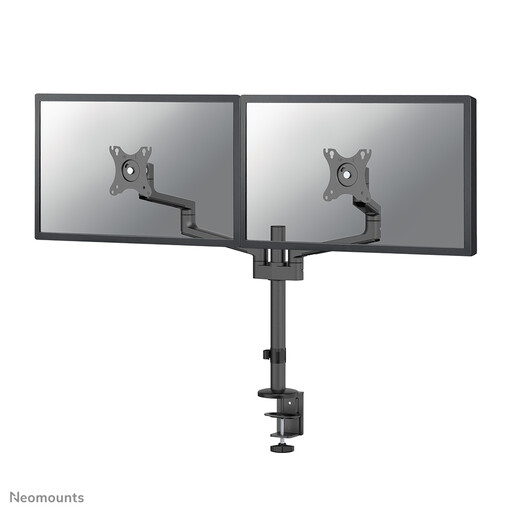
Why it suits this profile: This monitor arm for 2 screens is suitable for a workstation with two monitors up to 27 inches, even when the desk is close to a wall.
The short upper arms require less depth. The maximum load of 8 kg per screen also allows you to check the weight of each monitor separately.
Suitable for two screens from 17 to 27 inches, with height and depth adjustment, cable management and clamp or grommet mounting.
We have put together a complete, up-to-date list of products that fully meet these strict selection criteria and the applicable European safety regulations.
No. Check the VESA pattern, weight and screen size. A monitor without VESA mounting holes can sometimes be attached using an adapter, but the adapter must be suitable for the model and the arm’s load capacity.
That depends on the mounting system and the manufacturer’s instructions. A clamp applies pressure to the desktop. Therefore, do not use a monitor arm on glass, a damaged desktop or an unstable surface when the product information rules this out. Also check whether the desk can support the load.
Its lifespan depends on the load, installation and how often you move the arm. Regularly tighten the screws and clamps, and stay within the specified maximum weight. Some models in this selection come with a five-year manufacturer’s warranty; according to the product information, the Neomounts DS20-425BL2 states a minimum statutory warranty of two years. Your statutory consumer rights remain unaffected.
