
Vandaag of morgen in huis

Kwaliteit gegarandeerd

Welkomstaanbiedingen ontgrendelen: GRATIS bezorging | Tot 80% korting | Gratis 30 dagen JoyPlus-proefperiode
Download de app
A monitor arm can make your desk more organised and give you greater freedom when positioning one or more screens. However, many people buy a model that is not suitable for their monitor, desk or way of working. For example, a high load capacity means little if the VESA pattern does not match. And a gas-spring monitor arm is not automatically suitable for every screen.
This practical buying guide helps home workers, office professionals, gamers, IT users, receptionists and businesses compare their options with confidence.
A 27-inch monitor may be lighter than another model of the same size. So do not just check the screen size; also check the weight without the stand. A monitor arm that supports up to 7 kg per screen is not suitable for an 8 kg screen, even if the dimensions are compatible.
The design is especially important with ultrawide or curved screens. The arm must be able to support the screen’s weight and leverage. For larger curved screens, a model with reinforced mounting is a more sensible choice than a basic monitor holder.
Most products in this selection support VESA 75 × 75 mm and 100 × 100 mm. These are the distances between the mounting holes on the back of the screen. Measure this distance before ordering a monitor stand, monitor bracket or VESA monitor arm.
Does your screen have a different pattern? You may then need a VESA conversion plate. Also check the screw length. Screws that are too long can damage the screen.
A desk monitor arm is usually attached with a desk clamp or through-desk mounting system. Check the following beforehand:
A wall-mounted model requires a suitable wall. A monitor wall bracket or TV wall bracket should not simply be mounted on plasterboard alone. With brick, concrete or wooden studs, you need the correct wall plugs and screws.
With a single monitor arm, the maximum weight is usually given as one figure. For a dual monitor arm, there is often a limit per screen. For example, the Neomounts FPMA-D550DDBLACK supports up to 8 kg per screen and screens up to 32 inches. The FPMA-DCB100DBLACK supports up to 10 kg per screen when holding two screens.
Remember to allow for accessories attached to the screen, such as a webcam, lighting or a laptop arm. If in doubt, leave a little safety margin.
An adjustable monitor arm can vary in height, depth, tilt, rotation and swivel. Do not just look at the number of functions; check the actual measurements.
A gas-spring or spring-assisted monitor arm is useful when you move the screen regularly. For example, the Neomounts FPMA-D650BLACK has spring-assisted height adjustment from 11 to 42 cm and depth adjustment from 0 to 49.4 cm. For a screen that stays in virtually the same position, a manually adjustable model may be sufficient.
Cable management prevents cables from hanging along the arm or becoming trapped during adjustment. Also check which mounting options are included. Some models come with both a desk clamp and through-desk mounting, while other solutions are designed specifically for wall mounting.
A fixed wall bracket such as the Neomounts NM-W25BLACK is just 1.2 cm deep. This is practical when a screen needs to sit flush against a suitable wall. The model is designed for screens from 10 to 30 inches, with a maximum weight of 25 kg and VESA 75 × 75 to 100 × 100 mm. Unlike an adjustable monitor arm, it does not allow you to pull the screen freely forwards.
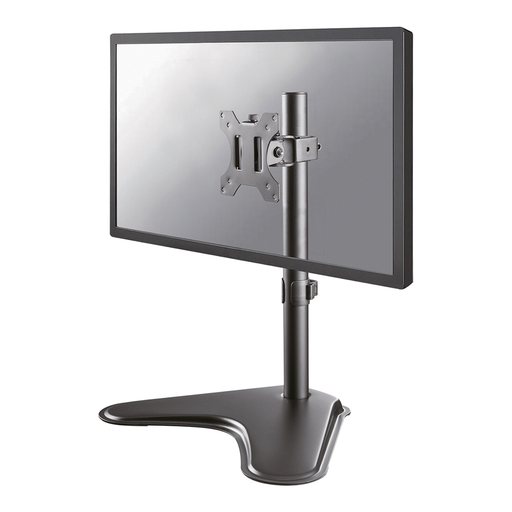
Why it suits this profile: A practical single monitor stand for anyone who wants to save space without immediately choosing a wall-mounted or clamp-on system with multiple arms.
The screen size, load capacity and VESA compatibility are clearly defined: 13 to 32 inches, up to 8 kg and VESA 75 × 75 or 100 × 100 mm.
Manual height adjustment from 5.6 to 41.9 cm, 360° rotation, tilt and cable management.
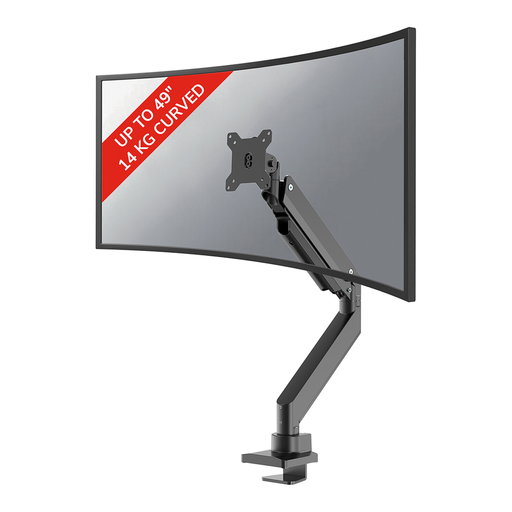
Why it suits this profile: Designed for users with a large or curved ultrawide screen who need extensive adjustment and a high load capacity.
The product specification explicitly states support for curved screens up to 49 inches and a maximum weight of 18 kg.
Gas spring, height adjustment up to 60 cm, depth adjustment from 0 to 63 cm, 180° stop and cable management.
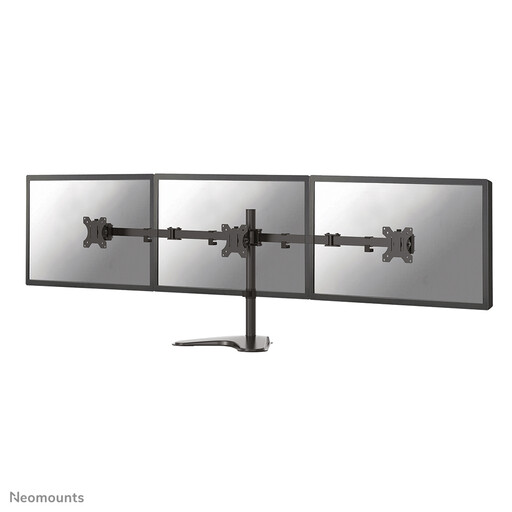
Why it suits this profile: For home workers, traders, designers and IT users who want to position three screens side by side.
The number of screens and load capacity are clearly specified: three screens from 13 to 27 inches, with a maximum of 6 kg per screen.
Height adjustment from 0 to 43.2 cm, tilting, rotating, swivelling, cable clips and Easy-release VESA.
Read the installation instructions in full before you begin. Use a spirit level and check that the supplied mounting materials are suitable for your desk or wall. For wall mounting, the surface must be able to support the combined weight of the screen and bracket.
Do not mount a monitor on plasterboard alone or on a thin panel. Use suitable wooden studs, brick or concrete. Tighten the screws securely, but do not overtighten them. After installation, carefully test whether the screen remains stable and check the connections again if you move the screen frequently.
A dual monitor arm is practical for two screens. If you want to position three screens, you need a triple monitor arm that can support both the total weight and the overall width. Also check that the edges of the screens do not touch when swivelling.
We have put together a complete, up-to-date list of products that fully meet these strict selection criteria and the applicable European safety regulations.
No. Check the VESA size, weight and maximum screen size supported by the arm. The models in this guide commonly use VESA 75 × 75 and 100 × 100 mm patterns. An adapter plate may be required for non-standard patterns.
That depends on how often you adjust the screen. A gas spring makes frequent height and depth adjustments easier, but it also requires a suitable weight range. Adjust the spring tension according to the screen weight and follow the safety instructions.
Its lifespan depends on how it is mounted, the load and how frequently it is used. Never exceed the maximum load capacity, and regularly check the screws, clamps and VESA mountings. A fixed monitor wall bracket generally has fewer moving parts than a fully adjustable monitor arm, but it still requires correct wall mounting.
